5
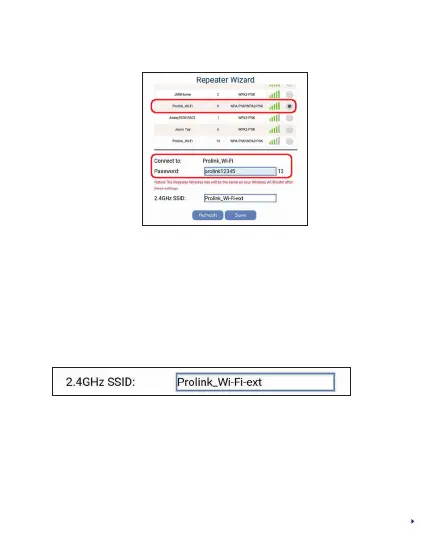
Step 7: Select your existing home Wi-Fi SSID and enter the
Wi-Fi password
Note: The PEN1201 SSID will now change to follow your home
router SSID with sux “-ext”. The Wi-Fi Password for
PEN1201 will also follow your home router Wi-Fi password.
Following Step 7 example, the PEN1201 SSID will be changed
to Prolink_Wi-Fi-ext
Step 8: Click Save to proceed
Step 9: Wait for about 60 seconds for both Status and Wi-Fi
Signal Strength indicators lit up, after which you may
connect to the new PEN1201 SSID with the same home
router Wi-Fi password



 To Next Page