3
Installation:
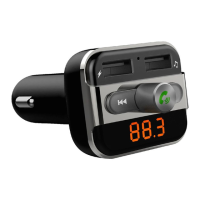
• Insert FM10+ into the car lighter socket.
• Adjust the frequency of FM10+ to any open FM channel on your car stereo,
between 88.1-107.9MHZ.
• It is recommended to use an open channel that does not interfere with another
similar frequency in use in that area.
• Once synchronized with the car stereo, FM10+ can play music from many sources
including USB flash drive, SD/MMC cards, or line-in sources such as an MP3/MP4
player, CD player, or iPod.
• An AUX cable can also be used to connect the FM10+ directly to the stereo’s input
jack.
LCD Display
• In normal playing mode the screen displays the source media, current playing
time, playing mode and current frequency
• Press and hold the PRV/NXT button on the FM10+ or press the volume (+/-)
button on the remote to show the current VOLUME setting
• Briefly press the PRV/NXT button on the main unit or remote to display song
number.
• Press the PLAY button on the main unit or remote to display current playing status
• Press the EQ button to show EQ mode (Country, Normal, Rock, Pop, Classic and
Jazz)
• Press and hold the EQ button on main unit or remote to display repeat format (All,
Single, Folder and Random)



 To Next Page