1.) Insert the device to car cigar socket power supply(12V-24V DC power).
You will see the screen as shown channel in LCD display.
2.) Tune your FM radio to one of pre-set FM frequencies used by the player.
3.) Press the button or to set the player’s broadcast frequency to match
the frequency you have set on your radio.
Set-Up
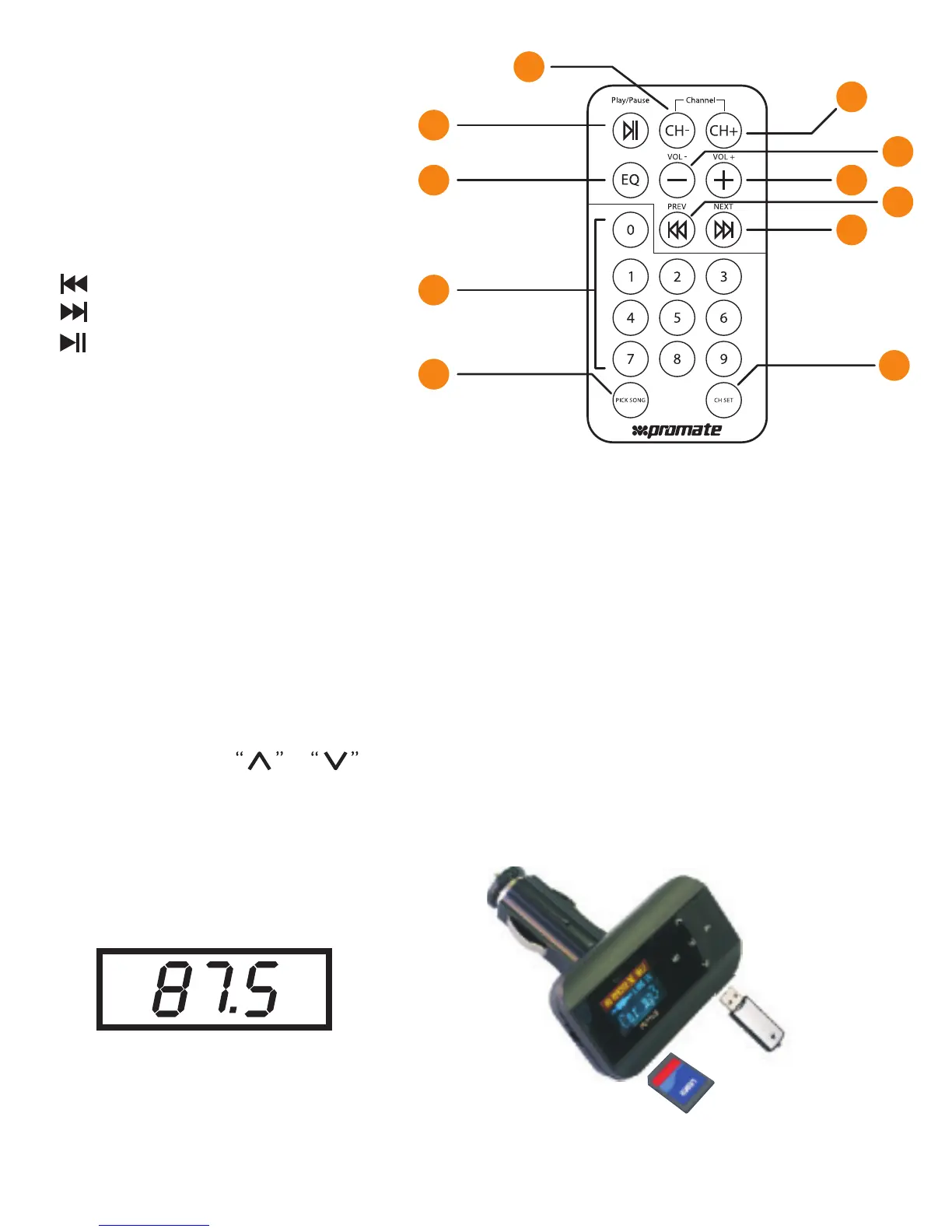
Remote Control
1.)CH-: Freq Minus
2.)CH+: Freq Plus
3.) Previous music
4.) Next Music
5.) Play/Pause
6.)VOL-: volume decrease
7.)VOL+: volume increase
8.)EQ:EQ mode Selection
9.)0~9 number key: For selection music or Frequency
10.)PICK SONG: Press number key then press this key to select song
11.)CH SET: Press number key then press this key selection transmitter
Freq from 87.5Mhz to 108Mhz
SD
USB
Pre-set Broadcast Frequency
2
1
5
8
9
10
7
4
6
3
11
4


 To Next Page