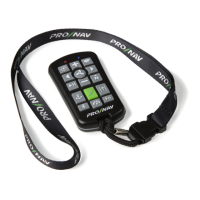
FEATURES
Bluetooth: Turns on and connects remote to the ProNav Angler.
How to Use
1. Press and release to wake up remote / turn remote on
(startup mode).
2. Press and hold while in startup modeuntil the blue
indicator light turns solid, indicating remote is connected to
theProNav Angler. (Reference Setup and Connection Guide for
initial setup)
GPS Anchor: Engages anchor mode to hold boat in current
GPS location. Motor will automatically adjust thrust and
direction to stay on desired spot.
How to Use
1. Press and release to hold boat in current GPS location.
2. Adjust location using PointJog.
3. Use prop on / off to disengage mode.
Notes
• For best results stop all forward momentum prior to
pressing button.
• Left / right manual control can be used to unwrap wires
around shaft without disengaging anchor mode.
• Reference knowledgebase articles on our website for more
information.
Feature Tip: Recommended Anchoring:
See images on next page
for a comparison of anchoring practices. In the event excessive cord
wrapping around motor shaft occurs (two or more wraps), use the left/
right manual controls or the foot pedal left/right controls to unwrap your
cord from around your motor shaft without losing your anchor point.
IMPORTANT: Use of Sonar Transducer Motor Attachments: It is not recommended to use anexternal transducercableon a trollingmotorwithany
autopilot in place due to the potentialwrapping issues that may occur. If you plan to use an external transducer, it is recommended to use the ProNav
transducer cable saver to prevent damage of sonar transducer cable. This accessory isavailable at pronavmarine.com/transducer-cable-saver.
Rapid Speed: Toggles thrust between current setting and
maximum.
How to Use
1. Function requires prop to be on.
2. Press and release to increase motorto maximum thrust.
3. Press and release again to quicklyreturn back to prior
thrust setting.
Function: Multi-function key allows combined key presses for
future expansion.


 To Next Page
 Loading...