EasyManua.ls Logo

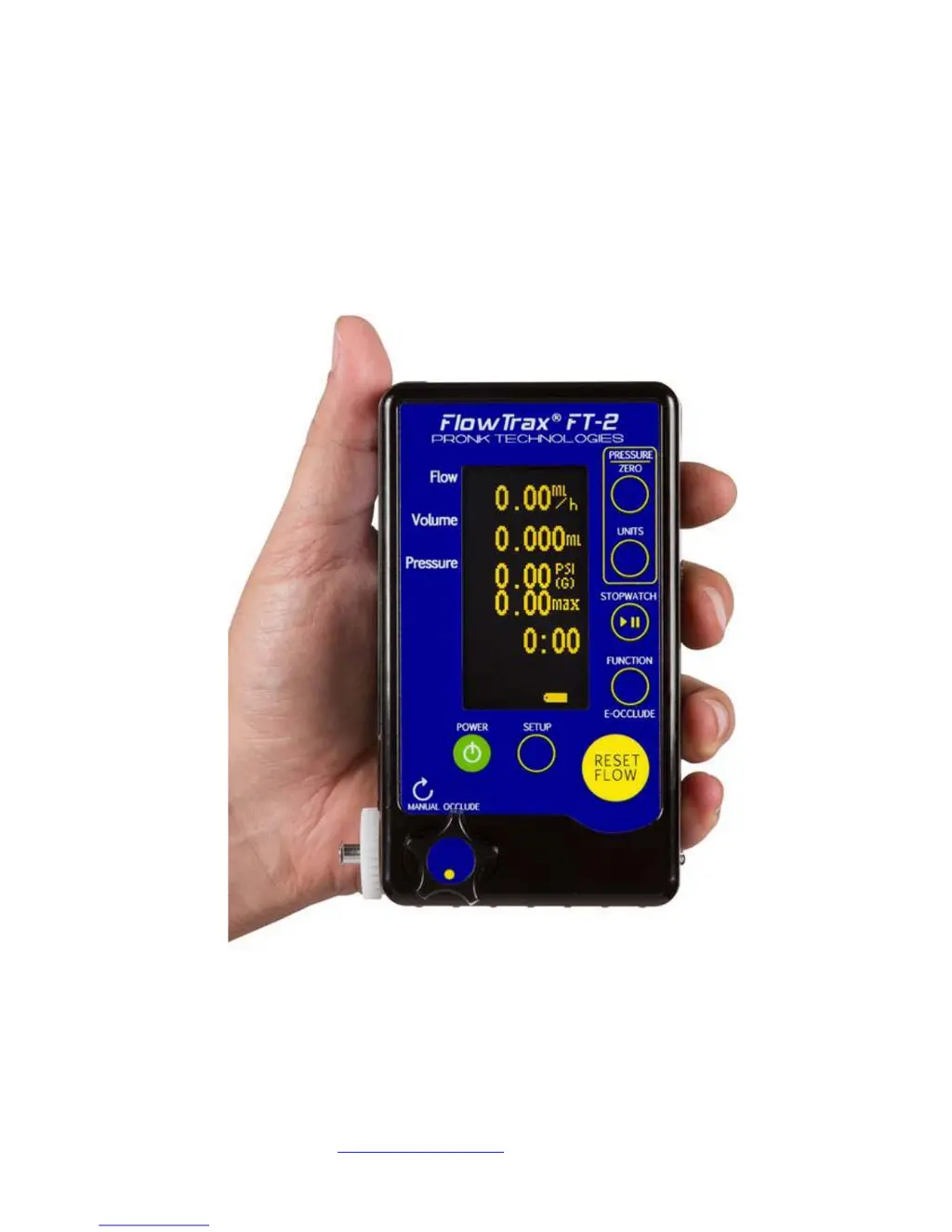
Pronk Technologies Flow Trax FT-2 - User Manual

Pronk Technologies Flow Trax FT-2
25 pages
Print Icon
To Next Page IconTo Next Page
Loading...
Pronk Technologies
2017 07-18
www.pronktech.com 800-541-9802
Page 1
©2015
Flow Trax
®
Infusion Device Analyzer
Operators Manual

Questions and Answers

  • C
    Charlotte SmithAug 18, 2025
    What to do if I keep getting occlusion alarm on infusion device with Pronk Technologies Flow Trax FT-2?
    • J
      Joseph LopezAug 18, 2025
      If you keep getting an occlusion alarm on your infusion device while using Pronk Technologies Measuring Instruments FlowTrax, ensure the occlusion knob on the FlowTrax is completely turned counter-clockwise to allow fluid flow. If the alarm persists, remove the filter assembly and inspect it for particles or contamination. Clean the filter assembly and reinstall it.
  • A
    Austin BerryAug 20, 2025
    Why is the volume measurement higher or lower than expected on Pronk Technologies Measuring Instruments?
    • R
      Rebekah HollowayAug 20, 2025
      To ensure accurate volume measurements with Pronk Technologies Measuring Instruments, always press the RESET FLOW button just before starting the pump. Also, make sure the Occlusion knob is completely open counterclockwise.
  • D
    Destiny ThomasAug 23, 2025
    How to troubleshoot inaccurate flow rate on Pronk Technologies Flow Trax FT-2?
    • B
      brownnancyAug 23, 2025
      If the flow rate doesn't seem accurate on Pronk Technologies Measuring Instruments, especially with pumps that have inconsistent flow patterns, use the volume divided by time (V/T) for accurate flow rates. To set this up, press SETUP, then MORE, then READINGS, and select VOL/TIME.
  • S
    Susan LaneAug 26, 2025
    How to fix inaccurate occlusion pressure on Pronk Technologies Measuring Instruments?
    • J
      James LawrenceAug 26, 2025
      To ensure accurate occlusion pressure readings on Pronk Technologies Measuring Instruments, make sure to ZERO the pressure on the FlowTrax to atmosphere and then press RESET FLOW before running an occlusion test.
  • H
    hillsandraAug 28, 2025
    What to do if “Prime Required” message appears on Pronk Technologies Measuring Instruments?
    • M
      Michael LinAug 28, 2025
      If the “Prime Required” message intermittently appears on Pronk Technologies Measuring Instruments, it means FlowTrax has determined the bubble in the glass tube assembly is not adequate for accurately measuring flow/volume. To resolve this, press FUNCTION, then press FLUSH. Program IV pump for 900ml/hr, 10ml volume. Start IV pump. When complete, program IV pump for 600ml/hr, 20ml volume. While running this rate, press EXIT on FlowTrax. Continue this rate until “Prime Required” message goes away.
  • J
    Jessica MarshallAug 30, 2025
    Why Glass Tube Sensor Carriage does not move on Pronk Technologies Measuring Instruments?
    • M
      moransarahAug 30, 2025
      If the Glass Tube Sensor Carriage does not move when priming or attempting to take a measurement with Pronk Technologies Measuring Instruments, it’s possible a small bubble is stuck against the glass tube. Press FUNCTION, then CLEAN GLASS to remove water and small air bubble, and then re-prime. If the problem persists, press FUNCTION, then CLEAN GLASS again, remove the glass tube, clean it with a bottle brush and cleaning solution, flush the cleaning solution, and re-install the glass tube.
  • R
    Rachel LopezSep 1, 2025
    How to clear TILT message on Pronk Technologies Measuring Instruments?
    • D
      Dale WallaceSep 2, 2025
      If the “TILT” message won’t clear or flashes on and off on Pronk Technologies Measuring Instruments, and you're sure the FlowTrax is on a level surface, press SETUP, then MORE, then CHK TILT. Press ZERO in the upper right corner to calibrate the accelerometer to the level surface.
  • K
    Karina KennedySep 4, 2025
    What to do if volume number stopped during test on Pronk Technologies Flow Trax FT-2 Measuring Instruments?
    • B
      brittanydavisSep 4, 2025
      If the volume number stopped during the test, or came out much lower than expected on Pronk Technologies Measuring Instruments, remove the IV set from the input. Press the FUNCTION button, then the CLEAN GLASS button. Remove the glass tube. Clean the glass tubes with a bottle brush and the cleaning solution provided. Flush out the cleaning solution from the glass with the flush bottle provided. Re-install the glass tube. If running a low rate test (1-20ml/hr), place the FlowTrax on its back (horizontal) for optimal performance.
  • D
    diane01Sep 6, 2025
    Why can’t I remove all bubbles from Pronk Technologies Measuring Instruments?
    • T
      Tina TravisSep 6, 2025
      Do not try to remove or expel the “tracking bubble” from Pronk Technologies Measuring Instruments. FlowTrax will generate a “tracking” bubble once it determines that the glass tubes are full of water and no other unwanted bubbles are present.
  • B
    Becky SmithSep 9, 2025
    Why DataSnap won’t capture data on Pronk Technologies Measuring Instruments?
    • B
      Bradley SerranoSep 9, 2025
      If DataSnap won’t capture data or control FlowTrax on Pronk Technologies Measuring Instruments, make sure that the TWedge program is active / launched, the com port selection in TWedge, Configure, Interface is correct for your PC and that FlowTrax is on and connected with adapter cables to your PC.

Summary

Introduction

Quick Start Guide

Provides essential first steps for setting up and beginning to use the FlowTrax device.

Detailed Operating Instructions

Priming the FlowTrax

Step-by-step guide on how to prime the FlowTrax for accurate flow and volume measurements.

Flow and Volume Measurements

Very Low Rate Testing

Specific procedures and considerations for conducting tests at very low flow rates with the FlowTrax.

Occlusion Testing

Electronic Occlusion (E-Occulde) Feature

Explains the operation and display of the electronic occlusion feature for enhanced testing.

Air-In-Line Testing

Important Application Notes

Contamination of FlowTrax Fluid Path

Routine Maintenance

Troubleshooting FlowTrax

FlowTrax Priming Troubleshooting Flow Chart

DataSnap Electronic Data Transfer

Flow Trax Serial Port Protocol

Serial Commands for Data Mode

Serial Commands for Trumpet Mode

Updating FlowTrax Software

Flow Trax Technical Specifications

Pronk Technologies Flow Trax FT-2 Specifications

General IconGeneral
BrandPronk Technologies
ModelFlow Trax FT-2
CategoryMeasuring Instruments
LanguageEnglish