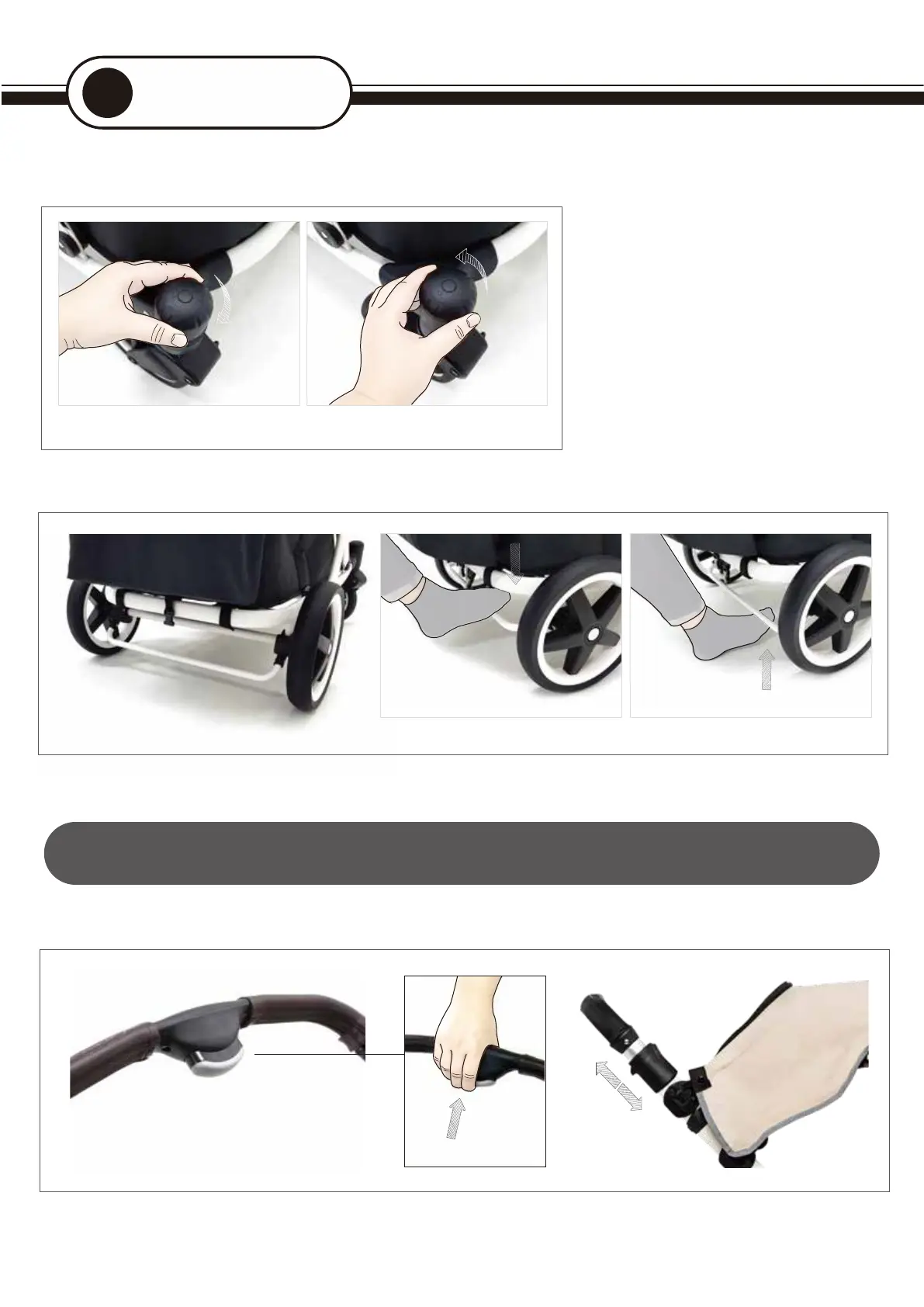
03. Locking the front wheels
04.
Applying the rear brakes
<LOCK fr
ont w
heels>
When you ar
e driving on an uneven surface,
turn the locking de
vice on the front w
heel
clockwise as shown in ① to L
OCK the front wheel.
< UNLOCK fr
ont w
heels >
Turning the lo
cking device counterclockw
ise
as shown in ② to UNLOCK the fr
ont wheel.
05. Adjusting the handle b
ars
① You can adjust the handle to y
our desired length by pressing the length adjustment button in the center of the stroller handle.
Warning! When you stop the str
oller with your child is on board, be sure to lock the brake.
Warning! Please be car
eful not to leave your child alone in the stroller
Operation
6
UNLOCK
<Lock fr
ont w
heels> < Unlock fr
ont wheels >
<Lock the br
ake> Press the brake bar located betw
een the r
ear wheels and lock the brake to fix the wagon
<Unlock the br
ake> The wagon can m
ov
e by raising the brake bar to release the brake
<Lock the br
ake> < Unlock the brake >
① ②
11


 To Next Page
 Loading...