Need help?
Do you have a question about the ProScan PBTW188 and is the answer not in the manual?
Instructions for initial charging and re-connecting the watch via Bluetooth after disconnection.
Measurement results are for reference only and not for medical use; follow doctor's instructions.
The watch is sweat-proof only, not waterproof.
Turn off notifications from QRunning app to save battery life.
Details on power button, screen roll button, and mode switching functions.
Identifies key components like MIC, Touch Screen, Speaker, and Heart rate sensor.
How to turn on the watch by long-pressing the power button for 3 seconds.
Recommendation to use the charger provided by the manufacturer.
Guidance on wearing the watch with suitable tightness; the band is removable.
Instructions to scan QR code to download and install the QRunning mobile app.
Steps to connect the watch via Bluetooth through the QRunning app, including pairing.
Steps to connect for Bluetooth phone calls and music playback.
Detailed functions of the watch buttons for power, screen, and mode switching.
How to navigate using screen swipes and taps for notifications and menus.
Features for tracking steps, heart rate, blood oxygen, and blood pressure.
Modes for sports, sleep tracking, messages, and phone call functions.
Options for watch display styles, finding the phone, camera control, and music playback.
Functions for timer, weather display, app access, and device settings.
Guidance on resolving Bluetooth connection problems and finding the watch.
Information on Bluetooth connection requirements for data sync and storage limits.
Troubleshooting charging issues and information on device radiation levels.
Details on FCC rules for Class B digital devices and interference.
Details of the product's 90-day warranty, exclusions, and limitations.
Instructions on how to contact support and what information is needed for a claim.
Contact details for service assistance and product information.
Information required when contacting the support team for warranty service.
This document describes the PROSCAN Smart Watch, Model No.: PBTW188, a device manufactured and sold under the responsibility of CURTIS INTERNATIONAL LTD. The PROSCAN brand and logo are trademarks used under license by CURTIS INTERNATIONAL LTD.
The information in this document is subject to change without notice. Users should charge the watch for at least 2 hours prior to initial use, using an accredited charger and cable. The "Search functions" feature cannot be used if the watch is disconnected by a significant distance. If the watch disconnects during use, especially for over 5 minutes, the user must manually re-connect the APP via Bluetooth. It is crucial to note that the measurement results provided by this product are for reference only and are not intended for medical use or as a basis for diagnosis. Users should always follow a doctor's instructions and should not self-diagnose or treat conditions based on the measurements taken by this product.
The watch is sweat-proof only, not waterproof. To conserve battery life, users are advised to turn off notifications from the QRunning app.
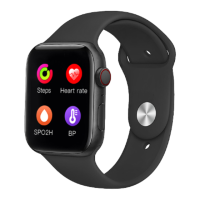
The smart watch features a power on/off button which also serves as a screen roll button. It includes a microphone (MIC), a button to switch between wallpaper and sport modes, and a touch screen for interaction. On the underside, it has a speaker and a heart rate sensor.
To power on the watch, long press the power button for 3 seconds. The watch supports wireless charging, and users are instructed to use a charger made by the manufacturer.
The watch should be worn on the wrist with suitable tightness. The watch band is removable.
The companion application for the smart watch is named "QRunning." Users can download and install the app on their mobile phone by scanning the provided QR code. The app is compatible with Android 5.0 and above, and iOS 9.0 and above, requiring Bluetooth 4.0 support.
For initial setup, users should turn on Bluetooth on their phone, open the QRunning app, tap "Device," and then "Connect device." The watch, identified as 'PBTW188,' will appear for connection. A "Bluetooth Pairing Request" dialog will pop up on the mobile phone; users should tap 'Pair' to connect. This will synchronize the time and date with the Bluetooth devices. Additionally, a "Prompt" dialog will appear; users should tap "ok" and then navigate to their mobile phone's Bluetooth settings to find and connect to 'PBTW188_Audio-XXXX.' This secondary connection enables Bluetooth phone calls and music playback through the watch.
If Bluetooth cannot be connected (failed to connect/reconnect or slow connection):
If the watch is not found by the mobile phone's Bluetooth radio:
If the watch cannot be charged:
Wearing the watch for a long time is not expected to cause harm to the human body. The equipment's radiation is far below the FCC standard of the United States and is considered negligible.
This equipment has been tested and found to comply with the limits for a Class B digital device, pursuant to part 15 of the FCC Rules. These limits are designed to provide reasonable protection against harmful interference in a residential installation. The equipment generates, uses, and can radiate radio frequency energy. If not installed and used according to instructions, it may cause harmful interference to radio communications. However, there is no guarantee that interference will not occur in a particular installation. If the equipment causes harmful interference to radio or television reception (which can be determined by turning the equipment off and on), the user is encouraged to try to correct the interference by one or more of the following measures:
This product is warranted to be free from defects in material and workmanship for a period of ninety (90) days from the date of original purchase. The exclusive remedy is repair or replacement of the product or component, at the manufacturer's option. The user is responsible for all costs associated with returning the product. If the product is no longer available, it will be replaced with a similar one of equal or greater value. The product must be rendered inoperable or returned before a replacement is sent. This warranty does not cover glass, filters, wear from normal use, use not in conformity with printed directions, or damage resulting from accident, alteration, abuse, or misuse. The warranty extends only to the original consumer purchaser or gift recipient. The original sales receipt is required as proof of purchase for a warranty claim. The warranty is void if the product is used for purposes other than single-family household use or subjected to voltage and waveform other than specified on the label (e.g., 120V~60Hz). All claims for special, incidental, and consequential damages caused by breach of express or implied warranty are excluded. All liability is limited to the purchase price. Every implied warranty, including any statutory warranty or condition of merchantability or fitness for a particular purpose, is disclaimed except to the extent prohibited by law, in which case such warranty or condition is limited to the duration of this written warranty. This warranty grants specific legal rights, and users may have other legal rights that vary by location. Some states or provinces do not allow limitations on implied warranties or special, incidental, or consequential damages, so these limitations may not apply. For faster service, users should locate the model, type, and serial numbers on their appliance.
For service assistance and product information, contact CURTIS INTERNATIONAL LTD. at 1-800-968-9853. Address: 7045 BECKETT DRIVE, UNIT 15. MISSISSAUGA. ON, L5S2A3. Website: www.curtisint.com To make a warranty claim, do not return the product to the store. Email support2@curtiscs.com or call 1-800-968-9853. Proof of purchase is required for warranty service. When contacting support, please have the following information available: name, address, and telephone number; model number and serial number; a clear, detailed description of the problem; and proof of purchase including dealer or retailer name, address, and date of purchase.

 To Next Page
 General