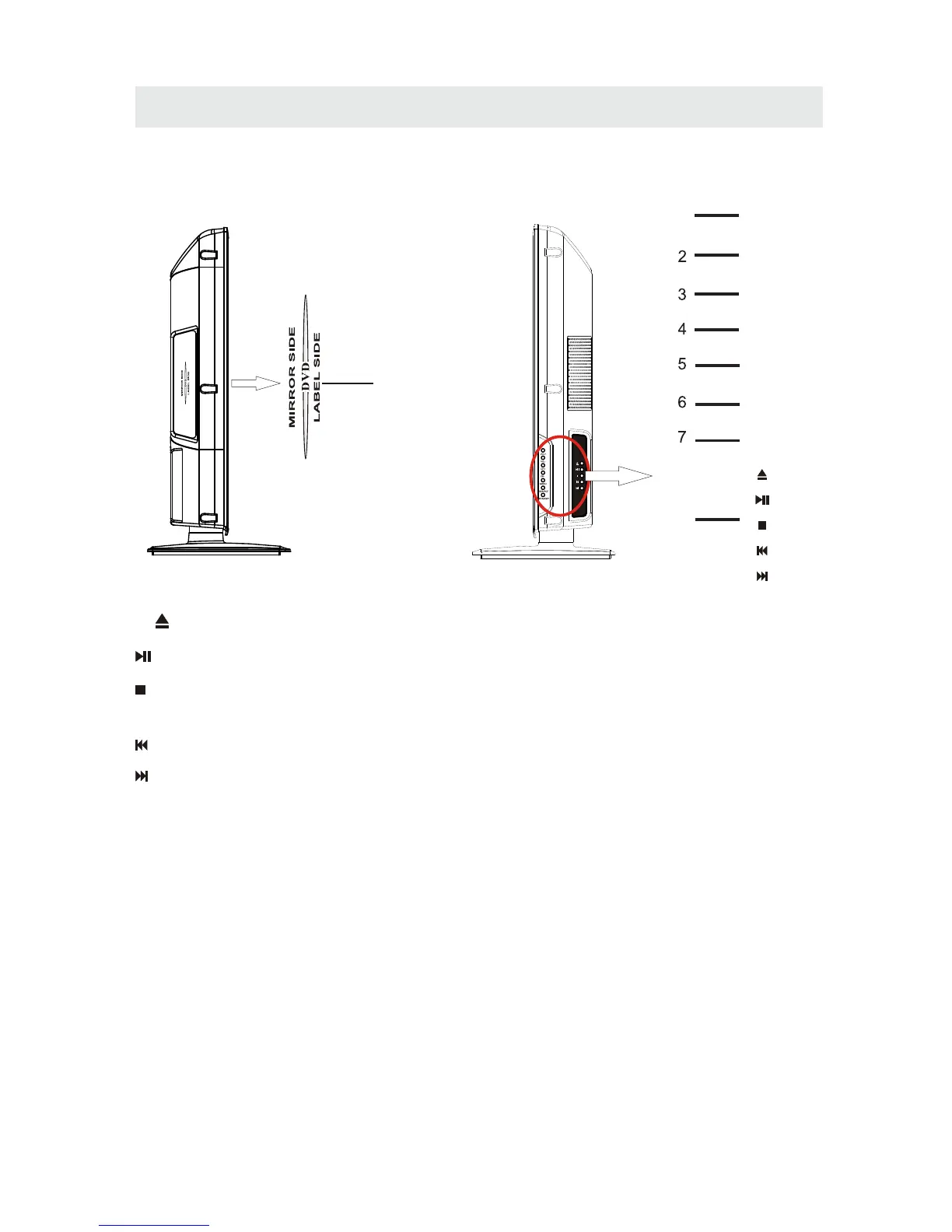
1. VOL+
2. VOL-
. CH+
4. CH-
5. MENU
. SOURCE
7.
Bu tt o n
Bu tt o n
Bu tt o n
Bu tt o n
Button
6 Button
STANDBY Button
Press to adjust the volume up.
Press to adjust the volume down.
3
Press to change the TV channels and up
highlight selections on the menu screen.
Press to change the TV channels and down
highlight selections on the menu screen.
Press to display the on-screen TV menu.
Press to select the input source of the TV.
Press to turn the unit on and off.
8.
To open or chose the DVD palyer loader.
Press this button to paly the DVD.
Press this button to stop playing the DVD
you’re watching.
Previous chapter in DVD mode.
Next chapter in DVD mode.
CONTROL REFERENCE GUIDE
9.Disc Slot
Insert discs to disc slot.
SIDE VIEW
(Right direction:put the label side of
the disc facing yourself)
7
9
Note:When inserting a disc,pleasetake
note of the indication of direction around
the disc slot for operation.
1
VOL+
VOL-
CH+
CH-
MENU
SOURCE
STANDBY
8


 To Next Page