CONTROL REFERENCE GUIDE
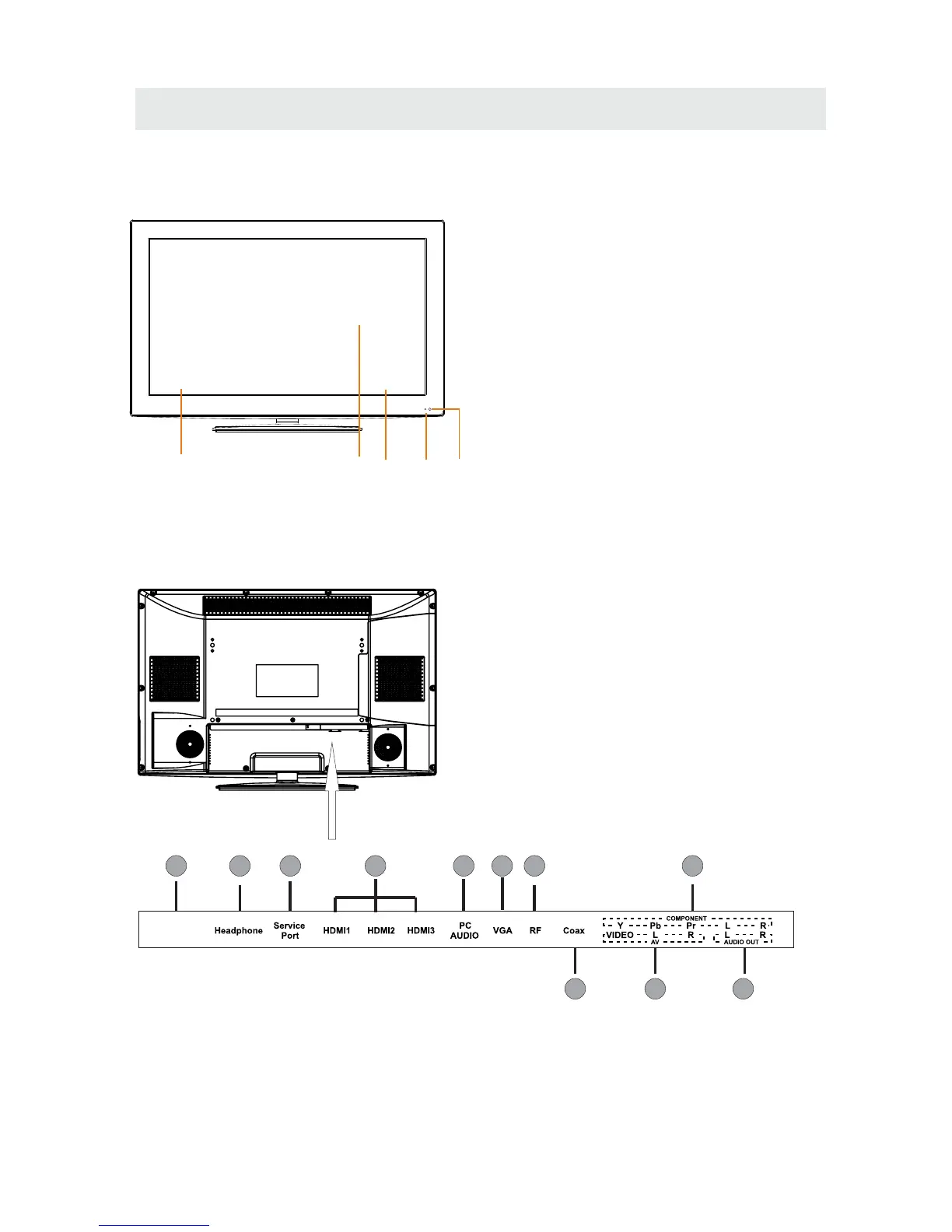
FRONT VIEW
1.Color Screen
2.Remote Sensor
Do not block this sensor or the
remote control will not work.
3.Standby Indicator
Indicates whether the unit is ON
or in STANDBY (OFF) mode.
Light in red: The unit is in STANDBY.
Light in blue:The unit is turned ON.
4. Speakers
BACK VIEW
6
3
2
4
4
1
118
7
10
2 3
4
6
5
9
1.AC100-240V~ 50/60Hz
2.Headphone Jack
3.Service Port
4.HDMI IN Jacks
5.PC ADUIO IN Jack
6.VGA IN Jack
7.TV ANTENNA Terminal
8.Coax OUT Jack
9.AV IN Jack
10.COMPONENT IN Jack
11.AUDIO OUT Jack
(Audio out-This connection is for sending
out analog audio signal to the 2nd equipment.
Red is for Right Channel,white is for left channel.)
1
AC100-240V~


 To Next Page