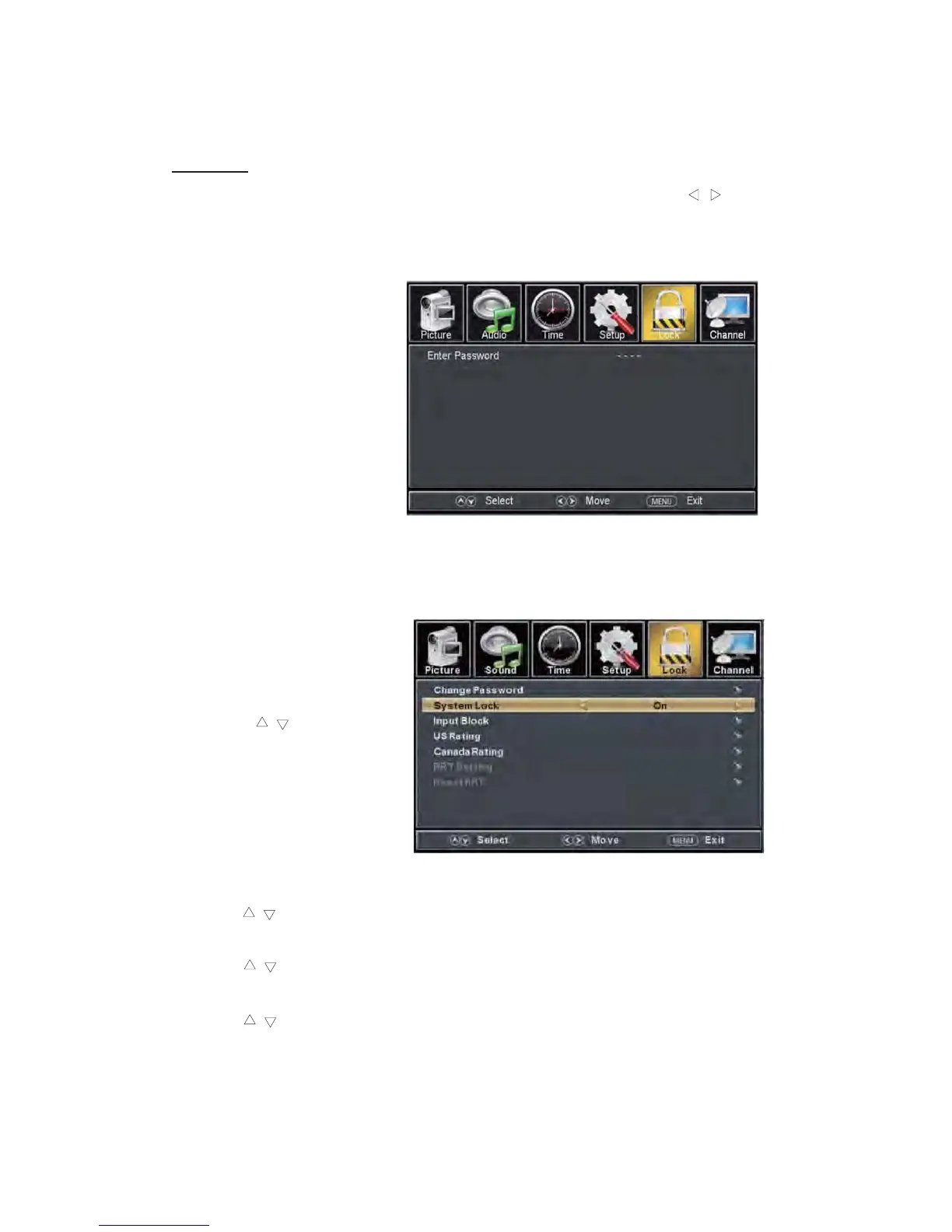
LOCK
Press the “MENU” button to enter the OSD menu .Then press “e
/f” button
to select the “Lock” menu.
1. Press “
d
” button to select “Enter Password” and press select digital button to enter.
Note: The default password is “0000”
2.
Press / b
u
tt
on
t
o
select “Change Password”, then press
“ENTER/f”
butt
o
n
to
ad
jus
t
the value.
If the password is changed, all of the passwords in the menu will be changed at the same time.
Note: If you forget your
password, you can use “1470”
to enter any menu locked.
3.
Press “c/d” button
to select “System Lock”
and press the “e/f”
button to select “On” or
“Off”.
4. Press / button to
select “Input Lock”, then press
“ENTER/f” button to enter
sub-menu.
a.
Press “c/d” button to select “TV” and press the “e/f” button to select “Block”
or “Unblock”.
b.
c.
Press “c/d” button to select “AV” and press the “e/f” button to select “Block”
or “Unblock”.
Press “c/d” button to select “DVD” and press the “e/f” button to select “Block”
or “Unblock”.
24



 To Next Page