Connect To Mobile Client
6
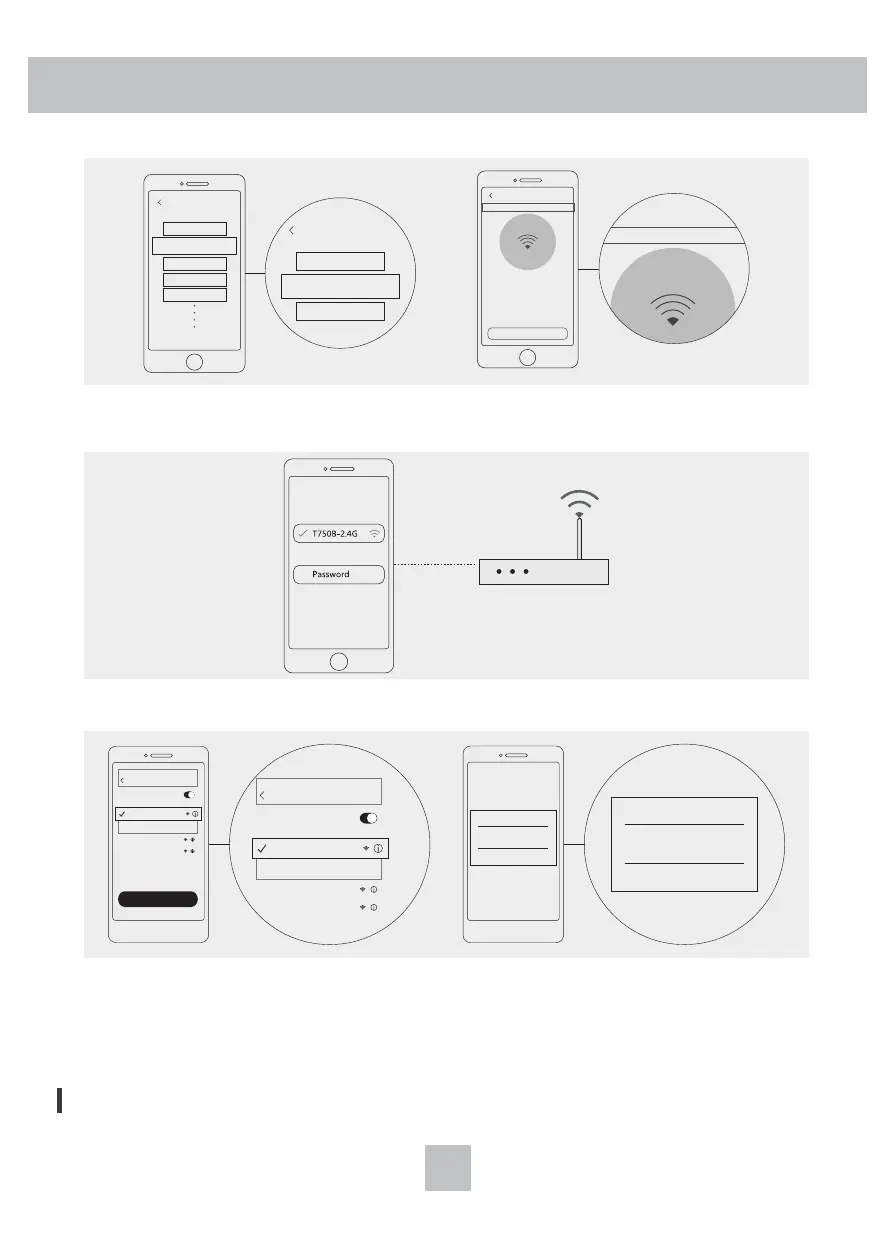
3. Add a humidifier device to the app, switch to the hotspot mode, and confirm that the WiFi
indicator is in a slow flashing state.
4. According to the prompt of the APP interface, select WiFi and enter the password.
5. According to the APP interface prompt, turn on“Phone Settings - Wireless LAN(WiFi)”, select
“Proscenic-xxxx”network connection and return to APP. Perform network configuration and wait
for the distribution network to complete.
* Note: the host does not support 5.8g band WiFi network.
807C
LDS-xxxx
M7
H500
H600
Please select the purchased device
Click or pull up to load more
Please select the purchas
807C
......
......
indicator flashes slowly
Add a Device AP mode
make sure the WiFi indicator flashes slowly
Add a Device AP mode
make sure the WiFi indicator flashes slowly
Setting
Available networks...
WLAN
WLAN
807C
XXXXXXXX
XXXXXXXX
Setting
Available networks...
WLAN
WLAN
807C
XXXXXXXX
XXXXXXXX
Network Configuration
SmartLife-XXXX
807C
Device Choice
Cancel Refresh
SmartLife-XXXX
807C
Device Choice
Cancel Refresh
The humidifier supports intelligent speaker voice control.


 To Next Page