EasyManua.ls Logo

Prosonic 55QAND9023 - Remote Control; Inserting the Batteries into the Remote

Default Icon
Print Icon
To Next Page IconTo Next Page
To Previous Page IconTo Previous Page
Loading...
English - 8 -
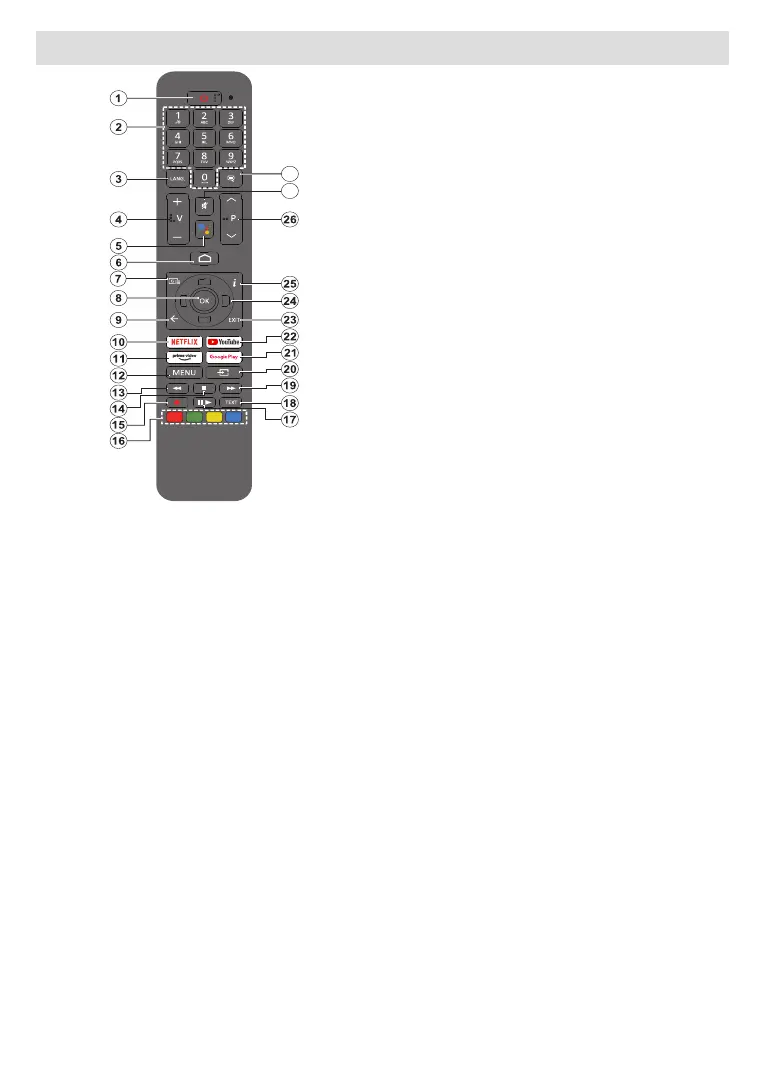
Remote Control
27
28
Inserting the Batteries into the Remote
The remote may have a screw that secures the battery
onto the remote control 

   Then remove the battery

AAA




To pair remote with the TV




Press and hold the Source button on the remote until

the Source button. That means the remote is in


OK 


󰀨


Settings   Remotes & Accessories
OK to start a search for accessories.
1. Standby: Quick Standby / Standby / On
2. Numeric buttons:      
           
the screen
3. Language:     


4. Volume +/-
5. Microphone: 
6. Home:
7. Guide:     

8. OK:     

9. Back/Return:

Teletext
10. 
11. Prime Video:   

12. Menu:        


13. Rewind: Moves frames backwards in media such as
movies
14. Stop:
15. Record:
16. Coloured Buttons: Follow the on-screen instructions for
coloured button functions
17. Pause: starts timeshift

Play:
18. Text:     

19. Fast forward: Moves frames forward in media such
as movies
20. Source: Shows all available broadcast and content

21. Google Play:      -
cation
22. YouTube:
23. Exit:        
       
     switches to last
set source
24. Directional buttons:
         


25. Info:
26. Programme +/-: Increases/Decreases channel number

27. Mute:󰀨
28. Subtitles:󰀨
Standby Button
Press and hold the Standby button on the remote
control. 󰀨
Highlight OK  OK  




Table of Contents