
 Need help?
Do you have a question about the PROTEAR E6850 and is the answer not in the manual?
Instructions on how to charge the hearing protector using the Type-C cable and a suitable USB power source.
Guide on how to properly wear and adjust the hearing protector for a secure fit by extending and tightening sliders.
How to turn the headset on and off by pressing and holding the power button for 2 seconds.
Notification system for low battery voltage, indicated by a voice warning and beeping.
Automatic power-down after 5 minutes of inactivity to conserve battery life.
Steps to connect the hearing protector to a Bluetooth-enabled device by scanning and selecting 'E6850'.
How to pause/play, skip tracks, and adjust volume using headset buttons and device controls.
Instructions for answering, disconnecting, or rejecting phone calls while connected via Bluetooth.
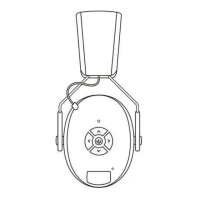
The E6850 is a wireless hearing protector featuring Bluetooth wireless technology, designed to provide both hearing protection and audio connectivity. This device allows users to listen to audio wirelessly while protecting their ears from loud noises.
The hearing protector comes with a partially charged integrated lithium-ion battery pack. To charge the device, connect the supplied Type-C connector cable to the Type-C jack located on the bottom of the right cup. The other end of the cable should be connected to a suitable USB power source, such as a computer or a third-party certified (UL, Intertek, etc.) AC to USB wall adapter. During charging, the LED will blink blue. Once charging is complete, the LED will turn solid blue.
To properly fit the headset, fully extend the sliders and place the cups over your ears. After positioning the cups, tighten the headband using the sliders to ensure a snug and comfortable fit.
To power the headset ON or OFF, press and hold the power button for 2 seconds.
The hearing protector includes a "Battery Low" warning system. When the battery voltage is low, the device will provide an audible "Battery Low" warning via a bleeping voice.
To conserve battery life, the hearing protector features an auto shut-off function. If either Bluetooth or the audio input is disconnected for 5 minutes, the device will automatically power down. To turn it back on after an auto shut-off, press and hold the ON/OFF button for 3 seconds.
Once the headset is powered on, the LED will blink blue, indicating it is in pairing mode. Ensure your Bluetooth-enabled device is scanning or searching for devices. Look for "E6850" in the list of available devices on your device. Select "E6850" to connect to the hearing protector. Upon successful connection, the LED on the right cup will turn solid blue. The Bluetooth audio volume will be controlled by your connected device. The next time you power up the hearing protector, it will automatically connect to your previously paired device.
In Bluetooth Mode, incoming phone calls will temporarily mute any music playing. You will hear your phone's ringtone through the headset until the call ends.
This device complies with part 15 of the FCC Rules. Its operation is subject to two conditions: (1) This device may not cause harmful interference, and (2) this device must accept any interference received, including interference that may cause undesired operation. Any changes or modifications not expressly approved by the party responsible for compliance could void the user's authority to operate the equipment.
This equipment has been tested and found to comply with the limits for a Class B digital device, pursuant to part 15 of the FCC Rules. These limits are designed to provide reasonable protection against harmful interference in a residential installation. This equipment generates, uses, and can radiate radio frequency energy. If not installed and used in accordance with the instructions, it may cause harmful interference to radio communications. There is no guarantee that interference will not occur in a particular installation. If this equipment does cause harmful interference to radio or television reception (which can be determined by turning the equipment off and on), the user is encouraged to try to correct the interference by one or more of the following measures:
The device has been evaluated to meet general RF exposure requirements. It can be used in portable exposure conditions without restriction, ensuring user safety regarding radio frequency emissions.
 General
| Microphone | Yes |
|---|---|
| Frequency Response | 20Hz-20kHz |
| Driver Size | 40mm |
| Impedance | 32Ω |
| Connection | 3.5mm jack |

 To Next Page