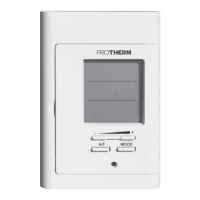
This document provides installation instructions for the Protherm Thermolink P and Thermolink RC room thermostats. It covers product documentation, CE Mark compliance, installation procedures, electrical connections, commissioning, installer menu functions, and maintenance.
Function Description
The Protherm Thermolink P and Thermolink RC are programmable room thermostats designed to control heating systems. They can function as either a "master" thermostat, providing full control over the heating system, or a "secondary" thermostat with a limited set of functions, typically for controlling a different zone within the dwelling.
Key functions include:
- Heating Control: Manages the heating system based on programmed settings.
- Outdoor Sensor Integration: Allows the heating system to adjust water temperature based on outdoor conditions, enabling automatic heating curve management or manual curve setting.
- Modulating Control: Optimizes heating output for efficiency.
- Room Temperature Function: Monitors and adjusts room temperature.
- Anticipation: Pre-heats the system to reach programmed temperatures rapidly, especially for morning settings.
- Hot Water Control: Activates/deactivates domestic hot water programs and sets maximum temperatures.
- Recirculation: Requires an optional card in the boiler and a recirculation pump to reduce hot water waiting times. Operating ranges are programmable.
- Cooling Control: Activates/deactivates cooling functions and programs.
- Efficiency Info: Provides a performance indicator calculated from the efficiency of all appliances over the last 24 hours.
- Auto Time: Manages automatic time settings.
- Date/Time: Allows setting of the current date and time.
- Language: Selection of the display language.
- Service Indicator: Reminds the user when appliance maintenance is due. The icon appears 30 days before the scheduled date.
- Radio (for wireless version): Includes connection and radio test functions.
Automatic Heating Curve:
When an outdoor sensor is connected, this function continuously seeks the most suitable value to ensure comfort and efficiency. The optimum value is typically obtained within 24 hours of system startup. If deactivated, the heating curve can be set manually.
Thermostat Function (with outdoor sensor):
The heating system adjusts the water temperature in the heating circuit based on both ambient and outside temperatures. If deactivated, only the outside temperature is considered.
Important Technical Specifications
Thermolink P (Wired Room Thermostat):
- Room temperature authorized: 50 °C
- Maximum authorised temperature of domestic water: 65 °C
- Power-supply voltage EBUS: 24 V
- Electrical connection cable section: 2 x 0.75 mm²
- Max. length of electric connection cables: 300 m
- Electrical protection: IP20
- Pollution rating: 2
- Dimensions:
- Height: 97 mm
- Width: 146.5 mm
- Depth: 35 mm
Thermolink RC (Wireless Room Thermostat):
- Room temperature authorized: 50 °C
- Maximum authorised temperature of domestic water: 65 °C
- Power-supply voltage EBUS: 24 V
- Electrical connection cable section: 2 x 0.75 mm²
- Max. length of electric connection cables: 300 m
- Transmission/reception frequency: 868 MHz
- Electrical protection: IP20
- Pollution rating: 2
- Frequency of communication with outdoor sensor: 15 min
- Frequency of communication with the control box: 10 min
- Average unobstructed working range (*): 100 m
- Average range within the home (*): 25 m
- Thermostat dimensions:
- Height: 115 mm
- Width: 146.5 mm
- Depth: 41 mm
- Wireless receiver dimensions:
- Height: 20 mm
- Width: 171 mm
- Depth: 58 mm
(*) Note: Ranges can vary according to installation conditions and electromagnetic environment.
Usage Features
- Installation: The manual provides detailed instructions for both wired and wireless installations, including fixing the thermostat and connecting electrical components. For wireless versions, a radio receiver is included.
- Commissioning: Involves fully opening radiator thermostat valves, switching on appliances, removing the insulating tab from the wireless thermostat's battery compartment, following installation assistant instructions, making necessary adjustments, and finalizing settings in the installer menu.
- Installer Menu: Accessible by pressing the "menu" button for 7 seconds and entering access code 96. This menu allows customization of the thermostat's functions based on the connected appliance and connection method.
- User Menu: Return to the main user screen by pressing the "menu" button for 3 seconds.
- Compatibility: The thermostat's functions vary depending on whether it's connected to a boiler or an Examaster control unit, and whether it's configured as a master or secondary thermostat.
Maintenance Features
- Trouble-shooting: The manual includes a comprehensive fault diagnosis section to help identify and resolve common issues. This involves checking error messages on the display and performing specific checks for wired and wireless thermostats.
- Fault Diagnosis (Wired Thermostat): Addresses issues like no display (checking power cut, boiler connection, control box connection), ambient temperature not reaching/exceeding programmed temperature (checking thermostat valves, heating curve settings, max heating outlet temperature).
- Fault Diagnosis (Wireless Thermostat): Addresses issues like no display (checking power cut, boiler connection, battery installation/polarity/exhaustion), ambient temperature not reaching/exceeding programmed temperature (checking thermostat valves, heating curve settings, max heating outlet temperature).
- Radio Receiver Faults: Provides solutions for issues like the red LED being switched on (checking appliance functioning, room thermostat batteries, electrical connection, radio communication).
- Resetting the Room Thermostat: This function returns the thermostat to factory settings, restarting the installation assistant. It's an irreversible process that will erase all customized configurations. To perform a reset, simultaneously press the specified buttons for 10 seconds and confirm.
- Service Reminder: The thermostat displays an icon 30 days before the scheduled maintenance date, reminding the user to service the appliance. The date for maintenance is entered in the professional menu during installation and after each service.

 Need help?
 General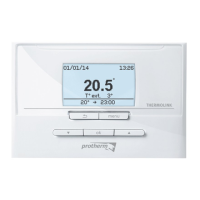

 To Next Page