- 8 -
4.3 How to use the Ear-mode
To measure the body temperature from the eardrum, follow these instructions:
1. Take o the sensor cover to expose the sensor probe.
2. Pull the ear backward and upward.
3. Gently insert the sensor into the ear canal.
4. Make sure the sensor points in the direction of the eardrum itself.
5. Press the Ear button once.
6. A beep indicates the measurement is successful.
7. Read the temperature from the display.
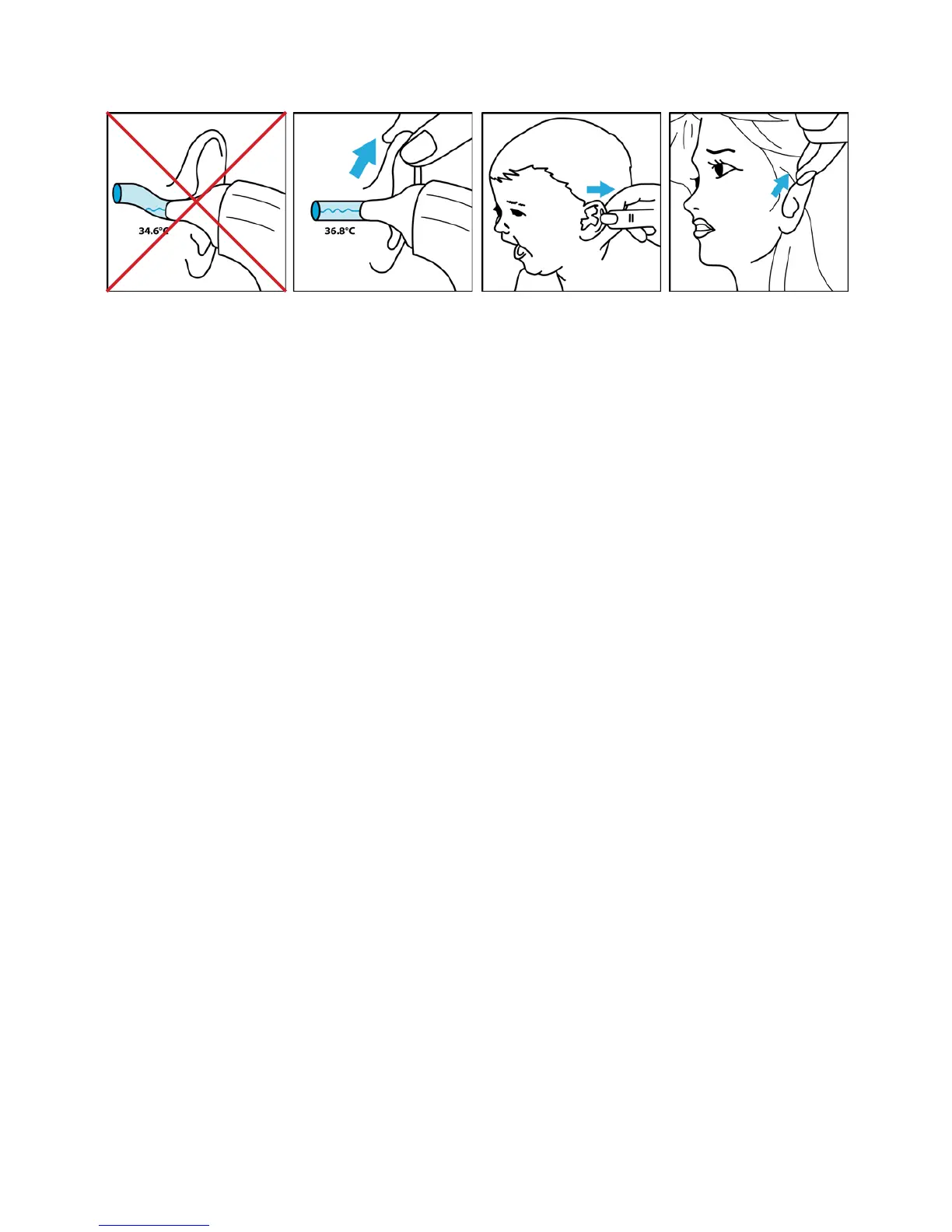
The most accurate measurement will be obtained when the sensor probe has a direct
view of the eardrum (image 2).
Straighten the ear canal by tugging the ear upward and backward to get the most
accurate measurement (image 2).
To measure your own temperature, wrap your free hand around the back of your head
and pull your ear upward and backward (image 4).
Aged between 6 and 12 months
Pull the ear backward (image 3).
Aged 1 year and older
Pull the ear upward and backward (image 4).
4.4 Memory retrieval
Each time successful measurement is performed the measurement data is stored in the
thermometer memory. The thermometer memory has a capacity of 20 sets of data.
To retrieve stored data sets follow these instructions:
1. Make sure the thermometer is o. If it shows anything on the display, leave the
buttons untouched for 10 seconds.
2. Press and hold the Ear-button for 4 seconds until the display shows “- - -M”.
3. Press the Ear-button once to get the last measurement in the display.


 To Next Page