EasyManua.ls Logo

Provision ISR PR-DVR-C10 - User Manual

Provision ISR PR-DVR-C10
20 pages
Print Icon
To Next Page IconTo Next Page
Loading...
PR-DVR-C10
Quick Installation Guide
Question and Answer IconNeed help?

Do you have a question about the Provision ISR PR-DVR-C10 and is the answer not in the manual?

Overview

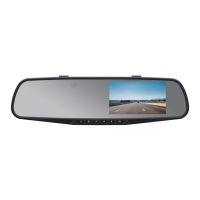
The PR-DVR-C10 is a dual-channel HD car dash camera designed to record video while driving, offering various features for safety and surveillance.

Function Description:

The device primarily functions as a video recorder for vehicles, capturing footage from both front and rear perspectives (implied by "Dual Channel HD Car Dash Camera" and "Front: 170° / Back: 120°" lens specification). It supports continuous recording, motion detection, and G-sensor activated recording to protect important footage during incidents. The camera can also be used to take still photos and offers a playback mode for reviewing recorded media. It features an LCD screen for live preview and menu navigation.

Important Technical Specifications:

  • Lens: Front: 170°, Back: 120° (suggests a wide-angle view for comprehensive coverage).
  • LCD Screen Size: 4.3-inch high definition LCD screen.
  • Video Resolution: 1080FHD, 1080P, 720P (indicating support for various high-definition recording qualities).
  • Video File Format: AVI.
  • Photo Format: JPEG.
  • Loop Recording: Seamless loop recording with no leakage of seconds, meaning it continuously records and overwrites the oldest files when the memory card is full.
  • Motion Detection: Supported.
  • G-sensor: Built-in, designed to protect video files from being deleted in case of a car accident or emergency.
  • Memory Card: TF (Micro SD) card, maximum support 32GB (Class 10 and above recommended).
  • Microphone: Supported.
  • Built-in Stereo: Supported.
  • Current Frequency: 50HZ/60HZ.
  • USB Modes: 1: USB-Disk (for data transmission), 2: PC-Camera (for webcam functionality).
  • Power: 5V 1A.
  • Battery: Built-in 200mAh (provides approximately 30 minutes of working time; requires connection to a power source for daily use).
  • Language Support: Traditional Chinese, Simplified Chinese, French, English, German, Russian, and more.
  • Exposure Settings: Adjustable from +0.0 to -2.0 and +2.0 in various increments.

Usage Features:

  • Installation: The device mounts to the car's original rearview mirror using provided strip holders. Power is supplied via a car charger plugged into the cigarette lighter socket. A trim removal tool is included for neat cable routing.
  • Automatic Operation: The camera automatically turns on and begins video recording when the car engine starts, and automatically turns off when the engine is turned off.
  • Modes:
    • Video Recording Mode: Starts/stops recording with the "OK" button. Video file duration can be set to 1, 3, or 5 minutes.
    • Photo Mode: Switches to photo mode using the "Mode" button, then captures pictures with the "OK" button.
    • Playback Mode: Switches to playback mode using the "Mode" button, allows browsing video/picture files with Up/Down keys, and plays/pauses selected files with the "OK" button.
  • Menu Settings: Accessed via the "Menu" button, allowing configuration of resolution, loop recording duration, exposure, motion detection, recording audio, date stamp, parking guard, G-sensor sensitivity, date/time, auto power off, language, frequency, format, and display auto-off.
  • Special Features:
    • Loop Recording: Ensures continuous recording by overwriting the oldest files when the memory card is full.
    • G-Sensor: Automatically locks current video files upon detecting sudden movements or impacts, preventing them from being overwritten.
    • Motion Detection: Records automatically when movement is detected in front of the camera. It is recommended to turn this off during normal driving and use it for surveillance when parked.
    • Auto Power On/Off: Synchronizes with the car's engine for convenient operation.
    • USB Mode: When connected to a computer, it can function as a Mass Storage device (USB Flash Drive) for file transfer or as a PC Camera (USB Webcam).
  • Battery Indicator: Displays the current battery level (full, slightly low, low, empty). A red charging indicator light shows charging in progress and turns off when complete. Full recharge time is approximately 180 minutes.

Maintenance Features:

  • Memory Card Formatting: It is recommended to format the memory card before first-time use and if "File error" appears during playback. This can be done through the camera's system settings.
  • Reset Function: A reset button is provided to restart the camera's operating system if it becomes abnormal or crashes during use.
  • Lens Cleaning: Users are advised to keep the camera lens clean and check for dirt or fingerprints, using a lens cloth for cleaning if necessary, to ensure clear video.
  • Exposure Adjustment: In scenes with high contrast (e.g., recording sky or water), the automatic exposure function may be affected, leading to a black image. Users can adjust the 'EV' (Exposure Value) in the setting mode to correct this.

Provision ISR PR-DVR-C10 Specifications

General IconGeneral
BrandProvision ISR
ModelPR-DVR-C10
CategoryDash Cameras
LanguageEnglish