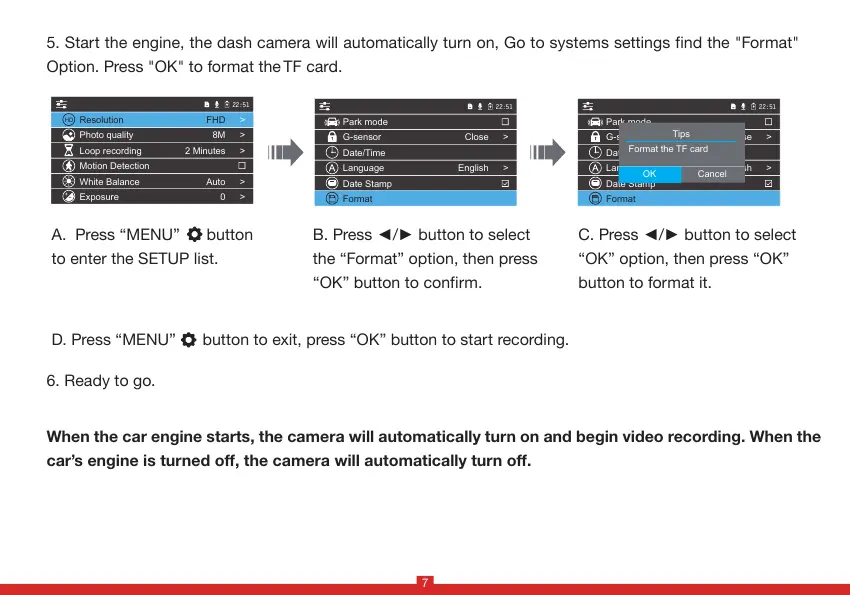
5. Start the engine, the dash camera will automatically turn on, Go to systems settings find the "Format"
Option. Press "OK" to format the TF card.
B. Press ◄/► button to select
the “Format” option, then press
“OK” button to confirm.
C. Press ◄/► button to select
“OK” option, then press “OK”
button to format it.
When the car engine starts, the camera will automatically turn on and begin video recording. When the
car’s engine is turned off, the camera will automatically turn off.
6. Ready to go.
A. Press “MENU” button
to enter the SETUP list.
22:51
Park mode
G-sensor
Date/Time
Language
Date Stamp
Format
Close
English
>
>
22:51
Park mode
G-sensor
Date/Time
Language
Date Stamp
Format
Close
English
>
>
Tips
OK Cancel
Format the TF card
22:51
HD
+
-
Resolution
Photo quality
Loop recording
Motion Detection
White Balance
Exposure
FHD
8M
2 Minutes
Auto
0
>
>
>
>
>
7
D. Press “MENU” button to exit, press “OK” button to start recording.


 To Next Page