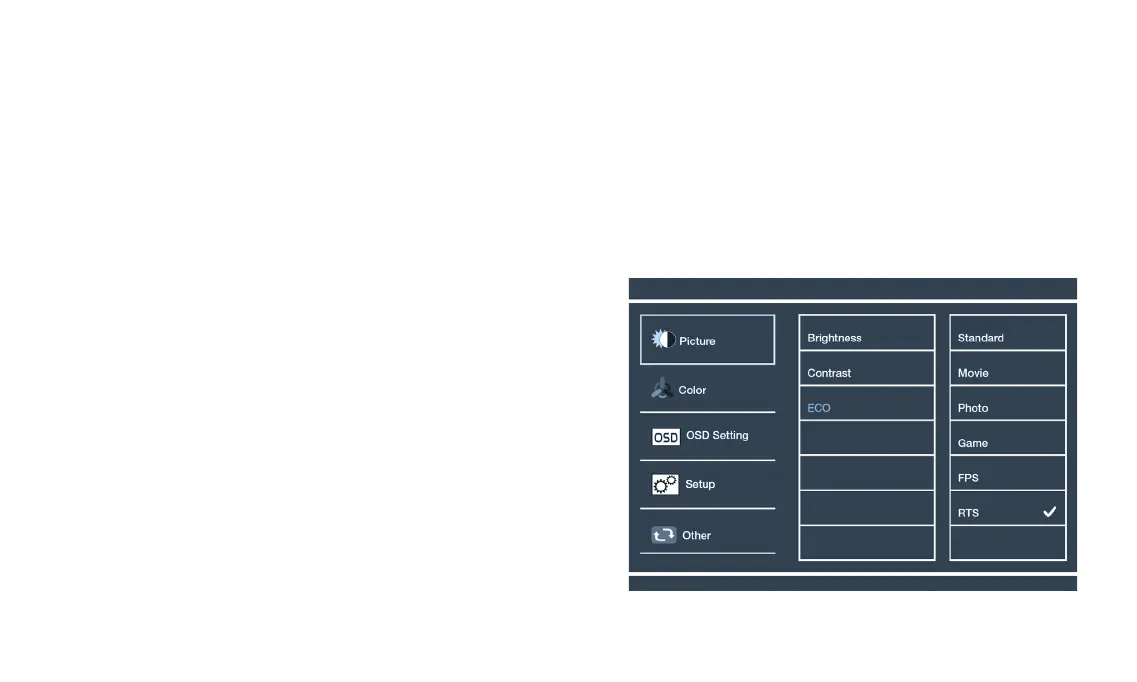
PICTURE ADJUSTMENT
• Adjust and .
• for the main menu,
select and press up or down to select or . Press
to open or close . function.
: Choose between different modes depending on your needs and
preferences.
Standard – This display mode is suitable for most activities.
Photo – This display is for photo use mode.
Movie – This display mode is for playing movies.
Game – This display is for game use mode.
RTS – This display mode is for playing real time strategy games.
ON SCREEN DISPLAY [OSD]
• The of the monitor provides various adjustments for the monitor such as color, brightness, contrast and more.
• When you press the
button, the screen will appear. Select each of the functions with the
buttons.
• Use the
button again to enter each of the functions. If you’re in the function already, use the
button to select the option you
want to adjust.
• Use the
buttons to adjust option values. Exit by pressing the
button.
English


 To Next Page