8
NOTE: It’s not possible to operate the BiT scale while charging. If you start charging while
in operation, it will disconnect and switch off automatically (starting the charging process as
described above).
How to use the product
• Place the scale on a hard and at surface.
• Open the Prozis GO App on your phone and tap the scale menu. The LED will remain blue
once the connection has been established.
• Press
TARE to clear the weight and place a container on the top of the scale. The App will
display the weight of the container.
• Press TARE to clear the weight of the container (reset to zero). The light will blink in green,
and then turn blue once the task has been completed.
• Place the food inside the container, and the App will display the weight of your food.
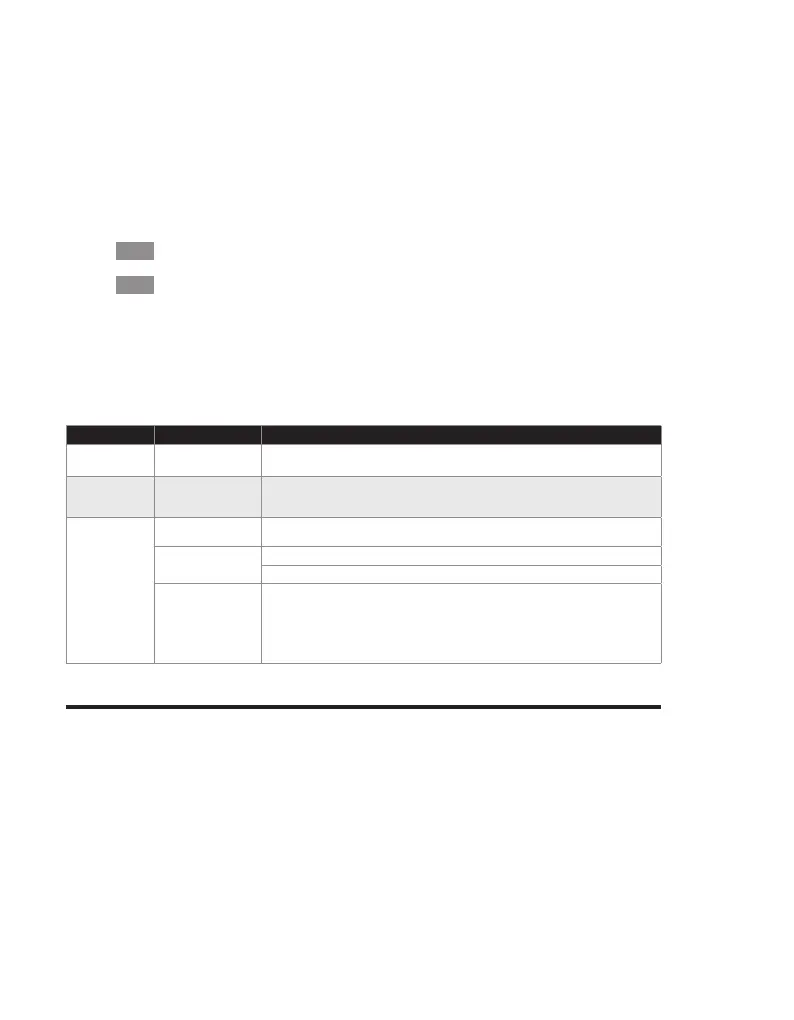
TROUBLESHOOTING
Some issues that arise may be solved by the user. If the problem persists after having tried
the following solutions, please contact Prozis customer service.
PROBLEM CAUSE SOLUTION
The appliance is
not working.
The battery is empty. Recharge the battery as described.
Unable to
charge the
scale.
Charging connection
problem.
Make sure the charging cable is intact and plugged in properly.
No BT
connection.
Error operating the
Scale.
Switch the scale off and on again.
BT device error. Reconnect the scale to the Prozis Go App.
Check if other devices using BT standard 4.0 or higher work with the BT device.
BT connection error. Move the devices connected via BT closer. Make sure the Scale is not already
connected to another device. Place the device to be connected within 10 m / 33 ft of
the scale. Switch off other BT devices to decrease the interference.
Warranty statement
All electrical and electronic products commercialized by Prozis via www.prozis.com are cov-
ered by the warranty applicable to the purchase and sale of consumer goods.
GENERAL CONSIDERATIONS
This document contains the terms and conditions of Prozis’ warranty for nal consumers.
This warranty is valid exclusively for consumers who purchase the product for non-professio-
nal purposes.
WARRANTY PERIOD
EN



 To Next Page