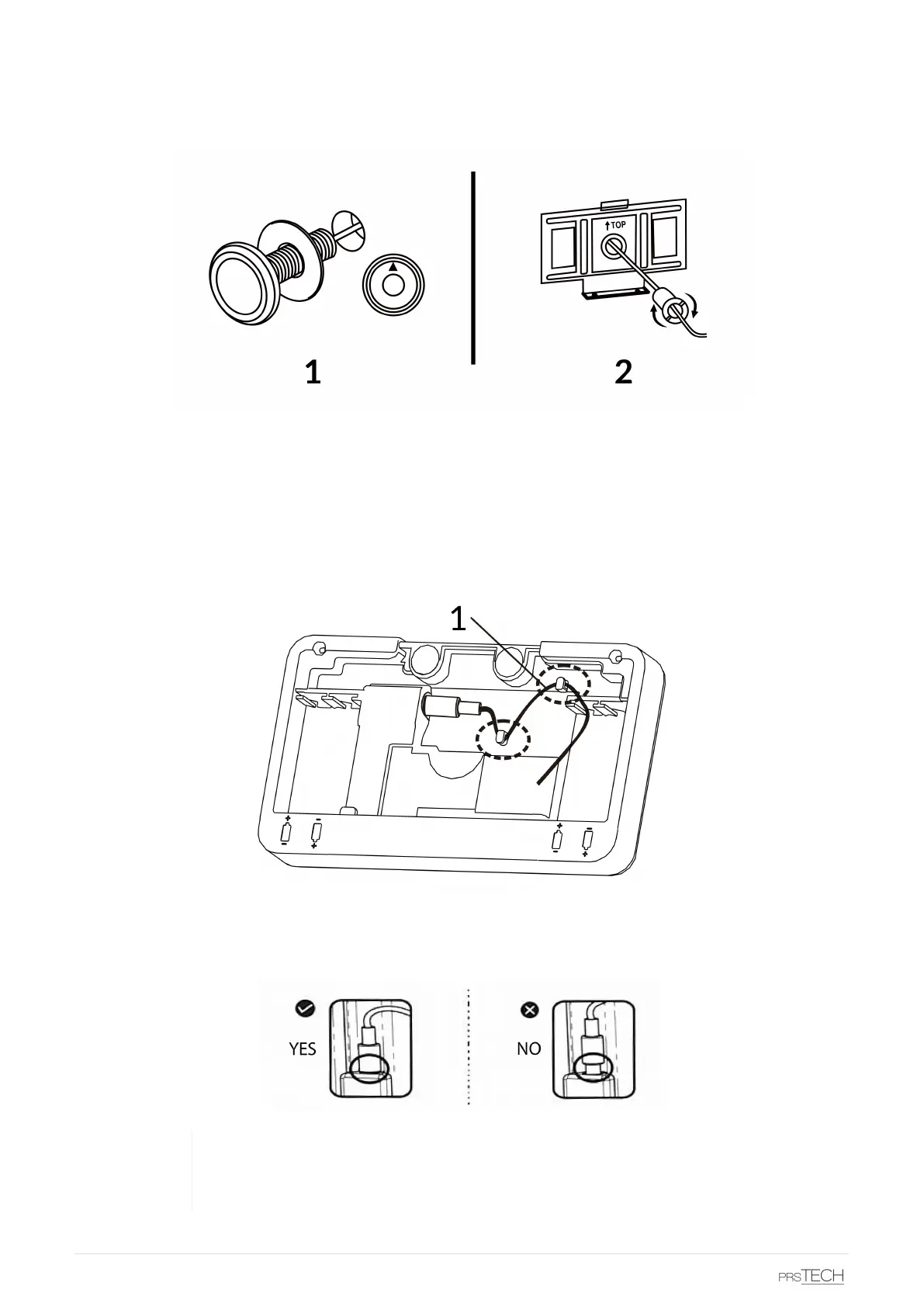
• Unscrew the cylinders from the camera
• Check the thickness of the door and set the approprate cylinders aside. If necessary, screw the cylinder
parts together (see fig. above).
• Insert the camera into the hole in the door (without the cylinder). Note that the arrow has to point up
(see fig. above, 1)
• Pass the camera cable through the hole of the backplate and place the backplate on the door using the
adhesive sticker on the plate.
• Take the cylinder and pass the camera cable through it. After that screw the cylinder tightly with the
camera. Use the installation wrench to secure it (see fig. above, 2).
• Connect the camera cable to the main unit. make sure the cable is fully inserted into the receptacle.
Secure the camera cable to the plastic flaps (see fig. above).
Make sure the cable is FULLY INSERTED into the receptacle. Not doing so could
damage the device and render it unusable. Any incorrect installation is not covered by
the manufacturers warranty.
4 DoorCAM DC2


 To Next Page