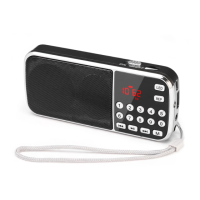
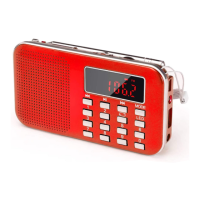
Functional Components
Precautions
Power Supply
EN
PRUNUS J-125 FM/AM Radio User Manual
Thank you for purchasing the PRUNUS J-125 radio. In order to get the best performance from the radio, please
read this manual carefully before using it and take special caution in the section below.
①Power switch
②Earphone jack
③DC 3V charging jack
④Volume +
⑤Volume -
⑥AM/FM (Mode will loop in between
AM/FM/Clock/Alarm clock)
⑦Preset/Scan and memory radio
channels/Time set/Alarm clock set
⑧Memo -
⑨Memo+
⑩UP button
⑪DOWN button
⑫Stereo/Lock button
⑬Lanyard/Aerial
⑭Lanyard hole
◆Please remove the batteries if you are not intended to use this radio for a long period of time.
◆Please do not use this product near or into any kind of liquid.
◆Please do not use this radio at a temperature over 40 degrees Celsius.
1. The J-125 radio requires 2 AAA batteries which can be replaced.
2. This radio is environmental friendly, which permit to use rechargeable batteries. To charge the batteries, turn
off the radio and use the standard DC 3V/500-1000mAh power adaptor and plug into <④DC 3V charging jack>
(the power adaptor must meet this voltage, or it may damage the radio).
Note:
Do not use the radio while charging.
Radio Reception
1. Press <①Power switch> to turn the radio on.
2. Press <⑥AM/FM> to switch between “FM” and “AM” mode.
3. How to search and store channels?
1) Auto Search and store channels
Press and hold <⑦Preset> for 3 seconds to automatically search, store and numbered the channels in your
areas; The channels will save in an order as "P00""P01”…”P19” and store up to 20 channels.
2) Previous/Next Search
Long press <⑩UP button> or <⑪DOWN button> to search for the previous or next available channel near you,
when a channel is detected, it will stop searching and play the current channel automatically.
3) Manually Preset
Press <⑦Preset>to store the channel while it is playing; When the screen appears “PRESET”, press either <⑧
Memo -> to reduce or <⑨Memo+> to add number the channel (any number from"P00" to “P19”), press <⑦
Preset> again or wait for 5 seconds to store the channel, as soon as the blinking “PRESET” disappeared which
means the channel has been stored and numbered.
4. Press <⑧Memo ->or <⑨Memo+> to select the channels you have stored.
5. Press and hold <④Volume +>or <⑤Volume -> to adjust the desire volume.
6. Press <①Power switch> to turn off the radio. (Attention: When the radio is OFF, it will turn into clock mode).
Note:
◆Adjust the position and rotate the radio to get the best reception.
◆In order to get a better indoor reception, place near to the window and keep it away from any electronic
devices (such as computers, TVs, refrigerators, mobile phones, etc).
ST ER EO
STEREO DC 3V
①
⑬ ⑭
② ③
④
⑧
⑨ ⑫
⑩
⑪
⑤
⑥
⑦
◆If you have taken out the batteries, you will need to reset the stored channels when you reinsert back the
batteries again.

 Need help?
 General

 To Next Page