© 2018 PRUVEEO
All Rights
Re
s
er
v
ed
.
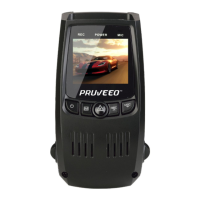
* Press and hold for about 3 seconds to turn the
device on or off.
* Press to turn screen on / off.
* In standby mode, press ONE/TWICE to enter
settings, press again to EXIT.
* Press and hold for about 3 seconds to switch
between Recording / Photo / Playback modes.
OK / Lock video
/ WiFi button
* Recording Mode Hot Key: Emergency Lock.
Press to manually lock the video during
recording.
* Press to confirm a selection while in Setting
Mode.
* In standby mode, press and hold for about 3
seconds to start or exit the WiFi feature.
* Recording Mode Hot Key: Record
Press to start / stop recording.
* Press to navigate UP through options in
Settings Mode.
* Recording Mode Hot Key: Mute
Press to mute / un-mute the microphone during
recording.
* Press to navigate DOWN through options in
Settings Mode.
If the dash cam stops working, press and hold
for about 7 seconds to reset the dash cam.



 To Next Page