
 Need help?
Do you have a question about the PTZ Optics PT-JOY-G4 and is the answer not in the manual?
Lists the components included with the PT-JOY-G4 controller.
Provides essential guidelines for maintaining and protecting the joystick.
Identifies and describes the buttons and dials on the joystick's top panel.
Detailed explanation of the function of each button and dial on the controller.
Details the connections and ports available on the rear of the joystick controller.
Guides on physical installation and initial setup of the joystick controller.
Instructions for configuring network connectivity and static IP addresses for the controller.
Details on setting up serial communication methods for camera control.
Steps to add cameras using the joystick's On-Screen Display (OSD) menu.
Instructions for adding cameras via the controller's web-based interface.
How to view and manage connected cameras within the joystick's OSD menu.
Procedure for resetting the joystick to its original factory default settings.
How to control the camera's pan, tilt, and zoom movements using the joystick.
Guide on how to set and recall camera position presets using the controller.
Adjusting camera exposure settings like Iris, Shutter, and various exposure modes.
Managing camera white balance settings, including gain adjustments and modes.
Operations for camera focus, covering auto, manual, and focus lock functions.
How to enable or disable backlight compensation for improved image quality.
Using Matrix Mode to control specific camera presets on selected cameras.
Using Basic Mode for simplified joystick control and preset calling.
Managing cameras through the controller's web interface, including adding and editing.
Using the web interface to call camera presets for connected cameras.
Using the web interface for Matrix Mode camera preset control.
Procedure to upgrade the joystick's firmware to the latest version.
Resetting the joystick to its original factory default settings.
Configuring network settings like IP address, subnet mask, and gateway.
Diagnosing and resolving control failure messages displayed on the joystick's LCD.
Troubleshooting steps when the joystick fails to control any cameras.
Addressing issues where multiple cameras respond to a single command.
Resolving issues with unintended camera movement or failure to stop.
Troubleshooting compatibility issues with non-PTZOptics cameras.
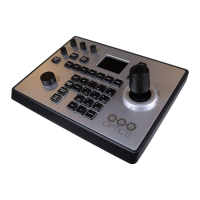
The PT-JOY-G4 is a 4th-Generation Network or Serial Camera Controller designed to provide in-depth control of PTZOptics and HuddleCamHD cameras in production environments and other settings. It offers flexible control by supporting both IP and serial communication from a single controller.
The PT-JOY-G4 allows users to remotely operate and adjust camera settings. It supports control over a Local Area Network (LAN) using TCP or UDP communications for PTZOptics VISCA over IP commands, with limited support for Sony VISCA over IP capable cameras. For serial connections, it supports RS-232, RS-485, or RS-422, utilizing PTZOptics VISCA commands, Pelco-D, Pelco-P, and limited Sony VISCA support. The controller features a comprehensive set of physical controls, including a joystick, various knobs, and an alpha-numeric keypad, all designed for intuitive camera management.
The controller allows for the selection of up to 6 cameras directly via dedicated buttons, or any camera up to 255 (for IP) or 7 (for serial) using the CAM ID button and alpha-numeric keypad. Once a camera is selected, full remote operation is enabled.
The core of camera movement is handled by the joystick controller, which enables variable speed pan, tilt, and zoom (by twisting the joystick). The speed of these movements can be precisely adjusted using the Speed Control knob. Additionally, a Fine Tune Zoom knob provides granular control over zooming at the slowest possible speed.
Users can adjust camera exposure settings using the [IRIS / SHUTTER] knob, which toggles between Iris and Shutter adjustments. The [EXPOSURE MODE] button cycles through various exposure modes, including Auto, Manual, Shutter Priority, Iris Priority, and Brightness Priority, offering flexibility for different lighting conditions.
White balance settings are managed via the [R GAIN / B GAIN] dial, allowing for adjustments to Red Gain and Blue Gain values. Pressing this knob toggles between red and blue gain adjustments. The [WHITE BALANCE MODE] button cycles through modes such as Auto, Indoor, Outdoor, One Push, and Manual. For precise white balance calibration in One Push mode, the [ONE PUSH TRIGGER] button can be used.
The [NEAR / FAR FOCUS] dial allows users to adjust the camera's focus. Pressing this dial toggles between Auto Focus and Manual Focus modes. The [ONE PUSH AUTO FOCUS] button provides an instant auto-focus without exiting Manual Focus mode. A [FOCUS LOCK / UNLOCK] button is also available to lock the focus at the current position, preventing automatic refocusing during zoom operations, which is particularly useful for PTZOptics cameras.
The [BACKLIGHT ON / OFF] button enables or disables backlight compensation, helping to improve image quality in challenging lighting scenarios.
The controller supports setting and recalling camera presets. Quick Presets (0-9) can be set by holding an alpha-numeric button for 3+ seconds and recalled with a quick press. For a wider range of presets (0-255), the [SET] and [CALL] buttons are used in conjunction with the alpha-numeric keypad. Presets can store specific focus values when set in manual focus mode with PTZOptics cameras.
The [OSD OPEN/CLOSE] button provides access to the camera's on-screen display (OSD) menu. The joystick is used to navigate the menu (up, down, left, right), and the [OSD ENTER] button selects options. The [OSD BACK] button returns to the previous menu.
The [SETUP] button opens the joystick's own OSD menu, allowing for configuration of controller settings. This includes adding network or serial devices, managing a device list, configuring network connections (DHCP/Static IP), setting the language, adjusting button tones, restoring factory settings, and viewing system information (Software Version, Hardware Version, Web Version, IP Address, Gateway, & Subnet Mask).
The PT-JOY-G4 offers different operating modes:
The controller features a web interface accessible via its IP address. This interface allows for device management, including defining new cameras, adjusting configured cameras, and calling presets (similar to Basic Mode without Joystick and Matrix Mode). Settings such as firmware upgrades, factory restore, restart, import/export of settings, system settings (invert Pan/Tilt), and network configuration (DHCP/Static IP) can also be managed through the web interface.
To ensure longevity and prevent damage, the joystick should be kept away from rain and moist environments. It should only be operated within recommended temperature (14° ~ 122°F / -10° ~ +50°C) and humidity (10% ~ 90% non-condensing) ranges.
Only the originally supplied 12V 2A international power supply should be used. It is crucial not to power the joystick controller using both PoE and the power supply simultaneously.
The joystick and signal cables should be kept away from strong electromagnetic sources to prevent abnormal or unreliable control.
For cleaning the product surface, a soft dry cloth is recommended. If the joystick is extremely dirty, a diluted neutral detergent can be used. Solvents should be avoided as they may damage the surface.
The manual provides guidance for common issues such as "Control Failure" on the LCD, the joystick not controlling cameras, multiple cameras being controlled at once, and the camera not stopping movement when the joystick is upright. It suggests checking network connections, cable integrity, camera control addresses, control modes, and network congestion. For power issues, installing a grounding pin/wire is recommended.
Users are advised to keep camera firmware up to date using the PTZOptics Firmware Finder. For non-PTZOptics cameras, some functions may have limited compatibility. The PTZOptics Knowledge Base and Forums are available for troubleshooting, and direct support can be accessed by submitting a ticket.
The PT-JOY-G4 comes with a 2-Year Limited Warranty covering manufacturer defects and shipping damage. It does not cover physical damage due to improper care. Support can be contacted via http://help.ptzoptics.com for warranty inquiries.
 General
| Type | Joystick |
|---|---|
| Product color | Black, Silver |
| Placement supported | Indoor |
| Maximum operating distance | 1200 m |
| Maximum number of cameras supported | 253 |
| Ethernet LAN | Yes |
| RS-232 ports | 1 |
| Connectivity technology | Wired |
| Rated power | 6 W |
| Output voltage | 12 V |
| Quantity per pack | 1 pc(s) |
| Operating temperature (T-T) | -10 - 50 °C |
| Operating relative humidity (H-H) | 10 - 90 % |
 Weight and Dimensions
| Depth | 234.95 mm |
|---|---|
| Width | 303.23 mm |
| Height | 107.95 mm |
| Weight | 2020 g |

 To Next Page