EasyManua.ls Logo

PULUZ PU360 - Remote Controller

PULUZ PU360
38 pages
Print Icon
To Next Page IconTo Next Page
To Previous Page IconTo Previous Page
Loading...
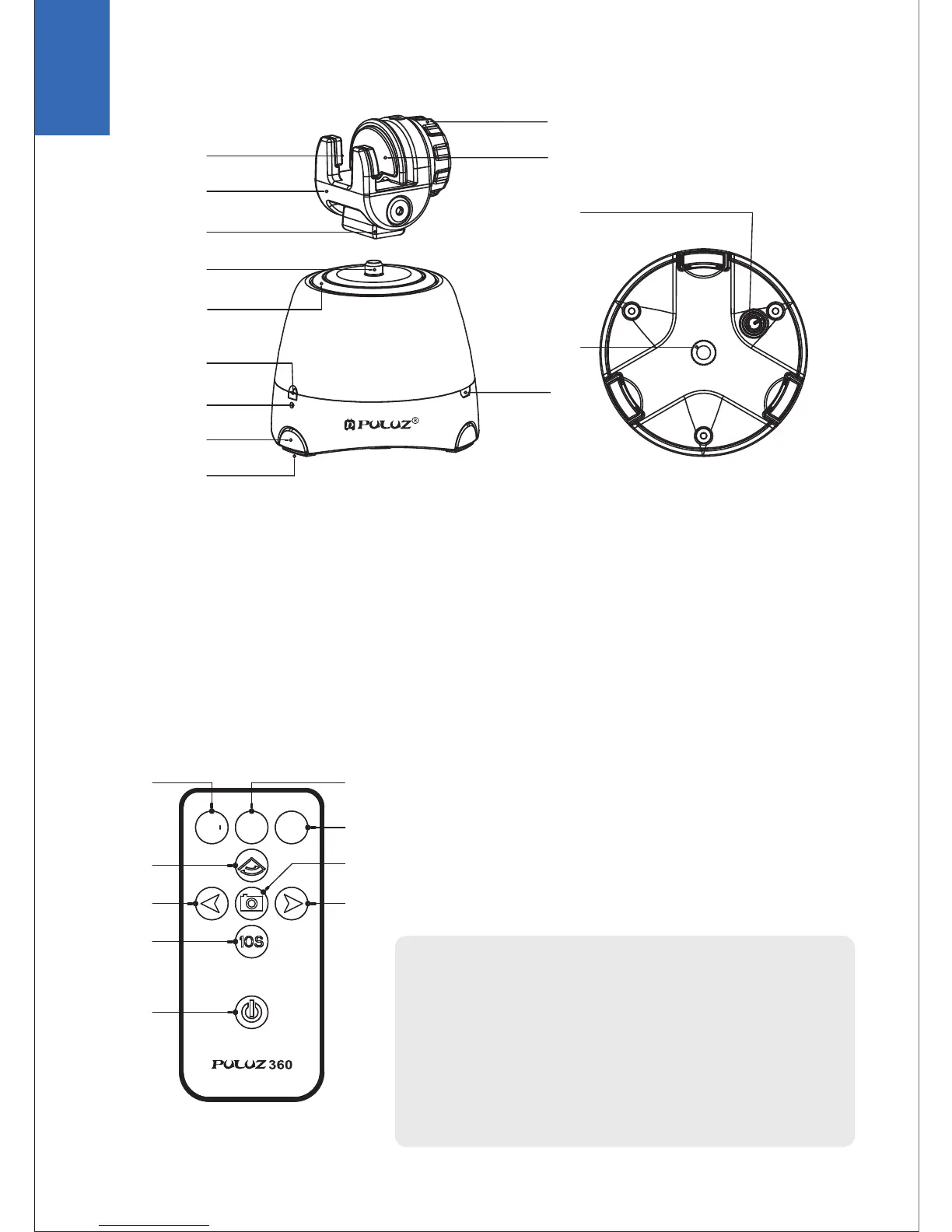
A. Body Part
B. Remote Controller
01. Rotary Knob
02. Rubber Mat A
03. Rubber Mat B
04. Angle Adjustment A
05. Angle Adjustment B
06. 1/4 Universal Screw
07. Horizontal Base
08. Receptor
09. Indicator Light
10. Support Leg
01. 24 Pic/r
02. 36 Pic/r
03. 48 Pic/r
04. Panorama Switch
05. Turn Left
Note:
1. To take 24/36/48 pictures per rotation;
2. You need choose the number and then press 05 or 09;
Use the panorama function of your smartphone to take a
panoramic picture;
3. Press 04 and then press 05 or 09;
The remote control should be directed at the infrared
port of the product.
06. Turn to the next
angle every 10 seconds
07. Stop
08. Take Photo
09. Turn Right
11. Rubber Mat
12. Power Switch
13. 1/4 Screw Hole
14. USB Interface
04
05
06
08
09
10
11
12
13
14
07
01
02
03
04
05
06
07
03
08
09
02
01
24
36
48
EN
02