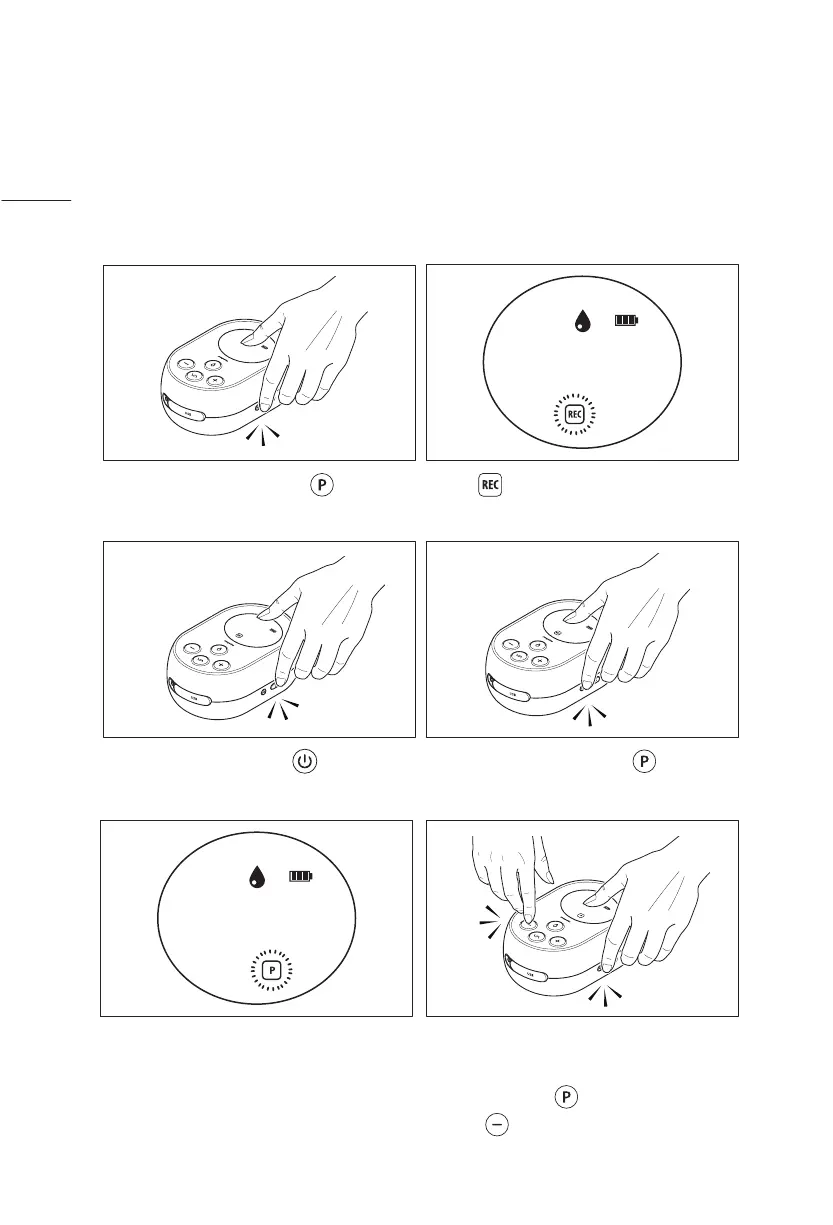
Save program to
Genie Advanced
Press the program button for 2
seconds to start recording.
00
00:00
00
CYCLEVACUUM
2 sec.
When flashes, adjust the settings
as best suit you.
00
00:00
00
CYCLEVACUU M
Save a favorite program to Genie Advanced’s
internal memory
Press the power button to pause
and resume while recording.
03
02:00
02
CYCLEVACUUM
The program icon in the screen shows
that your program has been stored.
0 1
00:02
0 1
CYCLEVACUU M
Press the program button for 2
seconds to save the recording.
00
00:00
00
CYCLEVACUUM
2 sec.
To record a new program, delete the
existing program first by pressing the
program button and the minus
button for two seconds
0 1
00:02
0 1
CYCLEVACUUM
2 sec.
16


 To Next Page