This document describes the PUNK Rider electric scooter, covering its features, technical specifications, usage, and maintenance.
Function Description
The PUNK Rider is an electric scooter designed for personal transportation. It features a display dashboard, accelerator, electromagnetic brake, headlight, horn, and various lighting systems including stem lights, signal lights, and rear safety lights. The scooter is equipped with front and rear suspension for a smoother ride and a dual locking folding mechanism for portability. It offers different riding modes (Eco, Standard, Sport) and allows switching between single and twin motor modes.
Important Technical Specifications
Battery Options:
- 48V13.5Ah/48V18Ah (Single)
- 52V18Ah (Twin)
- All models use 21700 cells.
Weight:
Max Speed:
Motor:
- 600W (Single) Peak at 1200W
- 1200W (Twin) Peak at 2080W
Controller:
- 25A (Single) Sine Wave
- 40A (Twin) Sine Wave
Brake System:
- Front and Rear drum brake
- Electromagnetic throttle brake
Suspension:
- Front and Rear Rubber Suspension cartridge system
Tires:
- Self-healing, 10-inch tubeless tires (10 x 2.70 inch)
Charging Port:
Charger:
IP Rating:
Main Dimensions:
- Overall size: 1272 x 1320 x 670 mm (50 x 52 x 26 inch)
- Handlebar to deck: 1078 mm (42 inch)
- Deck size: 460 x 220 mm (18 x 9 inch)
- Ground Clearance: 150 mm (6 inch)
- Folding Size: 1272 x 220 x 565 mm (50 x 9 x 22 inch)
- Package Size: 1320 x 270 x 580 mm (52 x 11 x 23 inch)
Usage Features
Folding Mechanism:
The scooter features a dual locking folding system.
- To fold: Press the safety lock on the folding lever, pull the folding lever, push the safety lock on the stem, and then fold the scooter stem.
- To unfold: Pull the stem of the scooter up and lock the folding lever.
Dashboard Controls:
- Power (On/Off): Press and hold for 3 seconds.
- Motor Mode: Double tap to switch between Single and Twin motor modes.
- Display Information: Triple tap to switch between Time, Odometer (ODO), Trip distance (TRIP), and Voltage (Volt).
- Lights: Four taps to switch on all lights.
- Kickstart Mode: Five taps to switch between kickstart and zero kickstart.
- Cruise Speed: Six taps to switch between cruise speed and non-cruise speed.
- Horn: Press the horn button.
- Signal Lights: Tap once for RIGHT signal, tap once for LEFT signal.
- Hazard Lights: Tap both RIGHT and LEFT signal buttons simultaneously to activate/deactivate.
- Speed Level Mode: The display shows the current speed level (1 for Eco, 2 for Standard, 3 for Sport).
Display Pictograms:
- Cruise indication: Indicates cruise control is active.
- Light indication: Shows when lights are on.
- Brake indicator: Activates when braking.
- Left/Right signal indication: Shows active turn signals.
- Battery: Displays battery level.
- Twin/Single motor mode: Indicates the active motor mode (flashing for twin, non-flashing for single).
- Zero/Kick start: Indicates the active start mode (flashing for zero kickstart, non-flashing for kickstart).
- Numeric indication (Speed): Shows current speed.
- Speed metric: Displays speed in KM/H or MPH.
- Error: Indicates an error code.
- Numeric indication (Time/ODO/Trip/Volt): Displays total ride time, odometer, trip distance, or voltage reading.
Safety Precautions Prior to Riding:
- Always wear a helmet and other body protection.
- Practice riding to familiarize yourself with the scooter.
- Keep hands ready on the brake.
- Slow down before turns and use signal lights.
- Be cautious on unfamiliar or poor road conditions.
- Always keep both hands on the handlebar.
- Pay attention to road and traffic conditions.
- Do not ride with the kickstand down.
- Be aware of heat from motors and brakes.
- Never drive under the influence of drugs or alcohol.
- Obey all local laws and regulations.
- The rider is responsible for any injuries or accidents.
Battery Safety:
- Do not repair the battery pack yourself; contact the seller for anomalies.
- Use the battery pack only with the PUNK Rider.
- Avoid shocks and protect from sharp objects.
- Avoid contact with liquid. If contact occurs, clean immediately and seek medical attention if injured.
- Do not charge or use the battery below 0°C or above 40°C.
- Use ONLY the original/recommended charger.
- Allow the battery to cool before charging.
- Never leave the scooter or battery charging unattended.
- Disconnect the charging cable when fully charged.
- Do not expose the scooter/battery pack to direct sun or high temperatures, especially in a car.
- Keep the battery pack away from hot surfaces.
- Do not charge with a wet or damaged charging port.
- Do not insert fingers or sharp objects into the charging port.
- Follow regulations for transporting lithium-ion batteries, as they are considered hazardous material.
Charging/Loading:
- Use ONLY the recommended charger (2A-5A).
- Allow the battery to cool before charging.
- Switch off the scooter before charging.
- Ensure the charger is connected to a power outlet before plugging into the scooter.
- Ensure the charger and charging port are properly connected.
- The charger LED is red when charging and turns green when fully charged.
Storage:
- Store away from moisture, direct heat, and sunlight.
- Regularly charge the scooter even when not in use.
- Avoid storing with a flat battery.
Maintenance Features
Brakes:
- Drum brakes require minimal maintenance.
- Adjust brake according to preference.
Tires:
- Check tire pressure regularly; keep tires at 50 PSI.
Screws:
- Every 500-1000 km, check for loose or damaged screws. Tighten or replace as necessary.
Repairs:
- Any repair must be carried out by a professional.
Cleaning:
- Do not use alcohol, gasoline, kerosene, or other corrosive/volatile chemical cleaners.
- Do not wash with water.
- Ensure the scooter is switched off and unplugged from the power source before cleaning.
General Safety Advices:
- Electric scooters are subject to stress and wear; components can react differently to fatigue. Replace components that show cracks, scratches, or discoloration in high-stress areas.
- Keep small parts and plastic protection out of reach of children.
- Avoid high-traffic or congested areas. Anticipate trajectory and speed, respect road regulations and pedestrian codes.
- Pay attention to yourself and others.
- Do not divert the scooter from its original use or use it for acrobatic stunts.
- Regularly check the tightening of bolted elements (wheel axles, folding system, steering system, brake system).
- Do not modify the vehicle, including the steerer tube, sleeve, stem, folding mechanism, and brakes.
Warnings:
- Comply with traffic laws and speed limits.
- Any modification increasing speed or power is prohibited and voids the warranty.
- Adhere to the age requirements for riding an electric scooter in your country.
- Wear a full-face helmet and other protective gear, including proper shoes.
- Consider reflective gear for night rides.
- Do not modify the scooter or spare parts yourself, as this creates a risk of accidents and malfunction.
- Not recommended for use in the rain for safety and longevity.
- Punk Rider is water-resistant, but do not immerse it in water.
- Before use, check the condition of the scooter, including tire wear, brake pads, and proper functioning.
- Ensure screws are tightened and the folding system is securely locked.
- Do not perform stunts. Ride safely.
Error Codes:
The display dashboard can show various error codes indicating specific issues:
- Error 1 (Faulty throttle sensor): Check throttle connector/cable or replace the throttle accelerator.
- Error 2 (Faulty throttle brake sensor): Check brakes, brake connectors/cables, or replace the brake lever/throttle brake.
- Error 3 (Abnormal Brake sensor parameters): Check for water intrusion, oxidation, or short circuit in the brake lever/throttle brake. Replace if necessary.
- Error 4 (Abnormal accelerator component parameters): Check for water, oxidation, or short circuit in the throttle accelerator. Replace if damaged.
- Error 5 (Controller data upload timed out): Restart the scooter. If the fault persists, check the communication cable between the display and controller. Replace controller and display sequentially if needed.
- Error 11 (Motor stall protection): Reduce load on the motor. If not due to overload, check for foreign objects or damaged bearings. Replace motor if aging is the cause.
- Error 12 (Controller Overcurrent Protection): Restart the vehicle. If the fault persists, replace the controller or motor with the same model.
- Error 13 (Communication between display and controller failed): Restart the scooter. If the fault persists, check the communication cable. Replace controller and display components sequentially if needed.
- Error 14 (Controller overvoltage protection): Caused by illegal battery modification or connection to excessive voltage. Use the original battery.
- Error 15 (Battery low voltage protection): Battery voltage is below critical. Recharge the battery with the recommended charger.
- Error 16 (Controller phase loss protection): Check for broken, worn, or oxidized virtual connections in the motor-controller wire. If no abnormality, replace the motor, then the controller, until the fault is eliminated.
- Error 17 (Motor hall failure): Check if the motor Hall connector is loose, oxidized, worn, or broken. If no abnormality, replace the motor.
- Error 21 (Controller op amp parameter abnormality): Restart the scooter. If the fault persists, replace the controller.
Application:
The PUNK Rider can be connected to a mobile application.
- Open the app, register, and log in. Bind the scooter by scanning the QR code on the scooter/display or by enabling Bluetooth search on your phone.
- The app's main interface allows access to the management page (top right corner) to view scooter information, add family accounts, or unbind the scooter unit.

 Need help?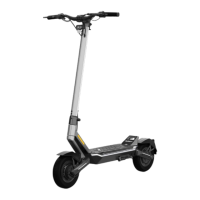

 To Next Page
 General