02
03
Getting Started.
Please read the Product and Safety information
before using the MP02. Please also check punkt.ch
for any updates.
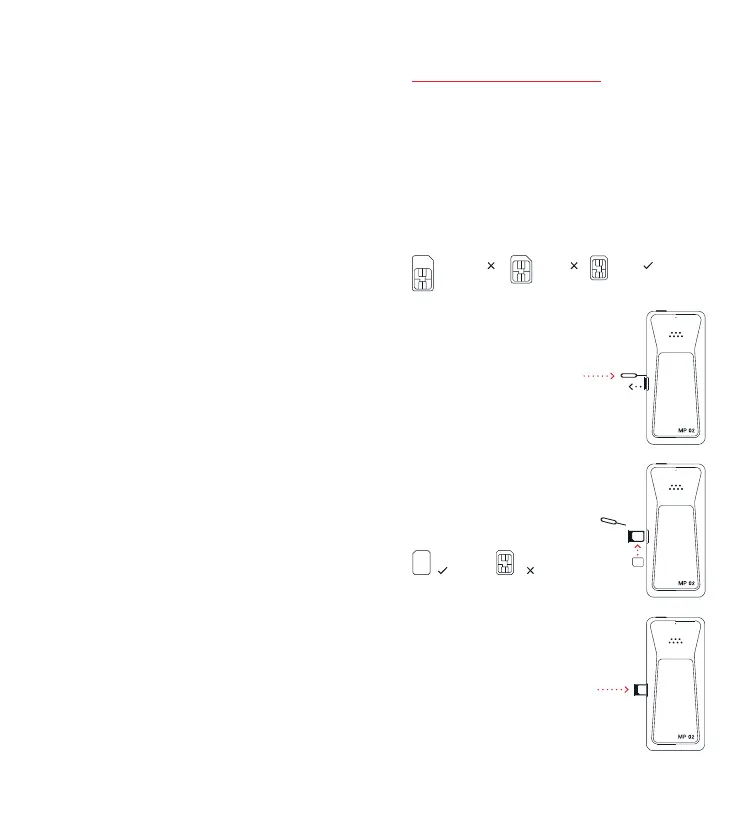
Inserting a SIM.
The MP02 uses a nano-sized SIM:
Standard Micro Nano
1. Remove the SIM tray
from the side of the
phone by inserting the
SIM ejector tool into the
small release hole next to
it and pushing firmly.
2. Taking care not to
touch the metal contact
element, put an active
nano-SIM into the tray,
face-down as shown. The
angled corner ensures
correct orientation.
Face-down Face-up
3. Insert the SIM tray
back into the MP 02 with
the SIM’s contact area
still facing downwards.
English
Punkt. MP 02
Mobile Phone.
— Getting Started.
— Product and Safety Information.
— Warranty.



 To Next Page