CleanSensor
™
Monitor:
PUR pitcher and dispenser filters provide up to 30 gallons of cleaner, refreshing water and
last for up to 2 months. The CleanSensor
™
Monitor is an easy way to see when it is time to
change your filter because it measures the amount of time the filter has been in your
pitcher. Be sure to activate your CleanSensor
™
Monitor
when you first use your pitcher or dispenser, and reset
it every time you replace your filter.
A.
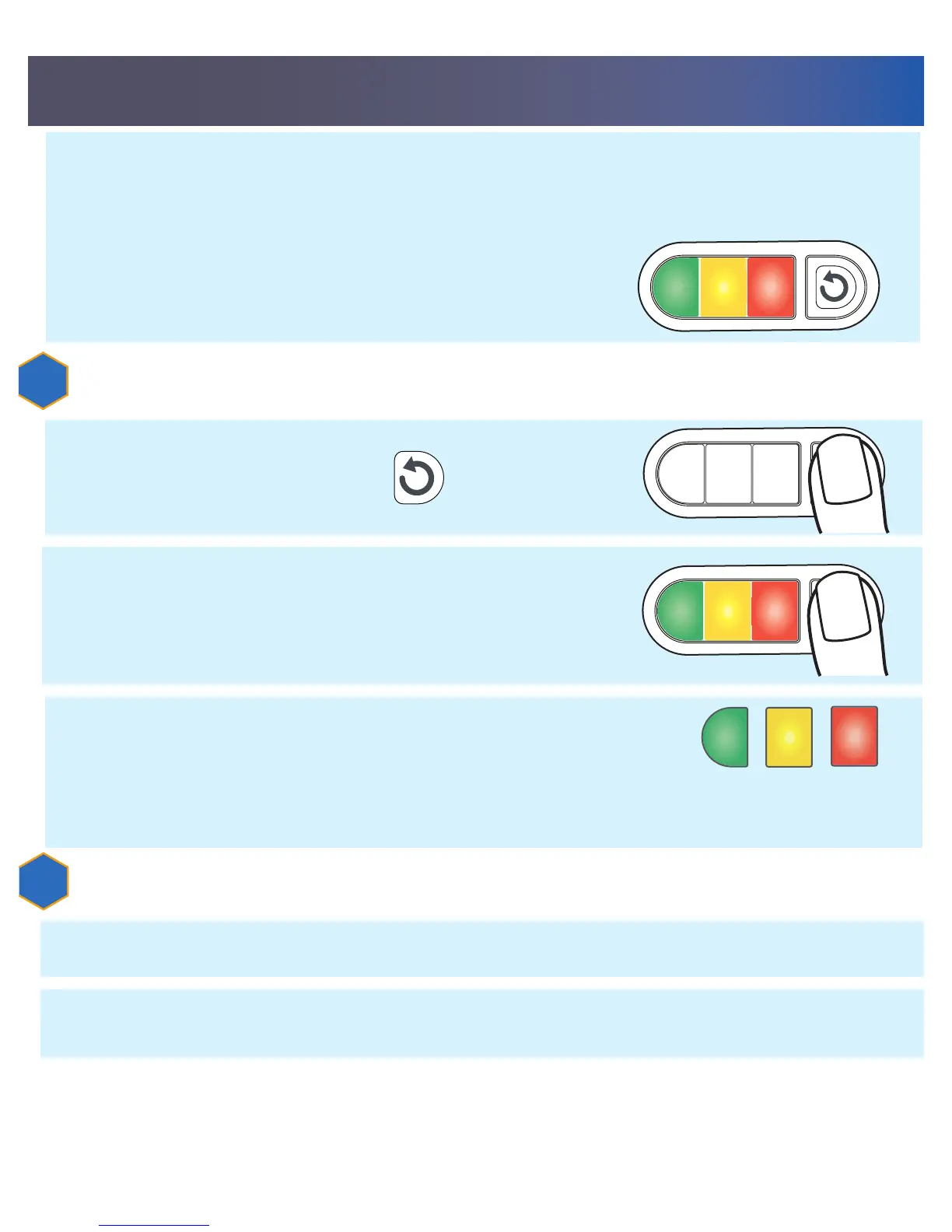
Press and hold reset button for 5 seconds.
A.
Press and hold the reset button for 5 seconds.
1
B.
As you hold the button, red, yellow, and green lights
will turn on together. RELEASE THE RESET BUTTON
WHILE ALL THREE LIGHTS ARE STILL LIT. The green light
will blink 6 times after you release the button.
2
C.
You have successfully activated the CleanSensor
™
Monitor.
Appropriate light will flash 6 times after water is poured
from the pitcher or dispenser. Lights will remain off until
after water is poured from the pitcher or dispenser.
CHANGE
FILTER
NOW
CHANGE
FILTER
SOON
FILTER IS
WORKING
TO ACTIVATE YOUR CLEANSENSOR
™
MONITOR:
TO RESET WHEN FILTER IS CHANGED:
Be sure to reset your CleanSensor
™
Monitor every time you replace your filter. The
CleanSensor
™
Monitor contains a non-replaceable battery. After several years of use,
the battery will eventually stop working but the pitcher or dispenser is still functional.
B.
As you hold the button, red, yellow, and green lights will turn on together.
RELEASE THE RESET BUTTON WHEN THE GREEN LIGHT BLINKS ALONE.


 To Next Page