The Pure Acoustics RDW-75 is an alarm clock with wireless charging capabilities, designed to offer a blend of timekeeping, audio playback, and device charging functions.
Function Description:
The RDW-75 serves as a multi-functional device, primarily an alarm clock with a digital display. It integrates wireless charging for compatible smartphones, allowing users to charge their devices by simply placing them on the designated charging area. Beyond timekeeping and charging, it functions as an audio player, supporting Bluetooth connectivity for streaming music from external devices like smartphones or tablets. It also includes an AUX input for connecting other audio sources via a 3.5mm audio cable. The device features controls for setting alarms, adjusting volume, skipping tracks, and managing display brightness.
Important Technical Specifications:
- Power Supply:
- Input: 100 - 240 V~, 50/60 Hz, 1A
- Output: 12 V===, 3A (max)
- USB Charging (Output): 5 V===, 2.1A (max)
- Wireless Charging:
- Charging output: 5 W
- Charging efficiency: 70 - 75 %
- Transmission distance: ≤ 8 mm
- Bluetooth V4.2 + EDR:
- Frequency range: 2402 - 2480 MHz
- Max. transmission power: -0.58 dBm
- Operating range: Up to 10 m (30 feet)
- Operation Power: 24 W
- Standby Power: 0.9 W
- Speaker Output: 3 W x 2 (max)
- Dimensions (W x H x D) / Weight: 200 x 70 x 120 mm / approx 840 g
Usage Features:
- Power On/Off and Mode Selection: Press and hold the power button to turn the product on or off. Short presses allow selection between Bluetooth, AUX mode, or clock display.
- Clock Setting: The clock can be set by pressing the clock button repeatedly to display the clock, then pressing and holding the play/pause button to activate setting mode. Hour and minute digits flash, and can be adjusted using the previous/next track buttons. The clock settings are confirmed by pressing the play/pause button. Users can switch between 12 and 24-hour formats.
- Alarm Setting: Two alarm timers can be set simultaneously. To activate alarm setting mode, press and hold the alarm button or the '+' button. The alarm icon and digits will flash. Hour and minute can be adjusted using the previous/next track buttons. After setting the time, the volume digits flash, allowing adjustment of the alarm volume using the volume buttons. Confirm all settings by pressing the alarm or '+' button again. The alarm icon indicates activation.
- Alarm Activation/Deactivation: Press the '-' or '+' button to display or cancel the alarm icon, which activates or deactivates the alarm timer, respectively.
- Turning Off Alarm Sound: When the alarm rings, pressing the snooze button will repeat the alarm in 9-minute intervals, up to four times. Pressing any other button (except snooze) will stop the alarm until the next set alarm time.
- Bluetooth Audio Playback: To stream music, select Bluetooth mode. The Bluetooth icon will flash, indicating pairing mode. On a Bluetooth device, search for "Q.1904" and pair. Once paired, the icon will light up steadily. The product automatically re-connects after successful pairing. Audio files can then be played from the Bluetooth device.
- Bluetooth Audio Control: Use the play/pause button to pause or resume playback. The '+' or '-' buttons adjust volume. The previous/next track buttons skip tracks.
- AUX Audio Playback: Repeatedly press the power button to select AUX mode, indicated by "AUX" on the display. Connect an external audio device (e.g., MP3 player) to the 3.5mm AUX jack on the product using an audio cable (not included). Audio will play through the product's speakers.
- AUX Audio Control: Use the play/pause button to pause or resume playback. The '+' or '-' buttons adjust volume.
- Wireless Charging: Ensure the product is turned on. Place a compatible smartphone on the wireless charging surface (marked with the ((+)) icon). Charging starts automatically. The ((+)) icon flashes slowly during charging. If an incompatible smartphone is detected, the ((+)) icon flashes fast. For successful charging, the smartphone should be placed in the correct position.
- USB Charging: Ensure the product is turned on. Connect a USB cable (not included) from the USB port on the product to a smartphone to charge the device.
Maintenance Features:
- Cleaning: Always disconnect the product from the power supply before cleaning. Use a soft dusting cloth. Avoid harsh cleaning products and acidic substances.
- Storage: Store the product away from dust and freezing temperatures.
- Environmental Protection: The product should not be disposed of with household waste. It should be recycled responsibly through designated return and collection systems or by contacting the retailer.
- Safety Precautions:
- Ensure local electrical voltage matches the product's specifications.
- Use in a moderate climate.
- Only use manufacturer-specified attachments/accessories.
- Ensure adequate ventilation around the product.
- Avoid exposure to dripping or splashing liquids; do not place liquid containers near the product.
- If the supply cord is damaged, it must be replaced by qualified persons.
- For indoor use only.
- Keep out of reach of children under 8 years old. Children aged 8 and above, and individuals with reduced capabilities, can use the product under supervision.
- Protect from rain, water, excessive heat, and extreme temperatures.
- Do not place near naked flames or other heat sources, including direct sunlight.
- Disconnect from the power outlet before lightning storms.
- Avoid strong magnetic fields to prevent dysfunction.
- Keep implanted medical devices (e.g., pacemakers) at least 20 cm away from the wireless charging area to avoid interference.
- Do not place other batteries or metals on the wireless charging area.
- Do not place magnets or magnetically sensitive devices (e.g., credit cards) on/near the wireless charging area.
- If the product gets wet, dry it completely before further use.

 Need help?
 General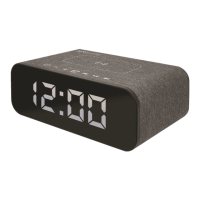

 To Next Page