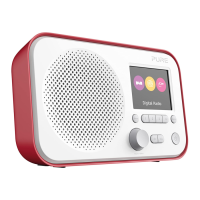
The Pure Elan One is a versatile DAB+ and UKW (FM) radio with Bluetooth® connectivity, designed for ease of use and a rich listening experience. This compact device allows users to enjoy a wide range of digital and analog radio stations, stream music wirelessly from smart devices, and benefit from convenient alarm and sleep functions.
Function Description
The core function of the Elan One is to provide access to radio broadcasts and Bluetooth audio. It supports both Digital Audio Broadcasting (DAB+) for high-quality digital radio and Ultra Short Wave (UKW), also known as FM, for traditional analog radio. The integrated Bluetooth® functionality enables wireless audio streaming, transforming the radio into a speaker for your smartphone, tablet, or other Bluetooth-enabled devices.
The device features a clear display that shows various menus, dialogues, and information screens. These include a standby screen with clock and date, a splash screen indicating the current mode, a "Now playing" screen displaying details about the current audio source, dialogue screens for changing settings, and information screens for specific messages.
Usage Features
Power and Basic Operation:
To turn the Elan One on, simply press the Select/Volume/Mute/Snooze knob. To turn it off, long-press the same knob. The radio requires a USB power source, connecting the supplied USB cable between the Elan One and a USB power adapter (not included). For optimal radio reception, the telescopic antenna should be extended.
Navigation and Control:
The Elan One is controlled primarily through a combination of buttons and a multi-functional knob.
- Select/Volume/Mute/Snooze Knob: This central knob is crucial for various operations.
- Volume: Rotate to adjust the volume up or down during playback.
- Mute: Press the knob to mute the music when playing.
- Select: Rotate to scroll through menus or station lists, and press to select the chosen option.
- Power: Press to turn on, long-press to turn off.
- Snooze: Press the knob to snooze an alarm when it's sounding.
- Presets (1, 2, 3+):
- Long press button 1 or 2 to save a favorite station.
- Short press button 1 or 2 to recall a preset.
- Long press button 3+ to save up to 20 stations to the preset list.
- Press 3+ to recall stations from the preset list.
- Back Button: Returns to the previous screen.
- Menu Button: Accesses the menu for the current source. Press again to exit the menu.
- Source Button: Switches between different audio sources: DAB, FM, and Bluetooth.
- Skip Back (KK) Button:
- Bluetooth: Selects the previous track.
- FM: Adjusts frequency in increments. Long press to scan for the previous station.
- Play/Pause (▷II) Button: Plays and pauses when playing from Bluetooth.
- Skip Forward / Stations (▷▷) Button:
- Bluetooth: Selects the next track.
- DAB: Accesses the station list.
- FM: Adjusts frequency in increments. Long press to scan for the next station.
- Info Button: Displays more information about the station or track playing. Press repeatedly to cycle through various information screens.
Digital Radio (DAB+) Features:
- Scanning for Stations: The radio automatically performs a full scan the first time it's used or if the station list is empty. Users can manually initiate a full scan via Menu > Full scan to update the station list, especially if new stations become available or if the initial reception was poor.
- Manual Tune: Allows users to manually tune to a specific channel/frequency, which can be useful for antenna adjustment and updating the station list for that channel. The display shows live signal strength.
- Now Playing Information: While a DAB station is playing, the screen shows its name and DLS (Dynamic Label Segment) information, such as program name, track title, and contact details. It also displays a thumbnail of the currently available slideshow image, cycling through different slideshow displays with a long press of the 'Info' button.
- Dynamic Range Compression (DRC): This feature reduces the difference between the loudest and quietest audio, making quiet sounds comparatively louder and loud sounds quieter. Options include DRC high, low, or off, accessible via Menu > DRC.
FM Radio (UKW) Features:
- Selecting Stations: The Elan One starts at the lowest frequency in the FM band or recalls the last used frequency/station.
- Scanning: Long press the skip forward or skip back buttons to scan through FM frequencies. Short presses adjust the frequency in 50 kHz steps.
- Now Playing Information: Displays the frequency or, if RDS information is available, the station name and RadioText.
- Scan Settings: Users can choose to stop scans only at stations with good signal strength or at all stations (which may include poor quality audio).
- Audio Settings: By default, stereo stations are reproduced in stereo. For weak stations, audio quality can be improved by selecting "Forced mono" via Menu > Audio setting.
Bluetooth Features:
- BT Pairing: To connect a Bluetooth-capable device, users select Bluetooth mode via the Source button and then use their smart device to pair and connect with the Elan One.
- Display Information: The screen indicates the connection state as either "Bluetooth Disconnected" or "Bluetooth Connected."
Alarms, Snooze, and Sleep:
- Alarms: The Elan One features two wake-up alarms. Alarms function when the unit is On or in Standby mode, indicated by an icon on the display.
- Setting Alarms: Accessed via System Settings > Alarm. Users can set parameters like On/Off, frequency (Daily, Once, Weekends, Weekdays), wake-up time, source (Buzzer, Digital Radio, FM – with preset selection), duration (15-120 minutes), and volume. The alarm volume gradually increases.
- Cancelling Alarms: A long press of the Select button cancels a sounding alarm and switches the radio to standby.
- Snooze: A short press of the Select button temporarily silences a sounding alarm. Snooze periods (5, 10, 15, 30 minutes) can be cycled through by repeatedly pressing the Select button. The radio returns to standby with a snooze countdown, re-triggering the alarm when the countdown reaches zero.
- Sleep Timer: Allows users to set a timer for the radio to turn off after a set period (15, 30, 45, 60, 90 minutes). Once set, a crescent moon icon and remaining time are displayed, and the radio switches to standby when the timer expires.
System Settings:
The System Settings menu, accessed via Menu > System Settings, provides extensive customization options:
- Sleep: Configures the sleep timer.
- Alarm: Sets and manages alarms.
- Equaliser: Allows users to adjust audio settings. Pre-set options include Normal, Classic, Jazz, Pop, Rock, Speech. A "My EQ" option enables custom treble, bass, and loudness settings.
- Time/Date:
- Auto Update: Updates time and date from DAB or FM broadcasts. Users can choose to update from "Any," "Digital radio," "FM," or "No Update."
- Manual Set Time/Date: Allows manual setting of time and date, with options for 12/24-hour format and DD-MM-YYYY or MM-DD-YYYY date format.
- Backlight: Adjusts backlight brightness (High, Medium, Low) and timeout duration (10-180 seconds) before dimming.
- Language: Changes the display language (default is English).
- Factory Reset: Clears all user-defined settings, including time/date, preferences, and DAB station list, restoring default values. A confirmation is required.
- Software Update: For future software updates.
- Software Version: Displays the current software version.
Maintenance Features
The manual does not detail specific user-performable maintenance tasks beyond ensuring a stable power connection and extending the antenna for optimal reception. The "Factory Reset" function can be considered a maintenance feature for troubleshooting or restoring the device to its initial state if settings become problematic. Regular software updates, if available, would also fall under maintenance to ensure optimal performance and new features. The device is designed for simple operation, implying minimal user maintenance is required.

 Need help?
 General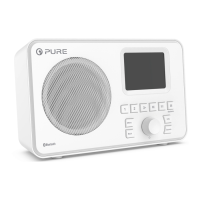

 To Next Page