EasyManua.ls Logo

PURE OASIS - User Manual

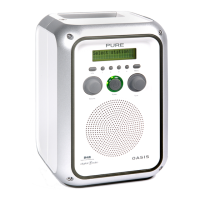
PURE OASIS
4 pages
Print Icon
To Next Page IconTo Next Page
Loading...
Info 1 2 3 4 Menu
Power
Tu
neVolume
OASI S
ChargePAK
12M87
PURE Digital
Imagination Technologies Ltd.
Imagination House
Home Park Estate
Kings Langley
Herts
WD4 8LZ, UK
+44 (0) 1923 270188
+44 (0) 1923 277477 support
+44 (0) 1923 277488 sales
support@pure.com
sales@pure.com
www
.pure.com
USB
UPGRADEABLE
USB
UPGRADEABLE
Question and Answer IconNeed help?

Do you have a question about the PURE OASIS and is the answer not in the manual?

Summary

Getting Started

Attach Aerial

Connect the aerial to the top panel socket for reception.

Connect Power

Connect the power adapter to the side panel and mains for charging.

Switch On

Press the power button to turn the radio on and initiate autotune.

Change Station

Use the Tune knob to select and tune to available stations.

Radio Controls and Features

Preset Stations

Store and recall favorite stations using numbered preset buttons.

Station Order Options

Customize station list order: Alphanumeric, Fav, Active, Multiplex, Trim.

LCD Backlight Control

Adjust screen backlight settings (On, Off, Timed off).

Autotune Function

Scan frequencies for digital stations and update the station list.

Manual Tune for Reception

Fine-tune reception for specific multiplexes using signal display.

DRC Value Adjustment

Adjust Dynamic Range Control for audio clarity.

Software Upgrade

Upgrade radio software via PC connected to the USB socket.

Resetting the Radio

Reset all settings, stations, and presets to factory defaults.

Connectors and Ports

Headphone Socket

Connect stereo headphones to the 3.5mm socket, muting the speaker.

Auxiliary Input

Connect an external audio source via the 3.5mm Aux In socket.

USB Port

Connect to a PC for software upgrades using a Type B USB cable.

Power Input

Connect the 9V DC adapter or car charger for power and charging.

Summary

Getting Started

Attach Aerial

Connect the aerial to the top panel socket for reception.

Connect Power

Connect the power adapter to the side panel and mains for charging.

Switch On

Press the power button to turn the radio on and initiate autotune.

Change Station

Use the Tune knob to select and tune to available stations.

Radio Controls and Features

Preset Stations

Store and recall favorite stations using numbered preset buttons.

Station Order Options

Customize station list order: Alphanumeric, Fav, Active, Multiplex, Trim.

LCD Backlight Control

Adjust screen backlight settings (On, Off, Timed off).

Autotune Function

Scan frequencies for digital stations and update the station list.

Manual Tune for Reception

Fine-tune reception for specific multiplexes using signal display.

DRC Value Adjustment

Adjust Dynamic Range Control for audio clarity.

Software Upgrade

Upgrade radio software via PC connected to the USB socket.

Resetting the Radio

Reset all settings, stations, and presets to factory defaults.

Connectors and Ports

Headphone Socket

Connect stereo headphones to the 3.5mm socket, muting the speaker.

Auxiliary Input

Connect an external audio source via the 3.5mm Aux In socket.

USB Port

Connect to a PC for software upgrades using a Type B USB cable.

Power Input

Connect the 9V DC adapter or car charger for power and charging.

PURE OASIS Specifications

General IconGeneral
Power SourceMains / Battery
DisplayLCD
DAB+Yes
FMYes
AlarmYes
Headphone Socket3.5mm

Related product manuals