ASIO drivers
The X2 sound card is compatible with ASIO drivers. To use the X2 with ASIO, a
generic ASIO driver can be used. There are some freeware ASIO drivers on internet.
We suggest ASIO4ALL by Michael Tippach, that can be downloaded from here:
http://www.asio4all.com/
Another free generic ASIO driver is ASIO2KS, by Tobias Erichsen.
It can be downloaded from http://www.asio2ks.de/
Please refer to the respective webpages for instructions about the use of these
drivers.
ASIO is a trademark of Steinberg Media Technologies GmbH
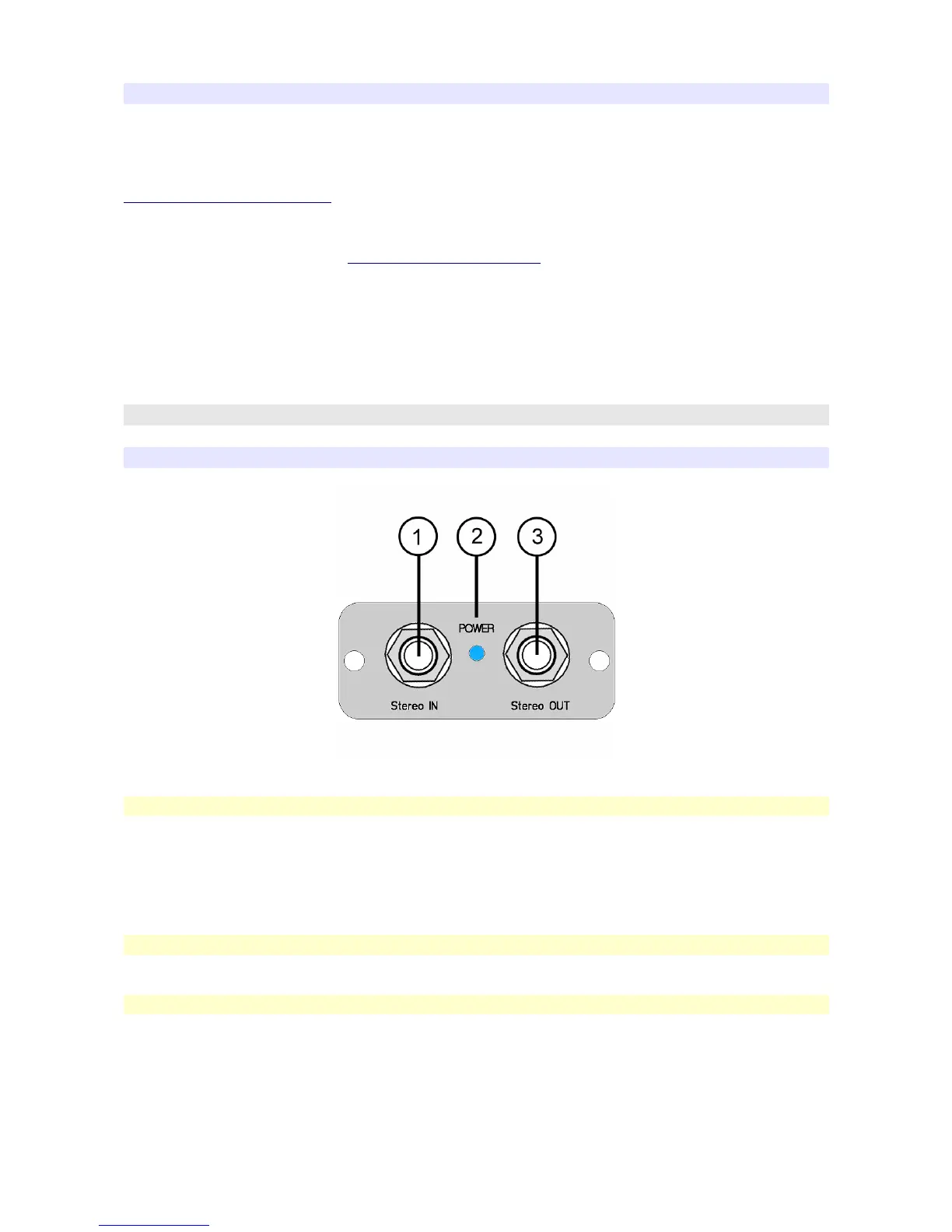
Controls and Indicators
Front Panel
[1] Stereo IN
- Stereo input of the soundcard
- The gain of the input be adjusted by means of the Windows mixer (see below)
- The phantom power supply (3.6 V) is always enabled. The voltage is obtained from
an 8.2KOhm resistor connected to a very clean source. This voltage is suitable for
most microphone electret capsules such as the Panasonic WM61 series.
[2] Power supply led
- It lights when the device is connected to the computer usb port.
[3] Stereo OUT
- Stereo output of the Soundcard.
- It can drive an Headphone.
X2 Owner's Manual - Rev. 1.4 - page 10


 To Next Page