Need help?
Do you have a question about the PURElight MUVY WashQ and is the answer not in the manual?
Warns about internal high voltages and prohibits opening the device housing for safety.
Prohibits power cord modifications; damaged cords must be replaced with original parts.
Advises proper packaging disposal and keeping children away from small device parts.
Direct viewing of the light source is prohibited to prevent eye injuries.
Stroboscopic effects can trigger epilepsy; sensitive individuals should be warned.
Max ambient temp is 40°C; ensure ventilation and 1m distance from heat sources.
Device is IP20 rated; avoid rain, moisture, dust, vibrations, and direct sunlight.
Verify voltage compatibility; use residual current circuit breaker; disconnect during storms/non-use.
Use DMX cables, not microphone cables; avoid connecting DMX to audio devices.
Allow the unit to adapt to ambient temperature before operation to prevent condensation.
New products may emit temporary odors, which is normal and dissipates quickly.
Explains symbols for electrical hazards, important instructions, indoor use, minimum distance, and manual reading.
Inspect unit for damage before use; protect with packaging during storage.
Unit can be mounted upright or suspended; use approved carrier with a safety cable.
Installation requires experienced personnel and adherence to mechanical/electrical safety regulations.
This device is not compatible with dimmers and cannot be used with one.
Outlines guarantee conditions from Music Store professional GmbH, viewable online.
Provides phone, fax, and email for Music Store professional GmbH for inquiries.
Lists items included: MUVY WashQ unit, Power Cord, and User Manual.
For use as an electronic LED lighting effect; deviations from intended use are prohibited.
All connections must be made before switching on; use high-quality, short cables.
Details the pin assignments for DMX connectors (Male/Female) and termination resistance.
Connect DMX input to controller, use 110 Ohm resistor, and address device according to DMX configuration.
Details functions for PAN, TILT, Dimmer, Strobe, Speed, and Reset in the 9-channel DMX mode.
Details functions for PAN, TILT, Dimmer, Strobe, Macro Colours, Speed, Modes, and Reset in the 14-channel DMX mode.
Describes device operation in fixed schemes (Auto) or via built-in microphone (Sound).
Explains how to connect multiple devices via DMX using Master/Slave configuration.
Connect the device to mains and wait for it to be ready for operation.
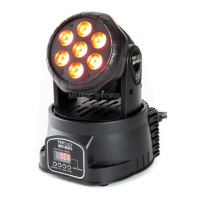
Identifies key parts like Projector Head, LED Lens, Fan, Control Panel, and ports.
Details the components of the control panel including display and buttons.
Describes DMX In/Output, Power Outlet, and Fuse location.
Explains how to use the Mode, Up, Down, and Enter buttons for menu navigation.
Provides a detailed breakdown of the menu hierarchy and options.
Maps menu codes to settings for DMX address, operating modes, and PAN/TILT movement.
Details menu options for selecting DMX channels, modes, and reset functions.
Lists key specs: Power Supply, Input, LEDs, Colour Mixing, Beam Angle, Movement, Dimmer, Strobe, Modes, Channels, Connections, Dimensions, Weight.
Provides solutions for common problems like no function or no DMX/remote reaction.
Advises on regular cleaning using dry microfiber cloth and compressed air for ventilation.
Recommends proper recycling of packaging materials according to instructions.
Advises against discarding batteries in household waste; use official collection points.
States the device is subject to WEEE Directive; dispose via approved company or local office.
 General
| Pan | 540° |
|---|---|
| Tilt | 270° |
| IP Rating | IP20 |
| Control | DMX512 |
| Input Voltage | 100-240V AC, 50/60 Hz |

 To Next Page