
 To Next Page
R
Rebecca BakerAug 3, 2025
What to do if my PURElight DJ Equipment has no function?
- JJose TorresAug 3, 2025
If your PURElight DJ Equipment isn't functioning, verify the main connection and inspect the fuse.

What to do if my PURElight DJ Equipment has no function?
If your PURElight DJ Equipment isn't functioning, verify the main connection and inspect the fuse.
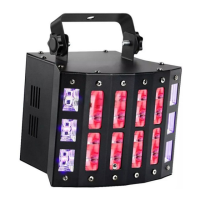
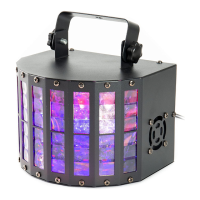
What to do if my PURElight FX Mini Derby 2 DJ Equipment shows no reaction in DMX mode?
If your PURElight DJ Equipment isn't reacting in DMX mode, check the cable connections. Also, check your DMX address setting. If available, try using an alternative DMX controller.
Warnings about high internal voltages and not removing the housing.
Prohibits modifications to the power cord if damaged.
Risk of suffocation from packaging material and unattended use.
Avoid direct viewing into the light source.
Stroboscopic effects may trigger seizures in sensitive individuals.
Max ambient temp 40°C, requires ventilation, distance from heat sources.
Device for indoor use (IP20); avoid moisture, vibrations, dust, sunlight.
Check device voltage matches mains, use a circuit breaker.
Use correct DMX cables, avoid microphone cables.
Allow unit to acclimatize to ambient temperature before use.
New products may emit temporary odors.
Explains warning symbols for voltage, attention, indoor use, and distance.
Inspect unit for damage; use original packaging for protection.
Attach securely to a solid carrier, use a safety cable.
Installation by experienced personnel following safety regulations.
Explicitly states the device cannot be used with a dimmer.
Refers to general terms and conditions of Music Store GmbH.
Provides contact details for questions or suggestions.
Electronic LED lighting effect, only for specified purpose.
Device must be operated by trained and competent users.
Connect all cables before powering on; use short, high-quality cables.
Explains the pin configuration for DMX connectors.
Connecting the device to DMX controller, using DMX cables.
Functions and values for each channel in 8-channel DMX mode.
Device runs fixed programs or syncs to music via microphone.
Control multiple units simultaneously via a master device.
Operating the device using the included remote control.
Lists remote control modes (A1-A7, S1, S2) and their functions.
Connect to mains and wait for the device to be ready.
Identifies numbered parts of the device and their designations.
How to navigate the menu using buttons like Mode, Up, Down, Enter.
Explains display options, values, and corresponding functions.
Lists model, power, LED, colours, beam angle, DMX, modes, connections, dimensions, weight.
Solutions for no function, DMX, or remote control problems.
How to clean the device safely and effectively.
Proper recycling of packaging materials.
Correct disposal of batteries.
Disposal according to WEEE directive and local regulations.
 General
| Voltage | 100-240V |
|---|---|
| Light Source | LED |
| Operating Modes | DMX, Auto, Sound Active |
| Power Supply | 100-240V, 50/60Hz |
| Control | DMX, Auto, Sound Active, Master/Slave |
| Type | LED effect light |