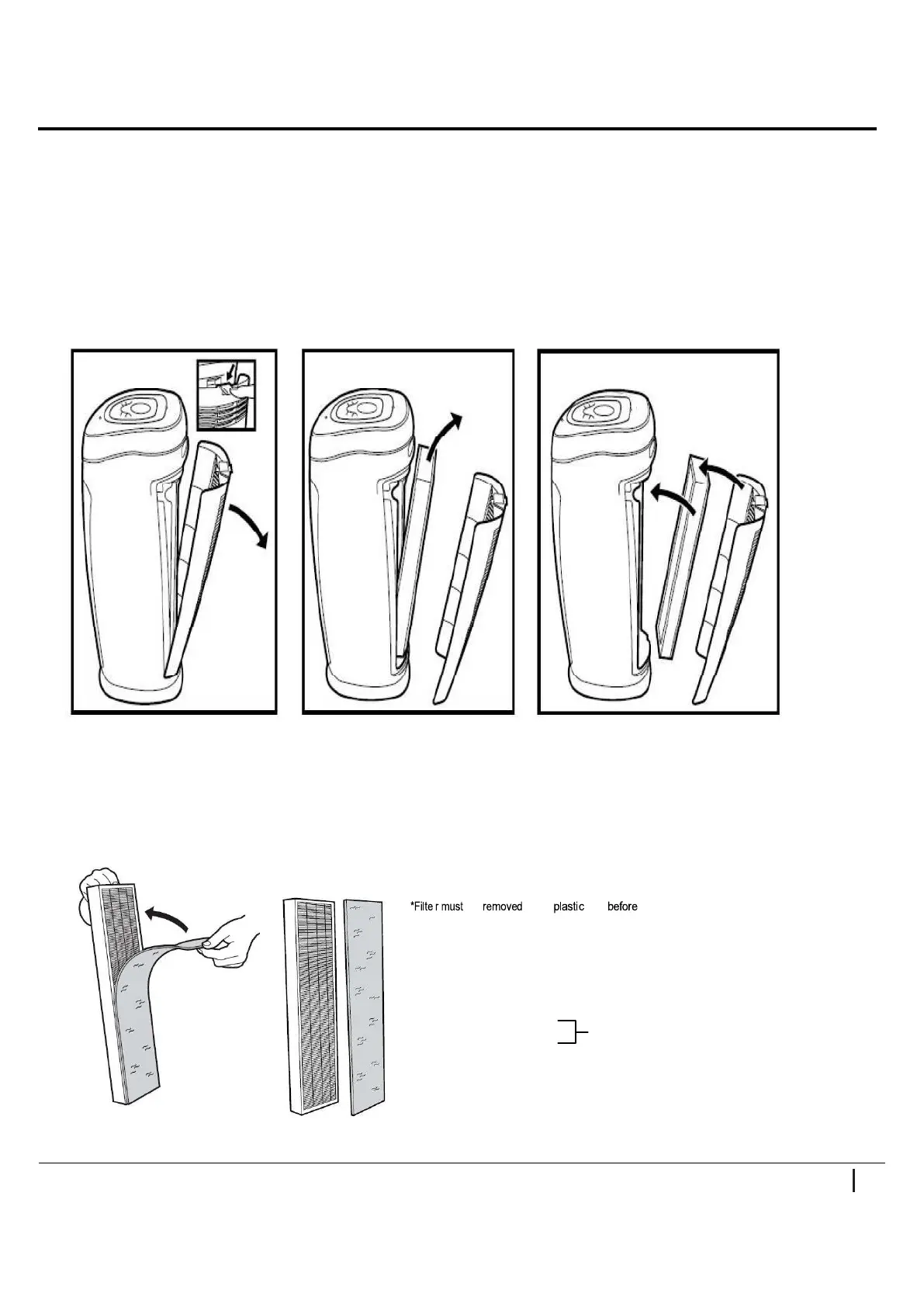
REMOVING AND INSTALLING COMBINATION FILTER
1. Turn off and unplug the unit.
2. Press the Lock & Release button and remove the rear cover from the unit.
3. Remove the used HEPA filter and dispose of it in the garbage. Replace with new HEPA
filter then insert it into the air purifier. Please consult the arrow on the HEPA filter to install.
4. Install the rear cover back to unit and ensure it is flush with the surrounding surface and
securely latch in place.
NOTE:
a. Do NOT try to wash and re-use the HEPA filter. Please contact the seller to purchase extra new HEPA
filter.
b. There is a pre-filter and a charcoal filter attached on the HEPA filter together.
be from bag use.
Note: Pre Charcoal Filter is affixed to True Hepa Filter with velcro
Filter Package includes:
1 True HEPA Filter
1 Pre -/Charcoal Filter
Create ONE COMBINATION FILTER
WWW.PUREMATE.CO.UK
English 6


 To Next Page