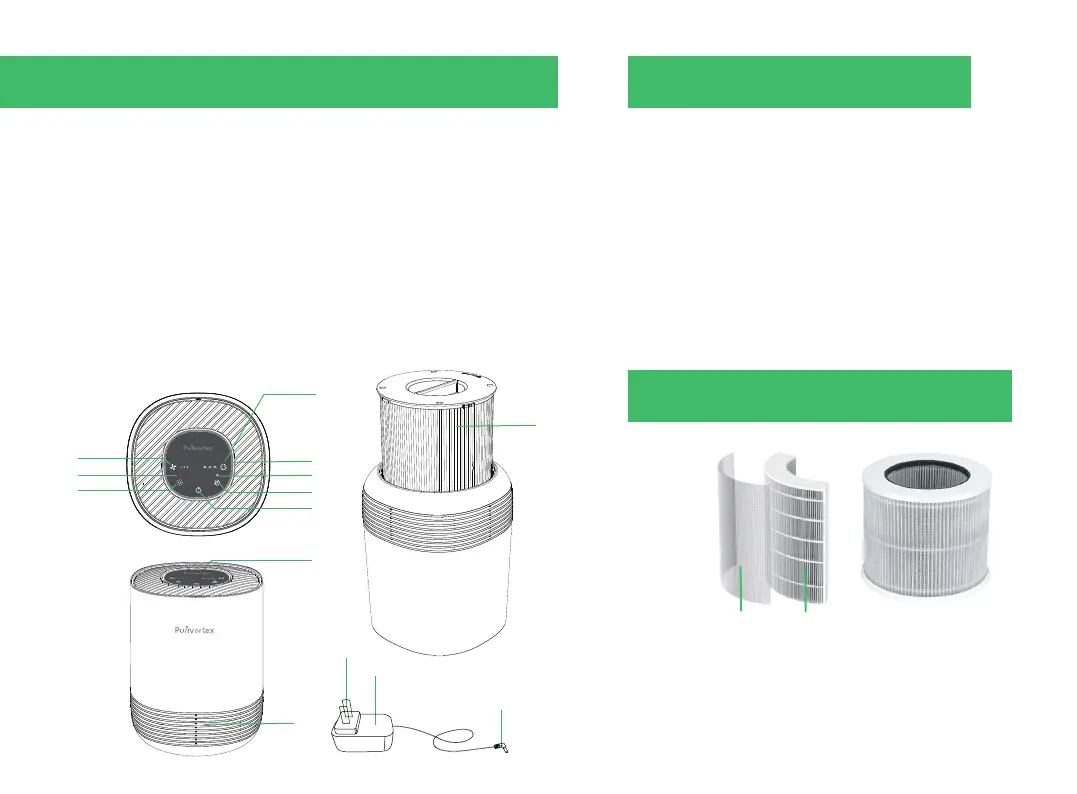
control panel
1.Timer button
2.Night light circle
3.Sleep mode indicator
4.Sleep mode button
5.On/O button
6.Fan button
7.Filter reset indicator light
8.Night light button
9.Air outlet
10.Wind inlet
11. HEAP lter
12.DC power jack
13.DC Power socket
14.AC power jack
IImprove your indoor air quality with our new Air Cleaning
System. Multiple levels of cleaning include a combination
of Pre-lter that traps big particles.
1. On/O Button
•Turns the air purier on/o.
2.Fan Speed Button
•Cycles through fan speeds:
I (low), II (medium), and III (high).
3.Timer Button
•Cycles through timer options .
4.The air night light indicates
•When the purier is on, the night light will automatically
light up.
HEPA Filter
3.GETTING TO KNOW YOUR AIR PURIFIER
Nylon Filter HEPA Filter
5. Filter core decomposition graph
4.CONTROLS
04
1
11
14
12
13
2
3
4
5
9
10
6
7
8


 To Next Page