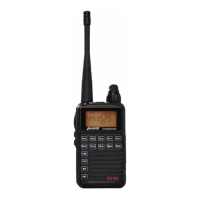
Programming
1 Turnontheradio.Ifyouseeachannelnamelike‘CH‐001’,you’rein
channelmode.Turntheradiooff,holddownENTER,andturnitbackon.
Youshouldnowseeafrequencydisplay.
2 Ifthereisa2‐digitnumberdisplayedunderthebatteryindicator,you’re
inmemorymode.PresstheVFO/MR
buttontoselectVFOmode.
3 EnterReceivefrequencyfromkeyboard(allsixnumbers–nodecimal
points)orbyturningselectorknob.
4 Forrepeateroperation,enteroffset(positive,negative,ornone)by
pressingMENU
andthen*LOCK.Selectoffset(‐,+,or0)byturning
selectorknob.PressENTERtosaveyourselection.PressVFO/MRtwice
togetbacktothefrequencydisplay.
5 Thedefaultrepeatersplitsettingmaybewrong,sobesuretocheckit–
pressMENUandusetheselectorknobtoselectDIFFR?#14andpress
ENTER.Usetheselectorknoborkeyboardtoselecttherepeatersplit.For
the2‐meterbandinNorthAmerica,thisshouldbe0.600MHz.
6 EnterreceivingCTCSStonebypressingMENUandthenENTER.Turn
theselectorknobuntilR‐CDC?#15isdisplayed.Turntheselectorknob
untilyouseethefrequencyyouwantandpressENTER.SelectOFFfor
normalrepeateroperation.
7 EntertransmitCTCSStonebypressingMENUandthenENTER.Turnthe
selectorknobuntilT‐CDC?#16isdisplayed.Turntheselectorknobuntil
youseethefrequencythatyouwantandpressENTER
.
8 ForpowerselectionpressMENUandthen4POWER.SelectHforhighor
LforlowpowerandpressENTER
tosaveyourselection.
9 TosavefrequencytomemorypressMENU
andthenVFO/MR.Achannel
numberwillflashontherightsideofthedisplay.Turntheselectorknob
toselectthechanneltosaveto,orenterthechannelnumberfromthe
keyboardandpressVFO/MR
tosave.


 To Next Page