EasyManua.ls Logo

PVA FCS300 Series - User Manual

PVA FCS300 Series
34 pages
Print Icon
To Next Page IconTo Next Page
Loading...
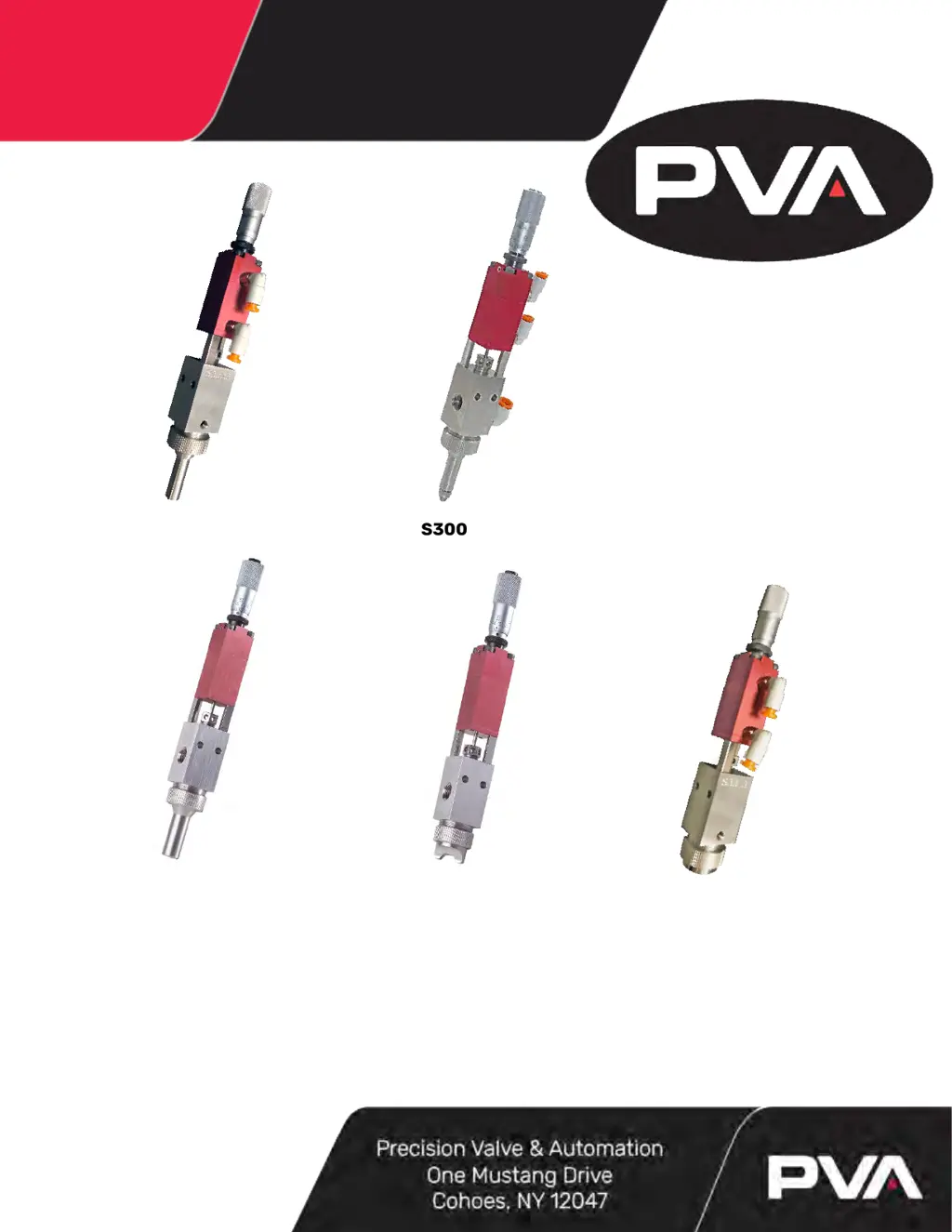
FCS300-ES-ND
FCS300-ES-UF
FCS300-ES
FCS300-F FCS300-R
WHERE
PRECISION
DRIVES
PRODUCTIO
Front Closing Spray Valve
FCS300 Series Operation Manual
Rev D

Table of Contents

Questions and Answers

  • K
    karen58Aug 14, 2025
    What to do if the PVA FCS300 valve does not spray anything?
    • R
      Rebecca CowanAug 14, 2025
      If your PVA Control Unit's valve isn't spraying anything, first, check if the fluid pressure is too low and increase it if necessary. Also, the material might have cured in the fluid section; if so, disassemble and clean the valve. Finally, ensure the micrometer adjustment bolt isn't set too close to zero by turning it counterclockwise.
  • D
    Danielle HernandezAug 18, 2025
    Why are there air bubbles in the fluid of my PVA FCS300 Control Unit?
    • Q
      quinnpatrickAug 18, 2025
      If you notice air bubbles in the fluid of your PVA Control Unit, it might be due to a few reasons. First, the valve may not be properly purged; try flipping it upside down and cycling it until the air bubbles are removed. Second, there might be an issue with the fluid delivery system, which would need diagnosing and repair. Lastly, the atomizing air pressure might be set too high, so try reducing it.
  • R
    Randy SmithAug 21, 2025
    How to fix a PVA FCS300 Control Unit valve that does not cycle?
    • E
      ekiddAug 21, 2025
      If the PVA Control Unit valve does not cycle, there could be several reasons. The air pressure to the air section might be too low; increase it to 60-100 psi. The packing nut might be too tight; loosen it until the valve just begins to cycle, then retighten. The micrometer adjustment might be bottomed out; back it out by turning it counterclockwise. The material might be cured in the valve; disassemble and clean the valve. Finally, the valve might have been assembled without lubricating the O-ring seals; disassemble the valve, lubricate the seals, and re-assemble.
  • T
    Timothy KnightAug 25, 2025
    Why is material leaking from the valve tip of my PVA FCS300 Control Unit?
    • N
      Nathan MartinezAug 25, 2025
      If material is leaking from the valve tip of your PVA Control Unit, it could be because the packing nut is too tight; try loosening it. Also, the needle and/or seat might be worn, requiring replacement. Lastly, the seat might not be tightened enough against the fluid section; use a seat wrench to tighten the seat onto the fluid section (FCS300).
  • B
    Brian HurleyAug 27, 2025
    How to troubleshoot a poor spray pattern in my PVA FCS300 Control Unit?
    • R
      Robert DoyleAug 28, 2025
      If you're experiencing a poor spray pattern with your PVA Control Unit, it may be due to dried material at the tip of the needle and seat; remove the air cap and clean the tip. Also, check for dried material in the air cap and clean it if necessary. Incorrect atomizing air pressure can also cause this issue, so adjust it accordingly. Lastly, damaged needle and or seat can result in a poor spray pattern, so replace parts as necessary.
  • D
    Dustin BanksAug 31, 2025
    Why is my PVA FCS300 Control Unit valve leaking from the mid-section?
    • R
      Roy SmithAug 31, 2025
      If your PVA Control Unit valve is leaking from the mid-section, it could be because the packing nut is loose; tighten it until it's snug. Alternatively, the packing might be worn, in which case you should replace it.
  • J
    josephrobbinsSep 3, 2025
    Why am I seeing cob webbing when using my PVA Control Unit?
    • T
      Tyler MooreSep 3, 2025
      If you are seeing cob webbing during spraying with your PVA Control Unit, it could be due to several reasons. The atomizing air pressure might be too high; try reducing it. The valve head might be too close to the substrate; move the valve head away from the substrate. Finally, there might not be enough solvent mix in the coating; re-examine the solvent mix ratio.
  • A
    Ana VargasSep 7, 2025
    How to decrease the spray rate on a PVA FCS300 Control Unit?
    • A
      Anthony WileySep 7, 2025
      If the spray rate of your PVA Control Unit is too fast, it's likely that the micrometer adjustment is set out too far. To correct this, turn the micrometer adjustment bolt clockwise toward the zero mark.
  • J
    Jessica BrownSep 10, 2025
    How to increase the spray rate on a PVA FCS300?
    • K
      Kenneth IngramSep 10, 2025
      If the spray rate of your PVA Control Unit is too slow, the micrometer adjustment bolt might be set too close to the zero mark. Turn the micrometer adjustment bolt counterclockwise to resolve this.

Summary

Introduction

1.1 PVA Contact Information

Provides contact details for PVA's main office and technical support.

1.2 Document History

Details the revisions made to the operation manual over time.

1.3 System Description

Lists and describes the different Precision Valve & Automation FCS300 Series valves.

1.4 Theory of Operation

Explains the working principles of the FCS300 Series spray valve, including air and fluid sections.

Safety

2. Safety Precautions

Outlines essential safety measures, including eye protection and ventilation.

Setup and Maintenance

3.1 Tool Kit

Lists the standard tool kits available for FCS300 series dispensing valves.

3.2 Part Reference Numbers

Explains how to reference part numbers using drawings and a key.

3.3 Operation

Provides step-by-step instructions for operating the FCS300 Series spray valve.

3.4 Periodic Maintenance

Details routine maintenance tasks, including lubrication schedules.

3.5 Routine Cleaning and Disassembly

Guides users through the process of cleaning and disassembling the valve.

3.6 Assembly Instructions

Provides detailed steps for reassembling the FCS300 Series spray valve.

3.7 Spare Parts

Lists available spare parts kits for FCS300 series valves.

3.8 Micrometer Adjustment Breakdown

Provides a visual reference for the micrometer adjustment components.

3.10 Bill of Materials

Lists all parts for specific FCS300 models, including part numbers and quantities.

Troubleshooting

4. Troubleshooting Guide

Lists common problems with possible causes and corrective actions for the FCS300 Series.

Warranty Information

5. PVA Warranty Policy

Details PVA's warranty coverage, terms, and return authorization process.

PVA FCS300 Series Specifications

General IconGeneral
TypeControl Unit
SeriesFCS300
Input Voltage24 VDC
Output Voltage24 VDC
Storage Temperature-20°C to +70°C
Protection ClassIP20