EasyManua.ls Logo

Pyle Pro PD1000A - Rear Panel Connectivity; Rear Panel Connections and Ports

Pyle Pro PD1000A
28 pages
Print Icon
To Next Page IconTo Next Page
To Previous Page IconTo Previous Page
Loading...
1
REAR PANEL
FUNCTION
1Q.111.£
II
I
O[FM<:5ANTENNA<:5AM~io
I 0 0
.A'.
~
<OOOO©
o 0 0 0 0 0
®OO
OO®
FAN
SPEAKER OUTPUT
~
~
.4-
1,
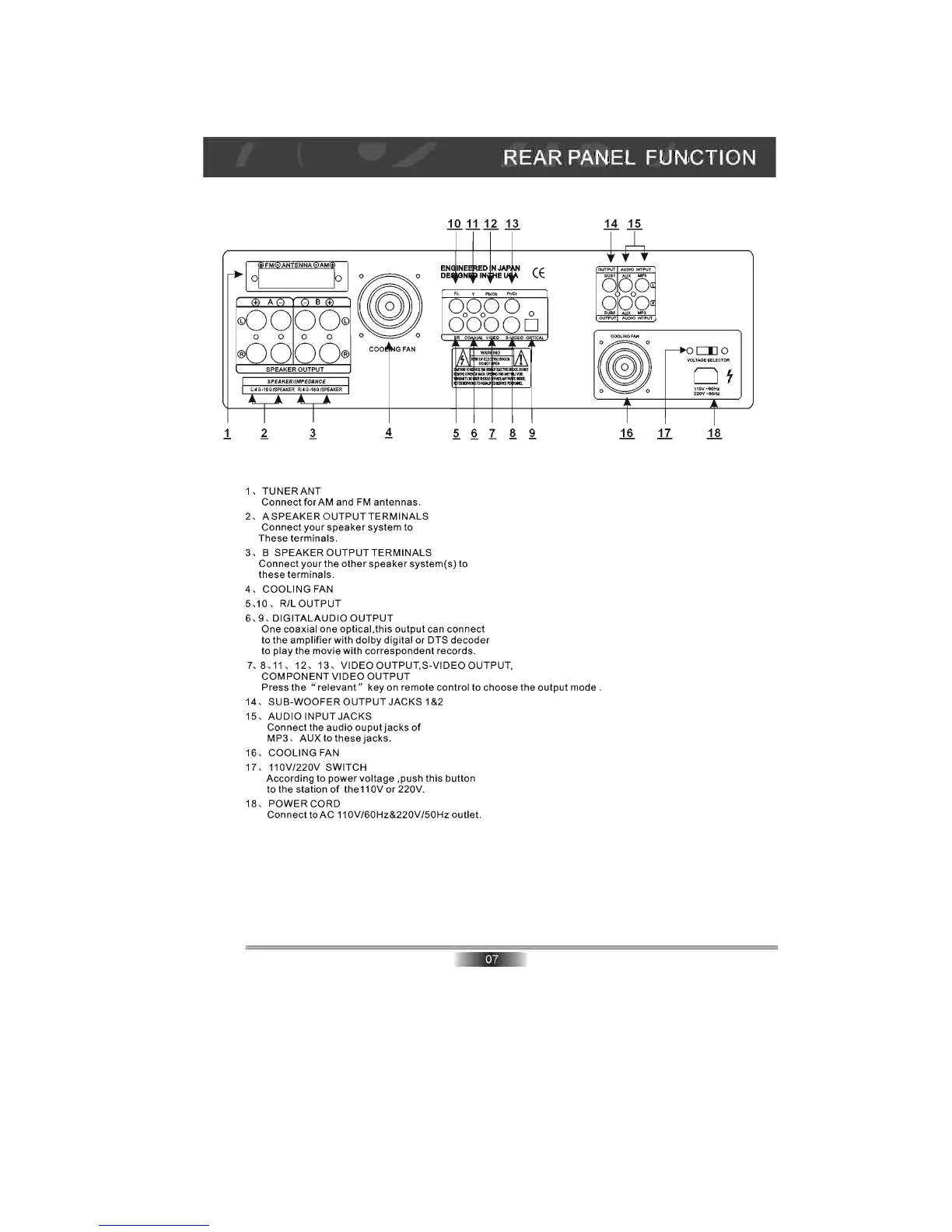
TUNERANT
Connect
for AM and
FM
antennas.
2,
ASPEAKER
OUTPUT
TERMINALS
Connect
your
speaker
system to
These
terminals.
~
3, B SPEAKER
OUTPUT
TERMINALS
Connect
your
the
other
speaker
system(s) to
these
terminals
.
4 , COOLING FAN
5, 10 ,
R/LOUTPUT
6 , 9,
DIGITALAUDIO
OUTPUT
§.
I
One coaxial one optical, this
output
can
connect
to the
amplifier
with
dolby
digital
or
DTS
decoder
to
play
the movie with
correspondent
records.
.§.
7, 8,
11
, 12 ,
13,
VIDEO
OUTPUT
,S-VIDEO OUTPUT,
COMPONENT
VIDEO
OUTPUT
1!.1§.
CE
~
~
1.§.
Press the " relevant " key on remote control to choose the
output
mode.
14, SUB-WOOFER
OUTPUT
JACKS
1&2
15,
AUDIO INPUT
JACKS
Connect
the
audio
ouputjacks
of
MP3 , AUX to these
jacks.
16, COOLING FAN
17-
110V/220V SWITCH
According to
power
voltage ,push this button
to
the
station
of
the
11
OV
or
220V
.
18, POWER CORD
Connect
toAC
11
OV/60Hz&220V/50Hz outiet.
LIlO
Ot
11
0
V-60Hz
220V - 50
Hz
11
1.§.

Related product manuals