EasyManua.ls Logo

Pyle view PLDN74BT - Page 6

Default Icon
12 pages
Print Icon
To Next Page IconTo Next Page
To Previous Page IconTo Previous Page
Loading...
T
T
T
T
T
T
T
T
T
i
ip
ip
:
:
Th
Th
e
e
fa
fa
ct
ct
or
or
y
y
ip
ip
:
Th
Th
e
fa
fa
c
t
o
ry
ry
T
T
T
T
T
T
d
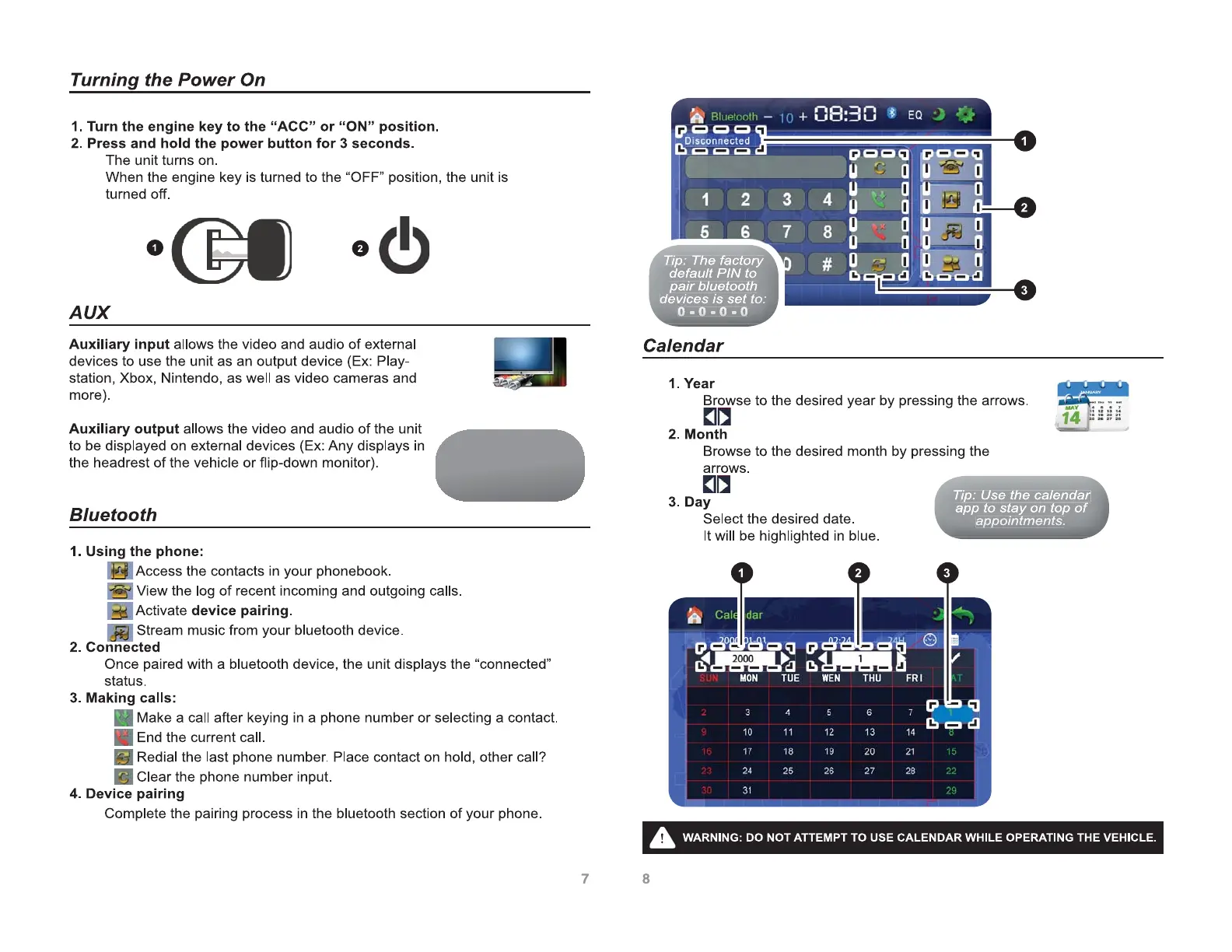
default PIN to
d
default PIN to
d
default
P
d
d
e
fa
fa
u
l
t
P
I
N
t
o
p
pa
ir bluetooth
p
p
a
ir
ir
bluetoo
b
l
u
e
t
o
o
th
th
de
v
e
vi
ce
s
is
s
et
t
o
o:
:
d
d
es is se
e
d
e
e
v
vi
vi
c
e
s
is
is
s
e
o
o
t
t
o
o
:
:
0
0
0
-
0
0
0
-
0
0
0
-
0
0
0
0
0
0
-
0
0
0
0
0
0
-
-
0
0
0
0
0
0
-
0
0
0
-
-
0
0
0
0
-
-
0
0
0
0
0
T
T
T
T
ip
ip
:
U
Us
e
th
th
e ca
l
le
d
nd
ar
ip
ip
:
U
s
e
th
th
e
c
a
l
e
n
d
a
r
T
TT
T
TT
app to stay on top of
a
p
p
t
o
s
t
a
y
o
n
t
o
p
o
f
ap
ap
p
po
po
p
in
in
tm
tm
en
en
ts
ts
.
a
a
a
p
p
po
po
e
p
p
p
p
p
p
p
p
o
o
o
in
i
n
in
tm
t
t
m
tm
e
e
e
n
n
ts
t
t
s
ts
s
.
Tip: Review the
Wiring (pg.19-20)
section for detailed
setup instructions.

Related product manuals