EasyManua.ls Logo

Pyle view PLVWR2200 - Precautions; Safety First for Rear Seat View; Remote Control Functions

Pyle view PLVWR2200
4 pages
Print Icon
To Next Page IconTo Next Page
To Previous Page IconTo Previous Page
Loading...
Th
a
nk
you
f
or
Pur
chasing of
thi
s
roo
f mou
ntin
g
22
i
nch
TFT-LC O mo
nit
ol
Before
opera
ting
th
e
unit
,
please
read t
hi
s
manu
at t
ho
ro
ughly
and
keep
it
for
f
ut
ure
refe
re
nc
e.
PRECAUTIONS
The
Unit
is
for
DC
12V.
Mobile
veh
ic
le
s Only .
Do
no
t
operate
other
than
describe
d in this
guide.
Doing
so
may
damage
it
and
may
void
your
wa
rr
an ty.
SAFETY
FIRST!F
OR
RE
AR SEAT VIEW USE ONLY.
Do not insta!1 on
dashboard
or
anyw
here
else
that
would
permi
t
monitor
to be
vi
ewed
by
.he
driver
.
Monit
or
mus
t
never
be
u~ed
in
an
y
manne
r
that
will
distract
driver
or
interfere
with
the
dr
ivers
safe
op
erat
ion
of t
he
mot
or
vehi
cle.
Be c
areful
;Jot to run
do
wn
th
e
car
ba
tte
ry
while
using
the
Unit with the
car
stop
p
ed
.
Do
no
t disa
ssemb
le or
modify
the Unit . Doi
ng
so
may
damage
it
and
voids
your
w
arranty
.
Keep
drin
ks
and
drops from
umbre
llas aIVay
from
the
Unit .
Water
may
damage
the
i
nte
rn
al
cir
cu
i
try
.
Do
not
l
et
the Unit
beco
me h
Ot.
If te
mp
erat
ure
in
the
car
is
high
or
the Unit
has
bee
n e
xpos
ed to
direc
t
sunlight
and
is
hoi
.
lower
the
temperature
be
fo re
using
it.
In
extr
e
mety
cold
t
em
p
erat
u
res.
the
mov
ement
of
the
pictu
re
may
be
slow
and
the
pictu
re
may
be
dark.
b
ut
t
his
is
not a
malfunction
.
The
Unit wilt w
or
k
normally
once
the
te
mperatur
e
increases
.
Small
Blac
k
and
sh
in
y
dots
ins
ide the
liq
uid
crystal
pane
l are
normal
f
or
liq
uici
crystal
pr
oduct.
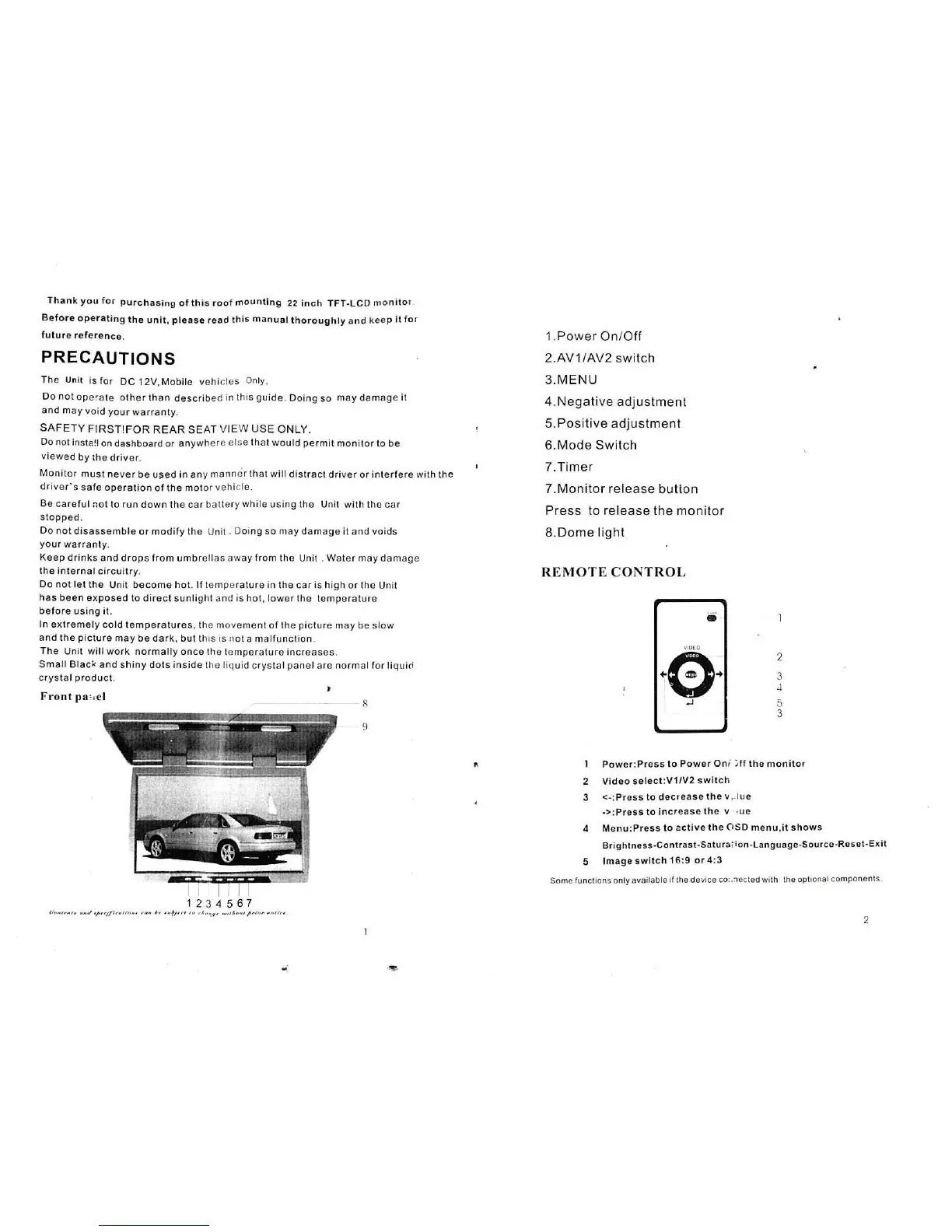
Front
pll':cl
1.
Power
Onl
Off
2.
AV
1/AV2
switc
h
3.MENU
4.Negati
ve
adjustment
5. Positive adjust
ment
6.Mode Swi
tc
h
7.
Timer
7 .
Monitor
re
le
ase
button
Press to release the
monit
or
8. o ome
light
R
EMOTE
C
ONTROL
2
3
"
5
3
"
Pow
e
r:Pre
ss
to
Power
Oni i ff
th
e m o
nit
or
2 V
ideo
select :V1
1V
2
switch
3 <
-:
Pr
e
ss
to
de
cre
ase
the
v .. l
ue
.
:>
:
Pr
ess
to
increase
the
v ·ue
4
Menu
:
Pres
s
to
2
cti
ve
th
e ('IS O me
nu
.it s
how
s
Brightness.Contrast-Sa
tur
a,ion.Language·Source-
Re
set-
E)(
;t
5
Imag
e
swit
ch 16:9
or
4: 3
Snme
functions
on
ly
avaitable
if the d
evice
co
.
:lo
c
ted
with
the
op
t
lOna
t components.
2

Related product manuals