EasyManua.ls Logo

Pyle fleXtreme PSPWP6BK - User Manual

Pyle fleXtreme PSPWP6BK
12 pages
Print Icon
To Next Page IconTo Next Page
Loading...
1
• For safety, please use the smaller size earplug than your
normal size earplug when doing outdoor sport and make
sure you can hear the outside sounds:
L size M size M size S size
• For safety, please do not use the headset when you are
driving a car, a motorcycle, ship, a bike, or walking on the
street. Please follow the local laws and regulations.
Question and Answer IconNeed help?

Do you have a question about the Pyle fleXtreme PSPWP6BK and is the answer not in the manual?

Summary

About PSPWP6 BK

Earbud Sizes and Types

Details available earbud sizes for swimming and land use.

Device Controls Overview

Overview of buttons for power, playback, and volume adjustment.

Wearing Instructions

Charging the Device

Water Film Removal

Safety Precautions

Listen to Music

Music Playback Controls

Details on how to power on/off, play, pause, and adjust volume.

Operating the MP3 Player

Track Navigation and Playback Modes

Instructions for skipping tracks, fast forwarding/backward, and managing shuffle mode.

Troubleshooting Common Issues

Product Specifications

Packing List

Overview

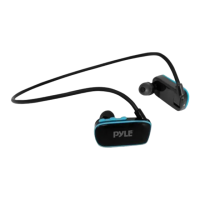
The PSPWP6BK is a waterproof MP3 player with headphones, designed for both land and water use, including swimming. It features a neckband-style design with earbuds that fit into the ear. The device comes with two sets of earbuds: one for swimming and one for land use, each available in L, M, and S sizes to ensure a comfortable and secure fit.

Function Description:

The PSPWP6BK functions primarily as an MP3 player, allowing users to listen to music. It has an integrated control panel on the earbud unit for easy operation. The device supports various music formats, including MP3 and WMA. It also has internal memory for storing music files.

Usage Features:

  • Power ON/OFF: To turn the device on or off, press and hold the Power ON/OFF/Play/Pause button for 4 seconds.
  • Play/Pause: A single click of the Power ON/OFF/Play/Pause button will play or pause the current track.
  • Volume Control:
    • Volume Up: Click the Vol+ button once to increase the volume. For a faster increase, long press the Vol+ button.
    • Volume Down: Click the Vol- button once to decrease the volume. For a faster decrease, long press the Vol- button.
  • Track Navigation:
    • Next Track: Click the "Next" button once to skip to the next track. For fast forwarding within a track, long press the "Next" button.
    • Previous Track: Click the "Previous" button once to go back to the previous track. For fast backwarding within a track, long press the "Previous" button.
  • Shuffle Play Mode:
    • Turn ON: When the player is on, press the Play/Pause button, then press the "Next" button to activate shuffle play mode.
    • Turn OFF: When in shuffle play mode, press the Play/Pause button, then press the "Previous" button to return to normal play mode.
  • Earbud Selection: The device includes specific earbuds for swimming and general land use. For swimming, it is crucial to use the swimming waterproof earbuds. Users should choose the earbud size that provides the most comfort.
  • Wearing Instructions: When wearing the device, especially for swimming, it is recommended to position swimming goggles against the connecting rod near the ear to help secure the device.
  • Safety Precautions:
    • When engaging in outdoor sports, use a smaller size earplug than your normal size to ensure you can hear outside sounds for safety.
    • Do not use the headset while driving a car, motorcycle, ship, or bike, or when walking on the street. Always adhere to local laws and regulations regarding headset use.
    • Avoid using the player in extreme environments (temperatures above 104°F or below -41°F, or very dry conditions) as it may affect functionality.
    • Do not impact the player with hard objects to prevent scratches, battery damage, or firmware issues.
    • Do not disconnect the player during formatting, uploading, or downloading to avoid "program errors" or "computer dis-recognition."
    • Do not repair, dismantle, or rebuild the player without manufacturer permission.
    • Reduce the volume to prevent hearing damage.
    • The manufacturer is not responsible for data loss or indirect losses due to improper operation, software/hardware issues, product maintenance, or accidents.

Maintenance Features:

  • Charging: Connect the player to a computer using the provided USB clip. Before connecting or charging, ensure the main body is dry.
  • Cleaning Contacts: Regularly clean the metallic contacts to prevent poor contact during battery charging and data transfer. A suggestion is to use an eraser or toothbrush for cleaning.
  • Water Removal (After Swimming):
    • If the volume decreases after swimming, it's likely due to a thin water film on the waterproof net or speaker film.
    • To address this, take off the waterproof earbuds and blow off the water film.
    • Squeeze the earbuds to help expel any trapped water.
    • After these steps, place the player in a dry place for more than 10 hours to air dry completely. This should restore the volume to normal.
  • Troubleshooting: The manual provides guidance for common issues:
    • No response/automatic stop/power off: Suggests charging the device.
    • No sound: Check if the volume is not at "0" level. Also, ensure MP3 files are not damaged and are complete.
    • Unable to download music: Check if the USB line is broken or poorly connected, if the driver is installed correctly, and if there is available memory.
    • Cannot be read by computer: Check the USB wire connection, ensure correct operation, and verify driver software installation.
    • Failure to play compressed MP3: Ensure MP3 files are not damaged and are complete.

Pyle fleXtreme PSPWP6BK Specifications

General IconGeneral
BrandPyle
ModelfleXtreme PSPWP6BK
CategoryMP3 Player
Storage Capacity8 GB
BatteryRechargeable lithium battery
Supported FormatsMP3, WMA
FM RadioYes
Voice RecordingYes
ConnectivityUSB 2.0
DisplayLCD
Expandable MemoryUp to 32GB via Micro SD Card
WaterproofYes
MountingArmband

Related product manuals