Need help?
Do you have a question about the Pyle PBMSPG198 and is the answer not in the manual?
Instructions on avoiding object placement, dust, magnetic fields, rain, and ensuring proper ventilation.
Guidance on proper disposal of electronics and restricting repairs to certified technicians.
Alerts regarding personal injury, fatal consequences, and property damage from improper use.
Addresses lack of sound due to no input source or low volume settings.
Covers distortion caused by high volume or damaged speakers.
Troubleshoots issues with the karaoke function, including microphone connectivity and battery.
Resolves problems with MP3 playback, such as incorrect file formats or USB disconnection.
Highlights the system's capabilities, including microphone use, audio output compatibility, and sound quality.
Lists essential technical details like peak power, input sensitivity, frequency response, and power supply.
Details all items included in the product package.
Explains connecting the power adapter and the approximate charging time.
Describes the LED indicator for battery status and charging.
Advises on voltage underflow, long-term storage, and keeping the unit away from heat/fields.
Details connecting various audio sources like computers, DVDs, and MP3 players.
Identifies and explains the functions of buttons and ports on the front panel.
Explains the use of USB slots for playback and Line In for external audio sources.
Lists and describes the purpose of each button on the remote control.
Provides guidance on aiming, angle, interference, and battery replacement for the remote.
Details pairing, connecting, and playing audio wirelessly via Bluetooth 4.0.
Explains switching to FM mode, auto-scanning, and manual station selection.
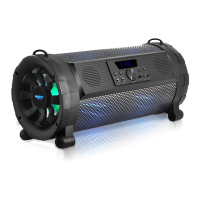
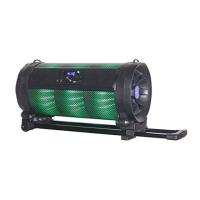
The Pyle PBMSPG198 Street Blaster is a wireless BT streaming boom box speaker system designed for portable stereo audio with built-in LED lights. This versatile speaker system is engineered to deliver a powerful and clear audio experience, suitable for various indoor and outdoor settings.
The PBMSPG198 serves as a comprehensive audio entertainment system, capable of connecting to a wide array of devices. Its primary function is to amplify audio from personal computers, mobile phones, DVD players, VCDs, CDs, LDs, TVs, MP3 players, radios, electronic pianos, and any other device with an audio output. The amplifier circuit utilizes high-performance, high-fidelity design, paired with professional-grade speakers, to produce a sound field that is clear, distinct, and well-positioned. The system boasts deep and powerful bass, complemented by strong, clear, and bright treble. A professional electronic frequency division circuit further enhances the machine's crossover point effect, ensuring optimal sound separation.
One of its key features is wireless BT streaming, allowing users to connect their BT-enabled devices such as iPads, iPhones, Samsung, HTC, MOTOROLA, and Nokia phones for audio transmission. The BT function has a range of up to 10 meters in an unobstructed environment, providing flexibility in placement.
The device also includes a built-in FM radio function, enabling users to tune into their favorite stations. It supports automatic searching and saving of FM channels, as well as manual selection. For improved radio signal reception, an FM antenna can be connected to the dedicated jack.
For vocal performances or announcements, the PBMSPG198 comes with a wired microphone, and it supports karaoke functions. Users can adjust microphone volume and echo, enhancing the vocal experience. A guitar slot is also available for connecting instruments, expanding its utility for musicians.
The integrated LED lights add a visual dimension to the audio experience, making it suitable for parties or events. The LED mode can be adjusted to suit different preferences.
The PBMSPG198 is designed for ease of use with a straightforward control panel and a remote control.
Power and Input Selection: The "POWER / INPUT" button allows users to power on/off the unit with a short or long press, respectively. A short press also cycles through input sources: Line, FM, Bluetooth, and USB.
Volume and Audio Adjustments: Dedicated controls are available for adjusting music volume, microphone volume, microphone echo volume, guitar volume, and LED mode. The "MENU / II" button, when pressed for 5 seconds, facilitates automatic searching and saving of FM channels.
Playback Controls: In USB/Bluetooth mode, a long press of the "MENU / II" button plays or pauses music. In FM mode, a long press initiates an automatic scan for FM channels. Short presses of the "44" and "144" buttons select previous/next songs in USB mode or adjust FM frequency by 0.1 increments. Holding these buttons for 5 seconds selects the last or next channel in FM mode.
BT Pairing: To use the BT function, select BT as the input source. Ensure the BT device you wish to connect is open, then scan and connect to the speaker. A "tick" tone confirms a successful connection. For optimal signal stability, it's recommended to keep the BT device and the mobile phone facing each other.
Remote Control: The remote control provides convenient access to various functions, including power on/off, signal input selection, music volume adjustment, LED mode selection, mute, repeat, play/pause, and track/channel selection. For optimal performance, the remote should be aimed directly at the receiving window within 4 meters and a 30-degree angle, free from obstacles.
Charging: The speaker is charged using a matched power adapter (AC100V-AC240V). Charging typically takes 6 to 10 hours. An LED indicator on the front panel shows the charging status: red for charging and green for fully charged. The battery status indicator on the LED panel, represented by three horizontal lines, each indicating 33% of remaining electricity, helps monitor battery levels.
Battery Care: To prolong battery life, it's crucial to unplug the power supply once the battery is fully charged, as prolonged charging can cause damage. If the battery voltage is low, fully charge it within 48 hours. For extended periods of non-use, ensure the battery is fully charged to prevent damage.
Environmental Considerations: Avoid exposing the device to strong magnetic or electrical fields, dirty or dusty environments, and rain. Do not place objects on top of the device to prevent scratches.
Troubleshooting: The manual provides solutions for common issues such as no sound (check input source and volume), sound distortion (adjust volume, check speaker damage), karaoke not working (check microphone connection, switch, volume, and battery), and MP3 not playing (check song format, reboot device, USB disc connection).
Device Integrity: Do not disassemble the device. Only a certified service technician should perform repairs. The device has apertures for heat dispersion; ensure these are not blocked to prevent overheating and malfunction.
Remote Control Maintenance: Replace remote control batteries regularly and avoid mixing old and new batteries. Ensure the remote control receiver is not exposed to direct sunlight, as this may impair its functionality.
Disposal: Please check with your local authority or retailer for proper disposal of electronic products.
The PBMSPG198 is designed for durability and performance, offering a rich audio experience with the convenience of portability and wireless connectivity.
 General
| Bluetooth Version | 5.0 |
|---|---|
| Microphone | Yes |
| Frequency Response | 80Hz-18kHz |
| Color | Black |
| Type | Portable Bluetooth Speaker |
| Inputs | 3.5mm AUX, USB, SD Card |
| Dimensions | 11.6 x 9.4 x 17.1 inches |
| Weight | 11.95 lbs. |
| Wireless Range | 30 Feet |
| Product Dimensions (L x W x H) | 8.5 x 6.5 x 4.5 inches |
| Speaker Type | 2-Way |
| Tweeter Size | 1'' -inch |
| Impedance | 3 Ohm |

 To Next Page