when not in
use!
Use
a dry
and
soft cloth
to
clean your product.
Be
careful
to
avoid scratches.
Use
a slightly moist cloth for heavy stains.
Look out for live cables! Do not use any cleaning supplies.
This
can
cause burns
to
the
materials. Avoid liquid entry
to
the
device.
Avoid places with high temperatures, humidity, or places
which can become wet, also during maintenance, care,
storage,
and
transport.
Keep
the
product away from children
and
store it at dry
and
dust-proof places!
Keep the original packing for transport
and
to
avoid damages.
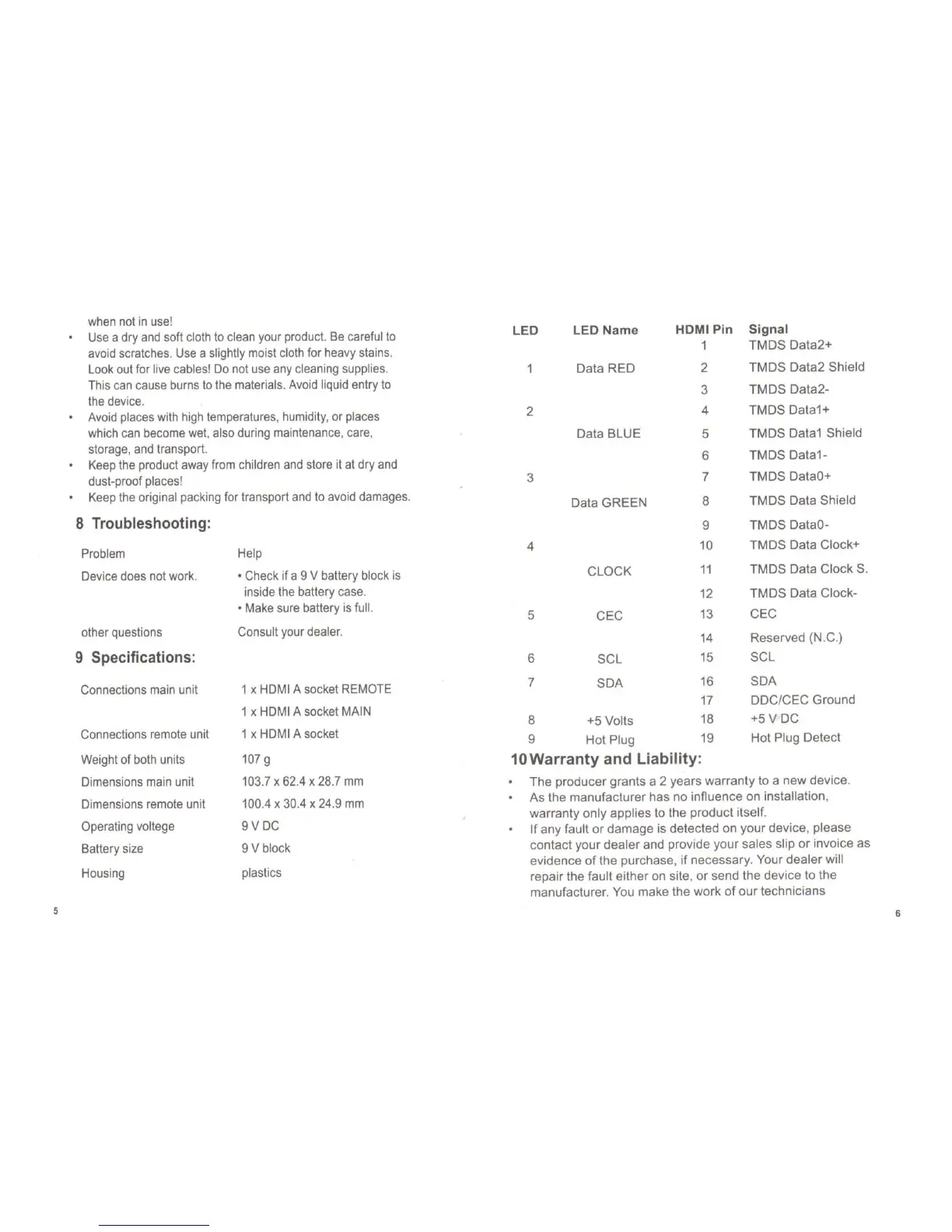
8 Troubleshooting:
Problem
Device does not work.
other questions
9 Specifications:
Connections main unit
Connections remote unit
Weight of both units
Dimensions main unit
Dimensions remote unit
Operating voltege
Battery size
Housing
Help
o Check
if
a 9 V battery block
is
inside the battery case.
o Make sure battery
is
full.
Consult your dealer.
1 x HDMI A socket REMOTE
1 x HDMI A socket MAIN
1 x HDMI A socket
107g
103.7 x 62.4 x 28.7
mm
100
.4 x 30.4 x 24.9
mm
9VDC
9 V block
plastics
LED LED
Name
HOM I Pin
Signal
1
TMDS
Data2+
Data
RED
2
TMDS
Data2
Shield
3
TMDS
Data2-
2
4
TMDS
Data1+
Data
BLUE
5
TMDS
Data1 Shield
6
TMDS
Data1-
3
7
TMDS
DataO+
Data
GREEN
8
TMDS
Data Shield
9
TMDS
DataO-
4
10
TMDS
Data Clock+
CLOCK
11
TMDS
Data
Clock
S.
12
TMDS
Data Clock-
5
CEC
13
CEC
14
Reserved (N .C.)
6
SCL
15
SCL
7
SDA
16
SDA
17
DDC/CEC
Ground
8
+5 Volts
18
+5VDC
9
Hot
Plug
19
Hot
Plug Detect
10Warranty
and Liability:
The
producer grants a 2 years warranty to a
new
device
.
As
the
manufacturer
has
no
infiuence on installation,
warranty
only
applies to the
product
itself.
If
any
fault
or
damage
is detected on your
device
, please
contact
your
dealer
and provide your sales slip
or
invoice as
evidence
of
the purchase,
if
necessary
. Your
dealer
will
repair the fault either on site,
or
send the device to the
manufacturer
. You make the
work
of
our
technicians



 To Previous Page
 Loading...