EasyManua.ls Logo

Pyle PLCDBT65MRW - User Manual

Pyle PLCDBT65MRW
14 pages
Print Icon
To Next Page IconTo Next Page
Loading...
MOBILE AUDIO SYSTEM
USER MANUAL
PLCDBT65MRW

Questions and Answers

Overview

This document describes the PYLE PLCDBT65MRW Mobile Audio System, a car stereo designed for audio playback and communication.

Function Description

The PLCDBT65MRW is a versatile mobile audio system that supports various audio sources and features. Its primary functions include:

  • Radio Operation: It can receive FM and AM radio broadcasts. Users can switch between different frequency bands (FM1, FM2, FM3, AM1, AM2), seek stations automatically or manually, and store/recall preset stations. It also features automatic memory storing and program scanning to find and save strong signals.
  • CD/MP3/WMA Playback: The unit includes a CD player that supports standard audio CDs as well as MP3/WMA files recorded on CD-R/CD-RW discs. Playback features include selecting tracks, pausing, previewing all tracks, repeating a single track or all tracks, and random playback. It also supports directory navigation for MP3/WMA discs.
  • USB Playback: A front-panel USB port allows connection of USB memory devices for playing MP3/WMA files. The operation for USB playback is similar to CD/MP3/WMA playback.
  • SD Card Playback: A front-panel SD slot enables playback of MP3/WMA files from SD cards. This function is also similar to CD/MP3/WMA playback.
  • Bluetooth Operation: The system supports Bluetooth connectivity for hands-free communication and audio streaming (A2DP). Users can pair their mobile phones, answer/reject incoming calls, hang up calls, and stream music from their phones to the car speakers.
  • Auxiliary Input: A 3.5mm AUX IN jack on the front panel allows connection of external portable audio players.
  • Sound Adjustment: Users can adjust various sound parameters such as bass, treble, balance, fader, loudness, and equalization (EQ) presets (CLASS, POP, ROCK).
  • Display Information: The LCD display shows current frequency, activated functions, and time.
  • Time Setting: The unit allows users to set the current time.

Important Technical Specifications

General:

  • Power Supply: DC 12 Volts, Negative Ground
  • Chassis Dimensions: 178 (W) x 160 (D) x 50 (H) mm
  • Tone Controls:
    • Bass (at 100 Hz): ±10 dB
    • Treble (at 10 kHz): ±10 dB
  • Maximum Output Power: 4x40 watts
  • Current Drain: 10 Ampere (max.) (For Normal Power Version)

CD Player:

  • Signal to Noise Ratio: More than 55 dB
  • Channel Separation: More than 45 dB
  • Frequency Response: 40Hz – 18 kHz

Radio:

  • FM:
    • Frequency Coverage: 87.5 to 107.9 MHz
    • IF: 10.7 MHz
    • Sensitivity (S/N=30dB): 4μV
    • Stereo Separation: >25dB
  • AM:
    • Frequency Coverage: 530 to 1710 kHz
    • IF: 450 kHz
    • Sensitivity (S/N=20dB): 36 dBu

MP3/WMA Decoding Modes:

  • MPEG1 Audio Layer 3 (44.1kHz): Bit Rate 32, 48, 64, 96, 128, 192, 256, 320 kbps (Stereo)
  • Windows Media Audio (44.1kHz): Bit Rate 64, 96, 128, 192 kbps (Stereo)

USB/SD Solution Support:

  • Folders: 500 max.
  • Files: 999 max.
  • Depth of Folder: 8 layers
  • Size: 32 GB

Usage Features

Installation:

  • DIN Front-Mount: The unit is designed for DIN front-mount installation. It requires securing a sleeve into the dashboard opening and then sliding the unit into place until it locks. A metal strap is provided to secure the back of the unit.
  • Wiring: Detailed wiring diagrams are provided for a 4-speaker system, including connections for ground, accessory/switch, power antenna/amplifier turn-on, and constant power supply.
  • Removal: The unit can be removed by inserting supplied keys into slots on the sides and pulling it out.

Operation:

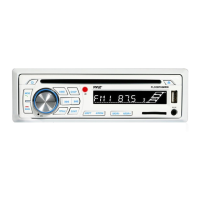
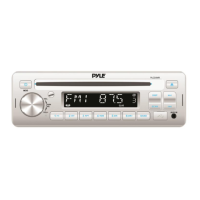
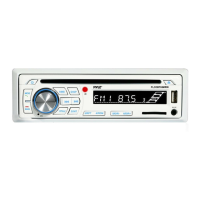
  • Controls: The front panel features a rotary knob for volume/selection, various buttons for mode, band, seek, display, pause, intro, repeat, random, directory navigation, and eject. An IR sensor is present for the remote control.
  • Remote Control (Optional): An optional remote control handset provides access to most functions, including power, mode, band, volume, tune/skip, EQ, pause, intro, random, directory, repeat, display, and mute.
  • Reset Function: A reset button is available to address issues like non-operating buttons or error symbols on the display. It should be activated with a thin object.
  • CD/MP3/WMA Playback: Discs are gently inserted with the printed side up and are automatically drawn in. The unit supports searching for tracks by number, file name, and from folders.
  • USB/SD Playback: Simply insert a USB drive or SD card, and the unit will automatically search for and play MP3/WMA files.
  • Bluetooth Pairing: To pair a mobile phone, users need to select "CAR BIT" on their phone's Bluetooth settings and enter "0000" if a password is required. A BT mark on the LCD indicates successful pairing.
  • Bluetooth Audio: After pairing, users can stream music from their mobile phone's music player.

Disc Notes:

  • Standard Discs: Only round-shaped CD discs should be used. Non-standard shapes can damage the unit.
  • Disc Condition: Avoid sticking paper or tape on discs. Dirt, dust, scratches, and warping can cause malfunctions.
  • CD-R/CD-RW Compatibility: Only discs with specific "DIGITAL AUDIO Recordable" or "DIGITAL AUDIO ReWritable" marks are supported. Discs must be finalized to play. Playback may vary depending on recording status and equipment used.
  • MP3 File Naming: MP3 files must have the ".MP3" extension to be recognized.
  • ISO9660 Format: MP3 discs should be in ISO9660 level 1 or 2, Joliet, or Romeo format.

Maintenance Features

  • Troubleshooting Guide: The manual includes a troubleshooting section to help users diagnose and resolve common issues such as no power, disc loading/ejection problems, no sound, sound skips, and non-responsive controls.
  • Reset Button: The reset button can be used to restore the unit to its initial state if functions are not operating correctly.
  • Cleaning: If the unit does not work after a reset, cleaning the front panel socket with a cotton swab soaked in isopropyl alcohol is recommended.
  • Installation Angle: The unit's optimum performance is achieved when the installation angle does not exceed 30° from horizontal. Adjusting the installation angle is suggested if sound skips occur.
  • Environmental Considerations: Avoid installing the unit where it will be exposed to high temperatures (direct sunlight, hot air from heaters), dust, dirt, or excessive vibration.
  • USB/SD Card Data: It is advised not to connect USB/SD cards with important files to the unit to prevent potential data loss due to wrong operation.

Pyle PLCDBT65MRW Specifications

General IconGeneral
BrandPyle
ModelPLCDBT65MRW
CategoryAudio system
LanguageEnglish

Related product manuals