Need help?
Do you have a question about the Pyle PMXU46BT and is the answer not in the manual?
Explains the difference between balanced and unbalanced audio lines and their noise rejection capabilities.
Details signal levels in audio using decibels (dBu) and their relation to voltage.
Discusses the judicious use of EQ for cutting frequencies to clean up a mix.
Illustrates the fundamental and harmonic frequency ranges for various musical instruments.
Advises on careful boosting of frequencies to avoid adding noise and overloading circuitry.
Guides on setting reverb and delay times based on music tempo and density for desired ambiance.
Details modulation effects like phasing, chorus, and flanging based on time-shifted signals.
Explains the use of compression for smoothing sound, taming dynamics, and achieving a unified mix.
Warns against fire/shock hazards, opening the unit, and recommends qualified servicing.
Advises on water avoidance, cleaning, ventilation, proper power supply, and unplugging.
Details MIC/LINE inputs, GAIN control, and PEAK indicators for signal adjustment.
Explains the 3-band EQ, AUX, and FX controls for shaping channel sound and send levels.
Describes PAN, MUTE, and PFL switches for channel signal positioning and monitoring.
Covers CHANNEL FADERS, TAPE I/O, AUX/RETURN, SUB, and MAIN MIX controls.
Details the EFFECTOR DISPLAY and PROGRAM control for selecting and managing effects.
Explains AFL switch for post-fader listening and FX SEND for effect signal level.
Details PARAMETER control for effects and ST GRAPHIC EQUALIZER for main output.
Covers +48V PHANTOM Power, its indicator, and the POWER indicator.
Describes MP3 player functions, EQ, volume faders, and SUB/MAIN MIX faders.
Details the POWER switch, FUSE HOLDER, IEC RECEPTACLE, and AMPLIFIER OUTPUT.
Illustrates wiring for various connectors like TS, TRS, XLR, and headphone jacks.
Provides solutions for common problems like no power, no sound, and distorted audio.
Compares input channels and dimensions for different mixer models (PMXU46BT to PMXU128BT).
Lists the included items in the product package, such as the mixer and power adapter.
Details Bluetooth features like streaming, device compatibility, network name, and range.
Highlights features like DSP, EQ, MP3 compatibility, USB port, and various input/output options.
Lists technical details including mic input, frequency response, distortion, gain, and levels.
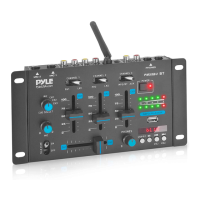
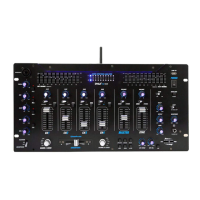
The Pyle Wireless BT Streaming Studio Mixer, also known as the DJ Controller Audio Mixing Console System, is a versatile audio device designed for professional studio applications and on-stage performances. This mixer series, including models PMXU46BT, PMXU67BT, PMXU88BT, and PMXU128BT, offers a range of features for audio mixing, recording, and streaming.
The core function of this device is to mix multiple audio input signals, process them, and output a balanced stereo mix. It serves as a central hub for various audio sources, allowing users to control levels, apply equalization, and add effects. The built-in Bluetooth wireless receiver enables seamless audio streaming from a variety of modern devices such as smartphones, tablets, laptops, and computers. This feature is particularly useful for playing background music or incorporating digital audio into a live mix without the need for physical cables.
The mixer is equipped with a direct-to-computer connect and sound record ability, making it suitable for recording studio sessions or live performances directly to a computer. It also includes a built-in MP3 player that supports various music formats, and a USB flash drive reader for playing audio files directly from a USB stick. A USB port is also available for desktop connection, further enhancing its versatility for digital audio integration.
For audio processing, the mixer features FX (Analog Effects) and a 16-bit DSP processor, offering 16 multi-FX effects to enhance the sound. These effects can be adjusted using dedicated controls, allowing for creative sound manipulation. A 7-band EQ is integrated for precise frequency shaping, along with a 32-bit dual engine DSP and a 24-bit ADC DAC converter for high-quality audio processing.
The mixer provides multiple input options, including balanced XLR-type microphone input jacks and balanced TRS phone-jack line inputs for monaural channels. It also has 1/4" mono + stereo inputs and (2) XLR/14" combo audio LINE/microphone inputs, accommodating a wide range of audio sources. For outputs, it offers (2) 1/4" (L/R) MAIN outputs to connect to power amplifiers and main speakers, as well as 1/4" send + return inputs for external effects devices. A 1/4" headphone jack is included for monitoring the mix.
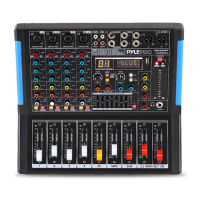
The mixer's interface is designed for intuitive control. Each channel features a GAIN control to adjust the input signal level, ensuring optimal balance between the S/N ratio and dynamic range. A PEAK LED indicator lights up when the input signal is too high, prompting the user to back off the TRIM control or adjust the EQ.
A three-band equalizer (HIGH, MID, and LOW) is present on each channel, allowing users to adjust the high, mid, and low frequency bands. Setting the knob to the "0" position provides a flat response, while turning it right boosts the frequency band and turning it left attenuates it. This enables precise tonal shaping for each input.
AUX and FX controls are available on each channel. The AUX control adjusts the output to the AUX pin signal level, while the FX control adjusts the level of the signal sent from the channel to the FX SEND buses, allowing users to incorporate internal or external effects into their mix.
The PAN control determines the position of the channel signal within the stereo image, offering flexibility in sound placement. A MUTE switch allows users to quickly silence a channel in the main mix, while a PFL (Pre Fader Listen) switch enables monitoring of a channel signal without affecting the main output.
Channel faders are used to adjust the level of each channel signal, facilitating the balance between various channels in the mix. The mixer also includes a TAPE INPUT/OUTPUT SOCKET with stereo RCA jacks for connecting playback devices like CD players and recording applications like tape decks.
For effects management, an EFFECTOR DISPLAY shows the type of effector currently in use. The PROGRAM control allows users to select effects presets by turning the knob and pressing it to recall the selected preset. A DSP MUTE SWITCH is also available to mute the DSP or effects.
The mixer features a +48V phantom power control, which can be switched ON or OFF to power condenser microphones. An AFL (post-fader listen) switch allows users to hear the channel signal after the channel fader, while a PARAMETER control adjusts the selected effect's depth, speed, or other parameters.
A 7-band graphic equalizer adjusts the signal sent to the MAIN OUT jacks, providing overall tonal control for the main mix. LED indicators for +48V phantom power and power level are also present for easy monitoring. The AUX control adjusts the output to the AUX pin signal level, and the RETURNS control adjusts the level of the signal received at the RETURN jacks. TAPE control adjusts the output to the TAPE pin signal level, and EQ IN switch is used to activate the graphic equalizer. PHONES control adjusts the level of the signal output to the PHONES jack OUT jacks. PHONES jacks connect a pair of headphones for monitoring.
The MP3 control section includes functions for playing, pausing, recording, and mode selection (USB, Bluetooth, or normal play). FX SEND Fader controls the effect input signal level, and MP3 VOL Fader adjusts the MP3 volume. SUB Fader adjusts the SUB output level, and MAIN MIX Fader controls the overall output level of the main mix.
The POWER switch turns the mixing console ON or OFF. A FUSE HOLDER / IEC MAINS RECEPTACLE connects the mixer to the main power supply. AMPLIFIER OUTPUT connects to 4ohm speakers, and a COOLING FAN helps to avoid overheating.
The mixer is designed with a rugged steel chassis to resist dust and grime, contributing to its durability and longevity. Sealed rotary controls further protect against environmental elements.
For safety, users are advised not to expose the unit to rain or moisture and to avoid opening the top cover or rear section, as high voltage exists inside. Servicing should be referred to qualified personnel. In case of liquid or water spillage, the unit should be unplugged and checked by qualified personnel before further operation.
Regular cleaning with a dry cloth is recommended. Ventilation openings should not be blocked, and the unit should not be installed near heat sources to ensure proper cooling. The mixer should only be operated on its designated power supply, and unplugged from the wall outlet or set to OFF if not in use for several days. When disconnecting the cord, users should pull the plug, not the cord itself. All units are properly grounded, and ground connectors should not be removed or rendered inoperative for safety.
The manual also provides troubleshooting guidance for common issues, such as power problems, no sound output, one channel no sound, no microphone input, and distorted sound, offering possible causes and solutions to help users resolve problems efficiently. This guidance emphasizes checking power connections, input/output levels, and cable integrity.
 General
| Type | DJ Mixer |
|---|---|
| Channels | 4 |
| Bluetooth | Yes |
| USB Playback | Yes |
| USB | Yes |
| Microphone Inputs | 2 |
| Phantom Power | Yes |
| EQ | 3-band |
| Dimensions | 10.5 x 8 x 3.5 inches |
| Frequency Response | 20Hz - 20kHz |
| SD Card Slot | Yes |
| FM Radio | Yes |
| Signal-to-Noise Ratio | 80dB |
| Input Sensitivity | Mic: -60dB |

 To Next Page