4
WIRELESS TRANSMITTER SET-UP
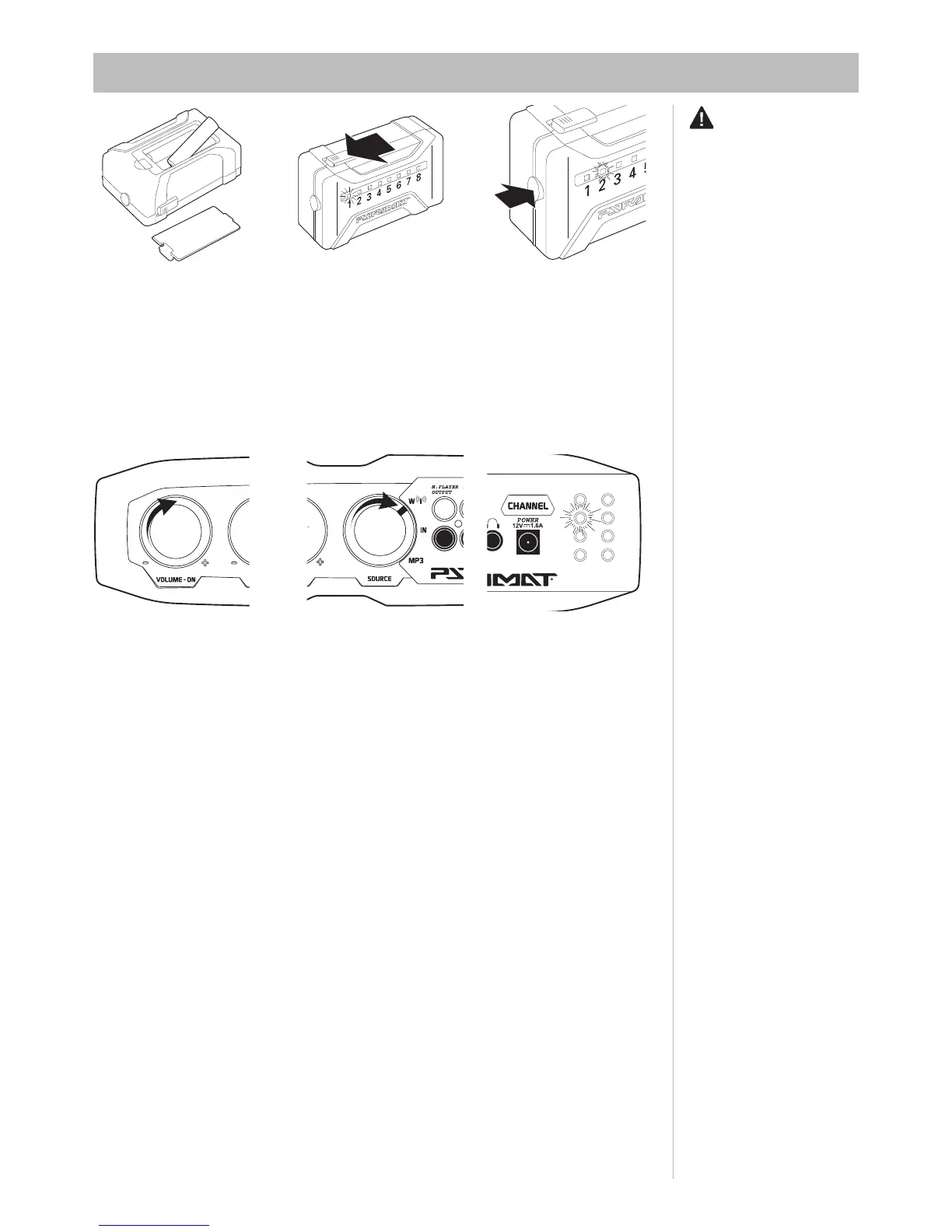
6 Select the same channel as the
transmitter on the Sound Rocker’s
control panel by pressing the chan-
nel button. Example: 1–1, 2–2
or 3–3. To add multiple Sound
Rockers, simply select the same
channel on each rocker.
Note: Both the transmitter and
control panel must be on the same
channel to hear sound.
1
2
3
4
5
6
7
8
4 Twist the volume knob on
the control panel to click on the
power.
5
Turn the source knob on the
control panel to W.
WARNING:
Do not
mix old and new batteries. Do not
mix alkaline, standard (carbon-zinc),
or rechargeable (nickel-cadmium)
batteries.
1 Remove the casing and insert
2 AAA batteries (batteries not
included).
2
Turn the power switch on the
front of the transmitter to the “on”
position
3
Press the channel button to
select the desired transmitter
channel. Eight channels are
available for the best quality
reception. If you experience
static or poor reception, try
another channel.



 To Next Page