EasyManua.ls Logo

Pyronix CHIME - User Manual

Pyronix CHIME
3 pages
Print Icon
To Next Page IconTo Next Page
Loading...
CHIME
GETTING STARTED
CHIME Revision 05
Question and Answer IconNeed help?

Do you have a question about the Pyronix CHIME and is the answer not in the manual?

Summary

Chime Getting Started

Device Overview

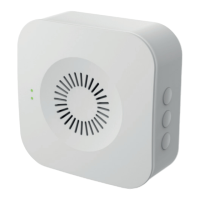
Details the physical components of the Chime device, including status lights, speaker, and buttons.

Button Actions

Describes the functionality of the device's pairing, volume, and ringtone buttons.

Specifications

Lists the technical specifications of the Chime, such as ring volume, power, and operating temperature.

Pairing

Pairing Instructions

Step-by-step guide on how to put the Chime into pairing mode and connect it to a doorbell.

Pairing Information

Additional details on Chime connectivity limits, volume adjustment, and tone selection.

Chime Support

Battery Information

Guidelines for battery usage, disposal, and charging when powered via Micro USB.

Product Warning Information

Safety precautions regarding electrical product disposal and preventing static damage.

Overview

This document provides a quick start guide for the CHIME device, a wireless chime designed to work with doorbells.

Function Description:

The CHIME device serves as an audible indicator for doorbells. It connects wirelessly to doorbells, playing a selected ringtone when the doorbell button is pressed. The device features a speaker for audio output, status lights to indicate its operational mode, and buttons for controlling its functions. It can be powered by batteries or via a Micro USB connection.

Important Technical Specifications:

  • Ring volume: ≥80dB, ensuring it is clearly audible.
  • Micro USB: DC5V±10% for power input.
  • Batteries: Requires 3 x AA Alkaline batteries (not included) for portable operation.
  • Operating temperature: -20°C to 50°C, allowing for use in a wide range of environments.
  • Standby consumption: <10μW, indicating very low power usage when idle.
  • Operating consumption: <100mA, demonstrating efficient power usage during operation.

Usage Features:

The CHIME device is designed for ease of use with several interactive features:

  • Pairing:

    • To enter pairing mode, press the pairing button for 2 seconds. The status LED will flash red slowly.
    • To pair with a doorbell, press the doorbell button. A successful pairing is indicated by the red LED stopping its flash and the ringtone playing on the Chime.
    • The Chime can connect to a maximum of eight doorbells.
    • Each doorbell can be connected to up to six Chime devices.
    • When pairing with another doorbell, the Chime must be put into pairing mode again, and then the button on the next doorbell should be pressed.
    • During pairing mode, the red LED flashes. When ringtones are playing, the blue LED flashes.
  • Volume Control:

    • The volume button allows users to adjust the volume.
    • A single click adjusts the volume.
    • Continuously clicking the button cycles the volume through a loop.
    • After a successful pairing, the volume is automatically set to the maximum level.
    • The volume adjustment cycles in a loop; once at the minimum volume, one more press will return it to the maximum level.
  • Ringtone Selection:

    • The ringtone button allows users to switch between four available ringtones.
    • Each press of the ringtone button cycles through the available tones.
  • Factory Reset:

    • Pressing the pairing button for 5 seconds restores the device to its factory settings.

Maintenance Features:

The manual provides important information regarding battery and product disposal, emphasizing environmental responsibility and safety:

  • Battery Information:

    • The specified batteries are designed for a long service life while maintaining safety by limiting output current.
    • When disposing of the product, batteries must be removed and disposed of separately in accordance with local regulations.
    • When powered via Micro USB, the batteries will not be charged.
  • Product Warning Information (for electrical products sold within the European Community):

    • At the end of its life, the electrical product should not be disposed of with household waste.
    • Users are advised to recycle where facilities exist and to check with their Local Authority or retailer for recycling advice.
    • To prevent damage to components from static charge, users should eliminate any static charge on their body by touching a grounded/earthed metallic conductor (such as a radiator/pipework) immediately before replacing batteries.

Support:

A QR code and URL are provided for accessing the CHIME Support HUB page, offering further assistance and information.

The CHIME device is manufactured by Pyronix Limited, located at Secure House, Braithwell Way, Hellaby, Rotherham, S66 8QY, United Kingdom.

Pyronix CHIME Specifications

General IconGeneral
BrandPyronix
ModelCHIME
CategoryAccessories
LanguageEnglish

Related product manuals