The PZP Adjustable Charger, The best matching of charging voltage and charging current makes
every charger charge safe and easy.It is probably the most convenient charger that can fit your
different batteries.
The PZP is designed for charging all types of 12V lead-acid batteries, including the charging of the
called "wet" maintenance-free valve batteries (for uninterrupted power supplies), absorbable glass
fiber battery, batteries with calcium and silver polar plates, most gel batteries as well as batteries of
3-150A-h and 12Vrecommended to charge by AGM and EFB chargers.
About PZP
User Manual & Warranty
PZ.P
WD-210
Step 6. After fully charged, the voltage will automatic become larger to your set value and the current will become smaller to near 0.
How To Use
10% of the battery capacity is very good for your batteries health, you can also adjust to 10A If you need to charge quickly.
Step 1. Verify the voltage and chemistry of the battery,Set the charging voltage by referring to the label on the charger
Step 2. Connect the clip to the battery (Confirm that you have connected the battery clamps or eyelet terminal connectors properly)
Step 3. Plug in power source (AC 120V), press the power button to “ON”(Confirm the AC power plug is plugged into an electrical outlet.)
Step 4. The Charge Green LEDs will illuminate (depending on the health of the battery) indicating the charging process has started.) The
charger can now be left connected to the battery at all times to provide maintenance charging.
Step 5. Turn the ammeter according to the battery capacity (10% of the battery capacity)

 Need help?
 General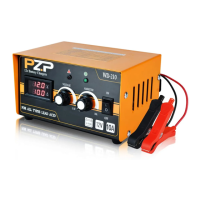

 To Next Page