The Q7 Sport Smartwatch is a wearable device designed to track various fitness metrics, provide notifications, and offer several smart features. It features a vibrant LCD display and a one-touch button for navigation.
Function Description:
The Q7 Sport Smartwatch serves as a personal activity tracker, timekeeping device, and a notification hub for your smartphone. It continuously tracks steps, distance, calories burned, and sleep patterns. When connected to a smartphone via Bluetooth, it can display call, text, social media, and app notifications, keeping the user informed without needing to check their phone directly. The smartwatch also includes features like a stopwatch, alarms, a sedentary reminder, connected GPS, and a camera remote.
Important Technical Specifications:
- Battery Life: Up to 7 days (standby time) on a full charge. Battery life and charge cycles vary based on usage.
- Charging Time: Approximately 2 hours for a full charge.
- Connectivity: Bluetooth.
- Compatibility: Compatible with most iPhones (via Apple App Store) and Android phones (via Google Play Store) using the dedicated Q7 Sport Smartwatch app.
- Display: Vibrant LCD display.
- Navigation: One-touch button.
- Notification Storage: Stores up to 16 notifications, with older ones being replaced as new ones arrive.
- Alarms: Supports up to 5 alarms, configurable via the Q7 Sport Smartwatch app.
- Water Resistance: Not water resistant; should not be submerged in water. If it gets wet, it should be removed and dried.
- Charging Interface: Micro-USB.
- FCC ID: 2ARUI-3556.
Usage Features:
- Navigation: Press the one-touch button to switch between apps. Hold the button to select and activate an app (e.g., stopwatch) or power off the smartwatch. On the home screen, hold the button to switch clock faces.
- Timekeeping: Displays time and date (e.g., 12:45 PM, FRI OCT 12). Includes a stopwatch and alarm functions. Alarms vibrate to alert the user and can be set for specific times and days via the app.
- Activity Tracking:
- Core Stats: Tracks steps taken, calories burned, and distance covered daily.
- Daily Activity Goal: Users can set goals for sleep, steps, distance, calories, weight, and water intake. The recommended default step goal is 10,000 steps per day, which can be adjusted in the app under the profile tab (Target Steps).
- Sleep Tracking: Tracks time asleep, sleep stages (light, deep, and awake time), providing a sleep score and efficiency number. Sleep schedules can be set in the app under Device > Smartwatch Settings.
- Notifications & Messaging:
- Setup: Requires Bluetooth to be enabled on the phone and notifications to be allowed in phone settings. Notifications are configured within the Q7 Sport Smartwatch app (Device > Notifications).
- Viewing: The smartwatch vibrates upon receiving a notification. Unread notifications can be accessed by navigating to "Notifications" on the smartwatch. Messages from different social applications can be viewed by holding the one-touch button.
- Management: Users can select which notifications to receive and can turn off all or specific notifications via the app.
- Sedentary Reminder: Can be set to remind the user to move during specified start and end times, configured in the app (Device > Sedentary Reminder).
- Connected GPS: When activated through the app (Home page > Run button > GO), it tracks distance, duration, and speed, displaying a live map of the route. Calories burned can be viewed after completion (View Run Data).
- Camera Remote (Shake For Selfie): To use, open the "Shake For Selfie" feature in the app's Device settings. On the smartwatch, holding the camera feature button or rotating the wrist will snap a photo.
- Find Device: A feature in the app that vibrates the Q7 Sport Smartwatch to help locate it.
Maintenance Features:
- Cleaning:
- The band and wrist should be cleaned regularly, especially after intense workouts or sweating.
- Rinse the band with water or wipe it with a small amount of rubbing alcohol.
- Avoid using hand soap, dish soap, hand sanitizer, cleaning wipes, or household cleaners, as these can get trapped beneath the band and irritate the skin.
- Always pat the band dry before wearing it again.
- Wearing:
- Wear the band loosely enough to allow movement on the wrist to prevent prolonged rubbing and pressure, which can irritate the skin.
- It is recommended to remove the band for an hour or two after extended wear.
- If skin irritation or redness occurs, remove the device. Consult a dermatologist if symptoms persist for more than 2-3 days.
- Troubleshooting (Updating, Restarting, Erasing):
- If syncing issues, connected GPS problems, or tracking inaccuracies occur, the smartwatch can be powered off and restarted from the wrist (navigate to the turn off screen and hold the one-touch button).
- If a restart does not resolve the issue, a "Factory Reset Smartwatch" option is available in the app's Device settings.
- The Q7 Sport Smartwatch app supports auto-sync, which can be enabled in Device > Smartwatch Settings > Auto-sync data. The smartwatch will sync automatically when the app is opened and the device is nearby.

 Need help?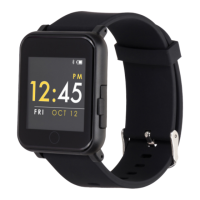

 To Next Page
 General